
 Need help?
Do you have a question about the rotork Bifold EHPC210 and is the answer not in the manual?
Details the four positions and operational behavior of the mechanical control switch.
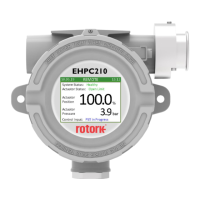
Explains the three main screens and how to navigate between them using the control switch.
Describes how to navigate menus, select choices, and change parameters using the control switch.
Explains the use of frames to organize and display related data within menus for easier reading.
Explains how to enter the menu passcode using the control switch and the associated screens.
Describes the screen displayed and return to local mode upon incorrect passcode entry.
Details secondary passcode security for individual functions within the controller menus.
Determines how often the main screen updates, affecting responsiveness and signal noise.
Controls screen rotation when multiple main screens are present, based on time intervals.
Enables switching between main screens using the control switch in Remote mode.
Automatically scrolls through main screens in Remote mode at a specified rate.
Rotates the main screen by 180° for installation orientation, improving readability.
Determines whether a passcode is required to enter the controller's menus.
Allows setting or changing the current passcode required to enter the menus.
Configures the unique address used to communicate with the controller via Modbus.
Specifies the data transmission speed (baud rate) for Modbus communication.
Sets the parity bit for error checking during Modbus communication.
Configures the number of stop bits used in Modbus communication frames.
Identifies the specific product code and associated physical hardware setup of the controller.
Indicates the input/output code, specifying the physical I/O configuration of the controller.
Shows the current version number of the firmware installed on the controller.
Indicates the revision number of the application software installed on the controller.
Provides the unique serial number assigned to each individual controller unit.
Indicates the specific date on which the controller unit was assembled.
Details calibration for analogue inputs/sensors, including raw signal injection and range setting.
Explains the calibration process for analogue outputs, adjusting values to drive correct output signals.
 General
| Category | Controller |
|---|---|
| Model | EHPC210 |
| Housing Material | Aluminum |
| Control Signal | 4-20mA |
| Operating Temperature Range | -20°C to +70°C (-4°F to +158°F) |







 To Next Page