Section 3 Safety 3-4 S85A / S86A Manual
www.rottlermfg.com
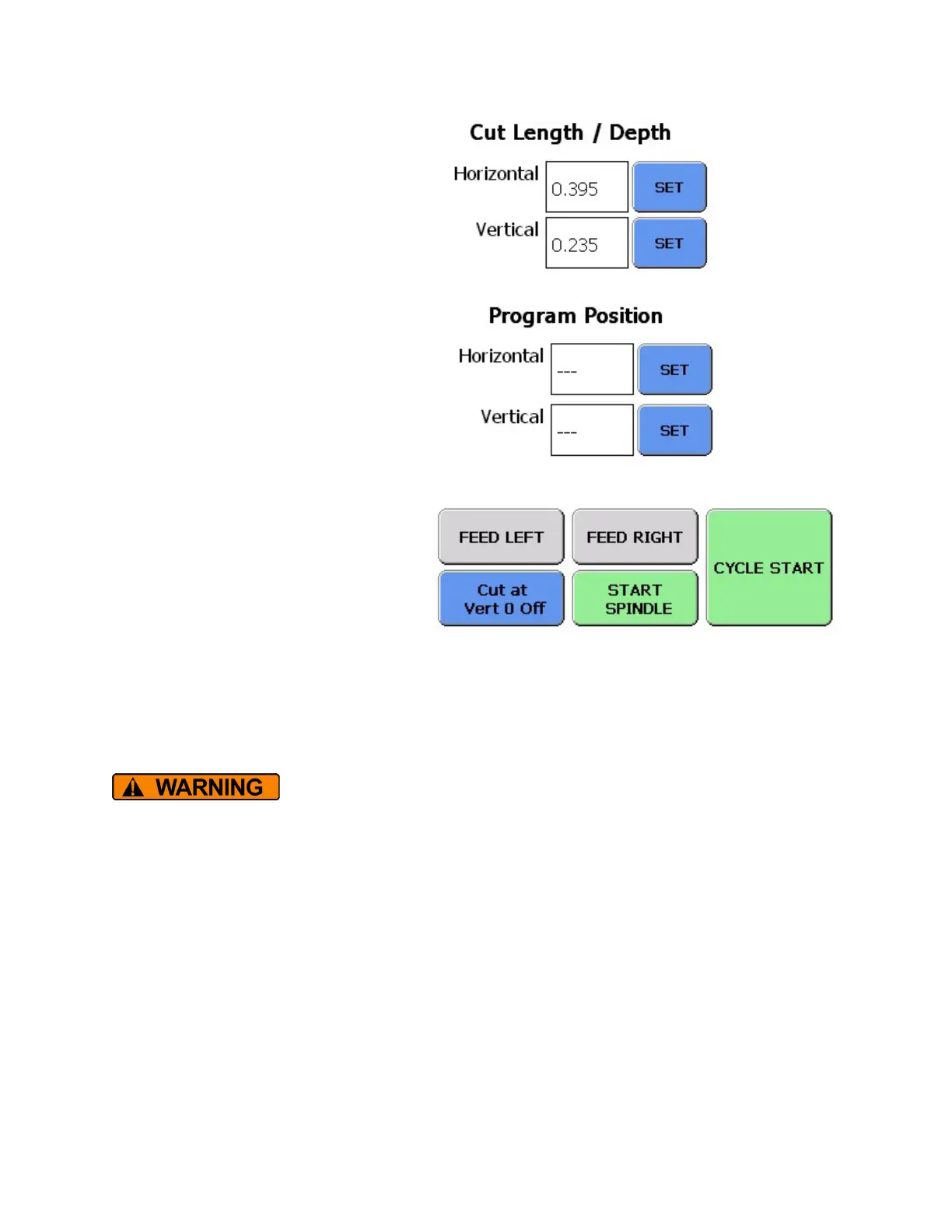
Cut Length and Depth Settings
This is where the length of the horizontal
travel and the depth of the vertical travel are
set.
Press the value boxes to bring up the keypad
and enter the values desired.
Pressing the SET buttons will set the current
position.
Program Position Settings
The value boxes will show the position of the
spindle and carriage when ever it is moved.
When the SET buttons is pushed the position
that is shown in the value box will be zeroed.
Operation Buttons
The CYCLE START button is pressed and
held for 2 seconds to begin the auto cycle
process.
The START SPINDLE, FEED LEFT, and
FEED RIGHT buttons are used for manual
operation.
The Cut at Vert 0 button will instruct the program to cut with or without any additional stock removal.
Button will show status as On or Off.
Even though the Spindle has been turned off, it will continue turning as it slows
down and travels to the right. Keep all body parts away from the cutting area
when in the automatic cycle.
Surface Depth Dial Indicator
This dial indicator is mounted on the surface of the cutterhead guard. When properly adjusted this
indicator will show the position of the cutting insert relative to the surface to be cut.
How to Change Measurement Units on S80 Series Machines
1. From the Profile Select Screen
2. Press Machine Settings
3. Press Using: inches to change to Using: mm (or reverse)
4. Press Save
5. Press Back



 To Next Page