5
P/N 1011271 Rev. A 06/14
INSTALLATION
NOTE: When placing the toaster
into service, make sure to
provide at least 3 inches of
space on all sides of the unit.
1. Remove unit and all pack-
ing materials from shipping
carton. The toaster is shipped
with the items listed below:
• Owner’s Manual
• Authorized Service Agency
Directory
NOTE: If any parts are missing or dam-
aged, contact Antunes Technical
Service IMMEDIATELY at 1-877-
392-7854 or 1-630-784-1000.
2. Remove all packing materi-
als and protective cover-
ings from the unit.
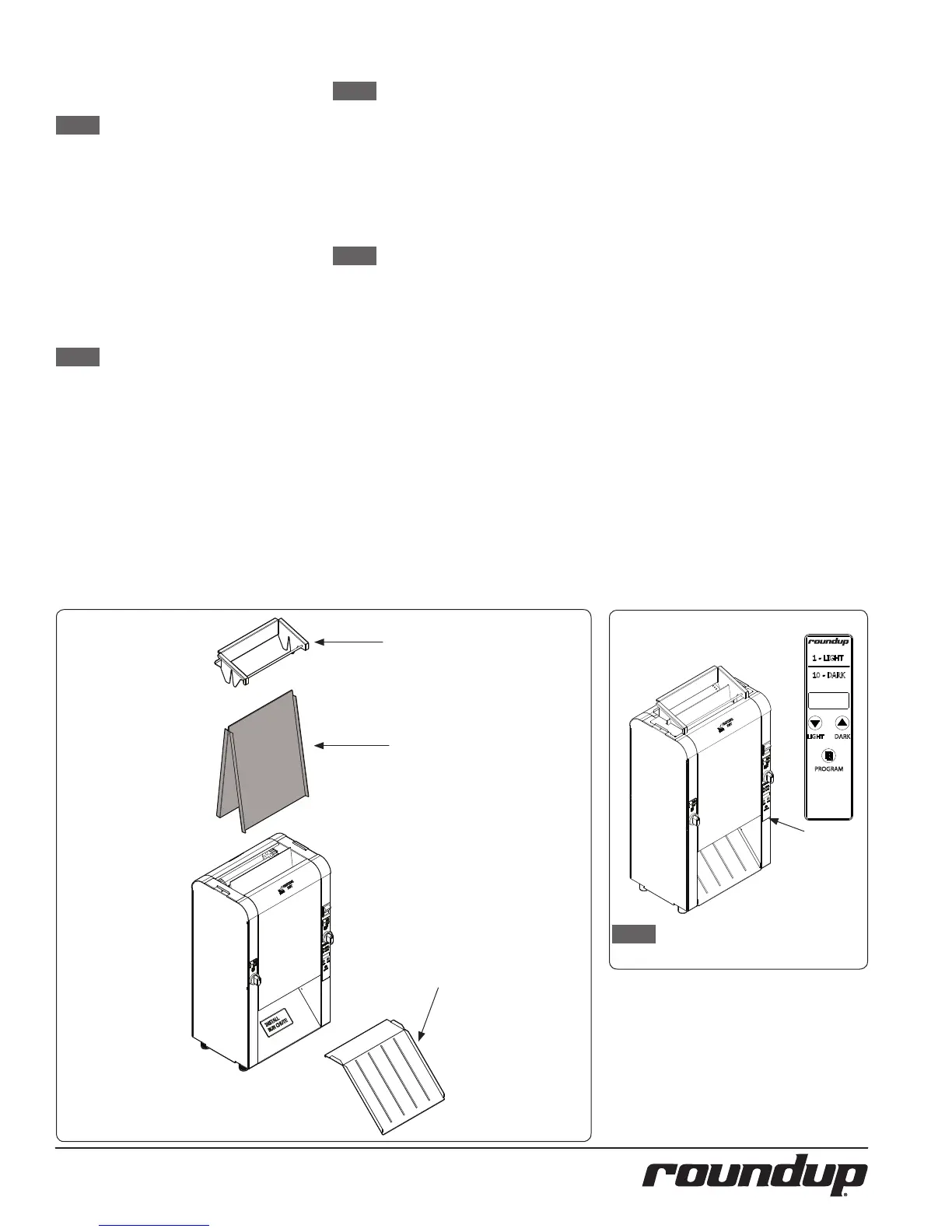
3. Refer to Figure 1. Remove the
Bun Feeder and Bun Chute. Wash
these items at the 3 compart-
ment sink and set aside to air dry.
4. Refer to Figure 2. Remove
the Release Sheet.
NOTE: Do not wash the Release
Sheet or Release Sheet Re-
tainers in the sink. These
must be washed by hand.
5. Wipe all surfaces of the unit
with a hot damp cloth.
6. Wipe both sides of the Release
Sheet with a hot damp cloth.
NOTE: Do NOT use a dripping wet
cloth. Wring out before use.
7. Re-install the Bun Feeder and
Bun Chute onto the unit.
8. Refer to the section titled
Installing the Release Sheet
on the next page. Install
the Release Sheet accord-
ing to those instructions.
NOTE: The main Control Panel is
located on the front of the unit.
Figure 1 Figure 2
When placing the unit into service, pay
attention to the following guidelines.
y Make sure to provide at
least 3 inches of space on
all aides of the unit.
y Make sure the power switch
is o and the unit is at room
temperature before plug-
ging in the power cord.
y Do not block or cover any
openings on the unit.
y Do not immerse the power
cord or plug in water.
y Keep the power cord away
from heated surfaces.
y Do not allow the power
cord to hang over edge
of table or counter.
Bun Feeder
Release Sheet
Bun Chute



 To Next Page