7
P/N 1011271 Rev. A 06/14
OPERATING
INSTRUCTIONS
NOTE: If the toasting quality needs
adjustment, refer to Adjusting
Toasting Quality in the Opera-
tion section of this manual.
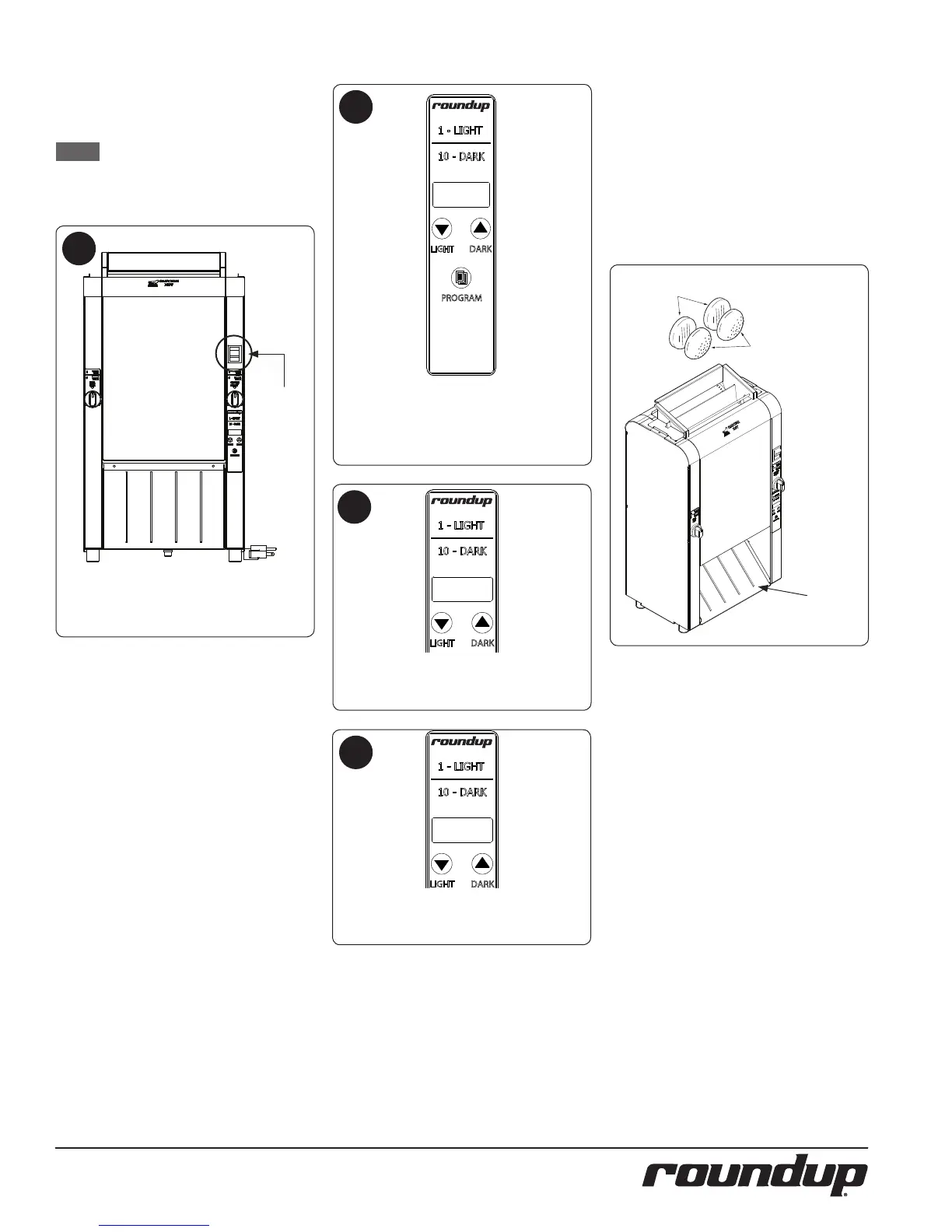
The unit displays the software version,
the current platen setpoint tempera-
ture and starts to warm up .
After the system check, the unit begins
to warm up and Lo-P appears
on the display.
The unit displays the USE
message when it reaches proper
operating temperature.
1
2
3
4
TOASTING PRODUCT
Facing the front of the unit, insert prod-
uct as described:
y Insert Crowns into the front lane
with the cut side facing in.
y Insert Heels into the rear lane
with the cut side facing in.
Refer to the image below.
CROWNS
(Cut sides
facing IN)
HEELS
(Cut sides
facing IN)
Power
Switch.
Buns Exit
Toaster Here
Turn the Power switch to the on posi-
tion. The unit makes a clicking sound.
This is normal.
4 D
USE
8888



 To Next Page