VERTICAL CONTACT TOASTER
9
P/N 1010775 Rev. J 10/13
Burger King
TEMPERATURE CONTROL PANEL
NOTE: The term “set point temperature” refers to
the desired temperature setting.
To display the actual Platen temperature—providing it
is over 440°F (227°C)—press the TEMP UP button.
To display the actual Auxiliary Air Heater temperature
—providing it is over 360°F (182°C)—press the TEMP
DOWN button.
To switch the temperature display between Fahrenheit
(°F) and Celsius (°C), press and hold the TEMP
SCALE button for 5 seconds.
PLATEN HEATER TEMPERATURE ADJUSTMENT
1. Turn the power on and wait for the Temperature
Display to finish the power up sequence (Figure
4).
2. Press and hold both TEMP UP and TEMP DOWN
buttons for more than 1 second until the display
flashes the Platen set point temperature, then
release (Figure 5).
3. Press the TEMP UP button to raise the set point
temperature or press the TEMP DOWN button to
lower the set point temperature.
NOTE: The Maximum Platen Set point Temperature
is 600°F (315°C). If no change in temperature is
made within 5 seconds, the display reverts back to
the previous set point.
4. Release the button when the desired set point is
displayed.
AUXILIARY AIR HEATER TEMPERATURE ADJUSTMENT
1. Turn the power on and wait for Temperature
Display to finish the power up sequence (Figure
4).
2. Press and hold both TEMP UP and TEMP
SCALE buttons for more than 1 second until the
display flashes the set point temperature, then
release (Figure 6).
3. Press the TEMP UP button to raise the set point
temperature or press the TEMP DOWN button to
lower the set point temperature.
NOTE: The maximum Auxiliary Air Heater Set point
Temperature is 400°F (204°C).
4. Release the button when the desired set point is
displayed.
NOTE: If no change in temperature is made within
5 seconds, the display reverts back to the previous
set point.
TEMP
UP
TEMP
DOWN
TEMP
SCALE
˚F
˚C
POWER
TEMP
UP
TEMP
DOWN
TEMP
SCALE
˚F
˚C
POWER
SP - P
600
TEMP
UP
TEMP
DOWN
TEMP
SCALE
˚F
˚C
POWER
TEMP
UP
TEMP
DOWN
TEMP
SCALE
˚F
˚C
POWER
400
SP - A
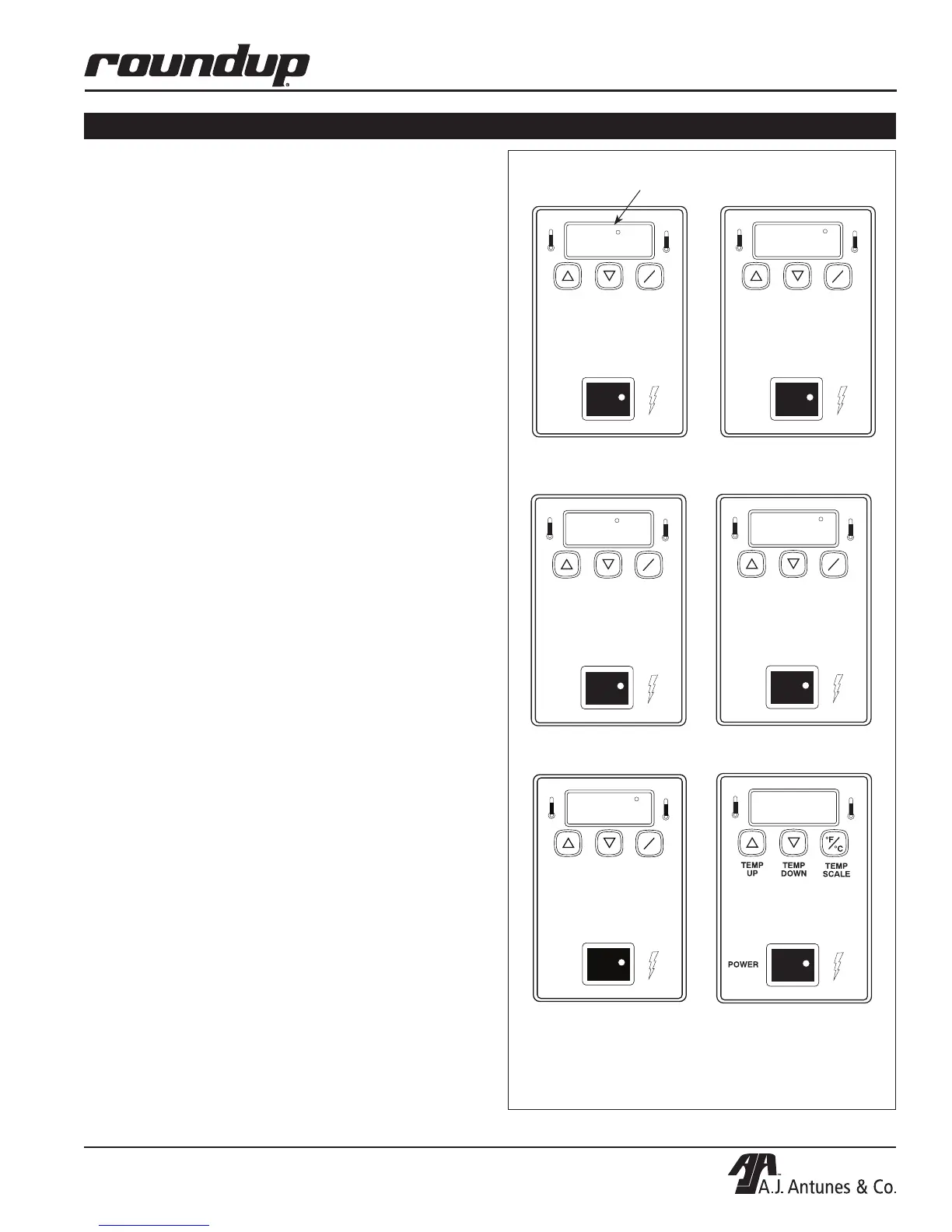
Figure 4. Temperature Power Up Sequence
3. “SP-A” (Set Point
Auxiliary) is displayed
1. “SP-P” (Set Point Platen)
is displayed
“Heat On” LED will blink on/off during warm-up and when
either platen or auxiliary air heaters are calling for heat.
2. Current Platen Set Point
Temperature Setting is shown
4. Current Auxiliary Air Set
Point Temperature is shown
5. “LO” is displayed until
platen temperature rises
above 550°F (288°C)
6. “USE” is displayed when
Platen Set Point Temperature*
is reached
TEMP
UP
TEMP
DOWN
TEMP
SCALE
°F
°C
POWER
LO
* Platen set point temperature must be between
460°F (238°C) and 600°F (315°C).
OPERATION (continued)


 To Next Page