OPC90 Server
OPC client connecting with the second instance of OPC90 that is only serving as
a user interface to the first instance. Under this situation, that OPC client will not
receive the data being collected by the first instance.
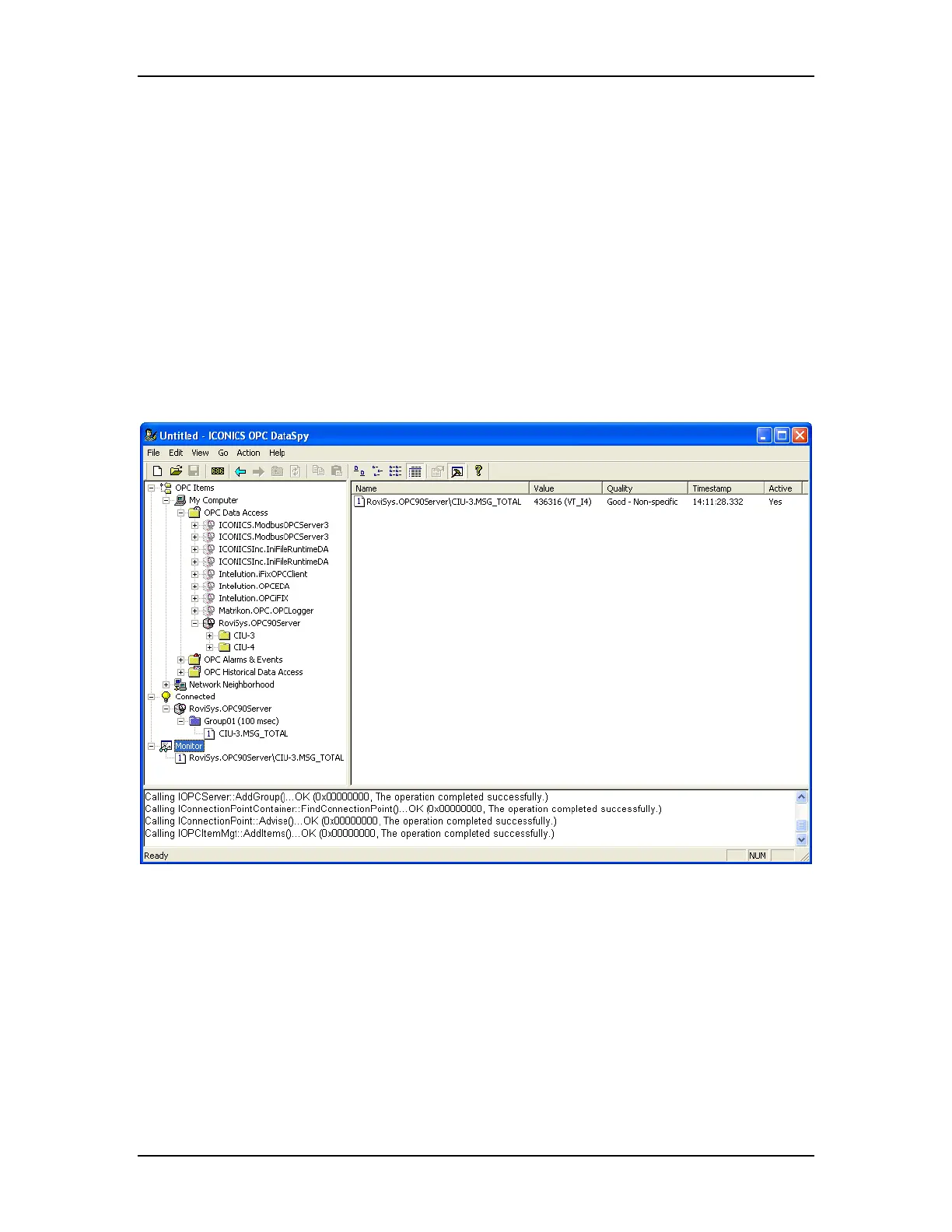
Installation of OPC90 includes a test client that can be used to validate local and
remote PC client connection with OPC90. This test client is called DataSpy. It is
installed in the C:\Program Files\OPC90 Server directory. DataSpy supports
local and remote server access.
If OPC client connection problems occur, try establishing an OPC connection
using the DataSpy OPC client shown by the following dialog. Select “View |
Output” so that it will post OPC messages to a list view box at the bottom of its
program window. These messages give sufficient details to determine
successful / problem operation.
For example if an error is posted for the IConnectionPoint::Advise() call, that
would be an indication that the OPC90 PC does not have sufficient access
privileges to setup call back functions within the OPC client PCs address space.
This would indicate a DCOM or user account setup error. Review the DCOM
settings. Also remember that if the local and remote PCs are members of a
domain, make sure the user account that is running OPC90 and the OPC clients
have sufficient privileges (Power Users minimum or Administrator). If the PCs
are members of a workgroup, they both must run OPC90 and the OPC clients
from user accounts that are the same on both PCs.
The RoviSys Company Version 7.0 Page 134



 To Next Page