OPC90 Server
Inclu d with the OPC90de installation is a sample configuration file called
amplePoints.cfg”. This file contains examples of all blocks supported and can “S
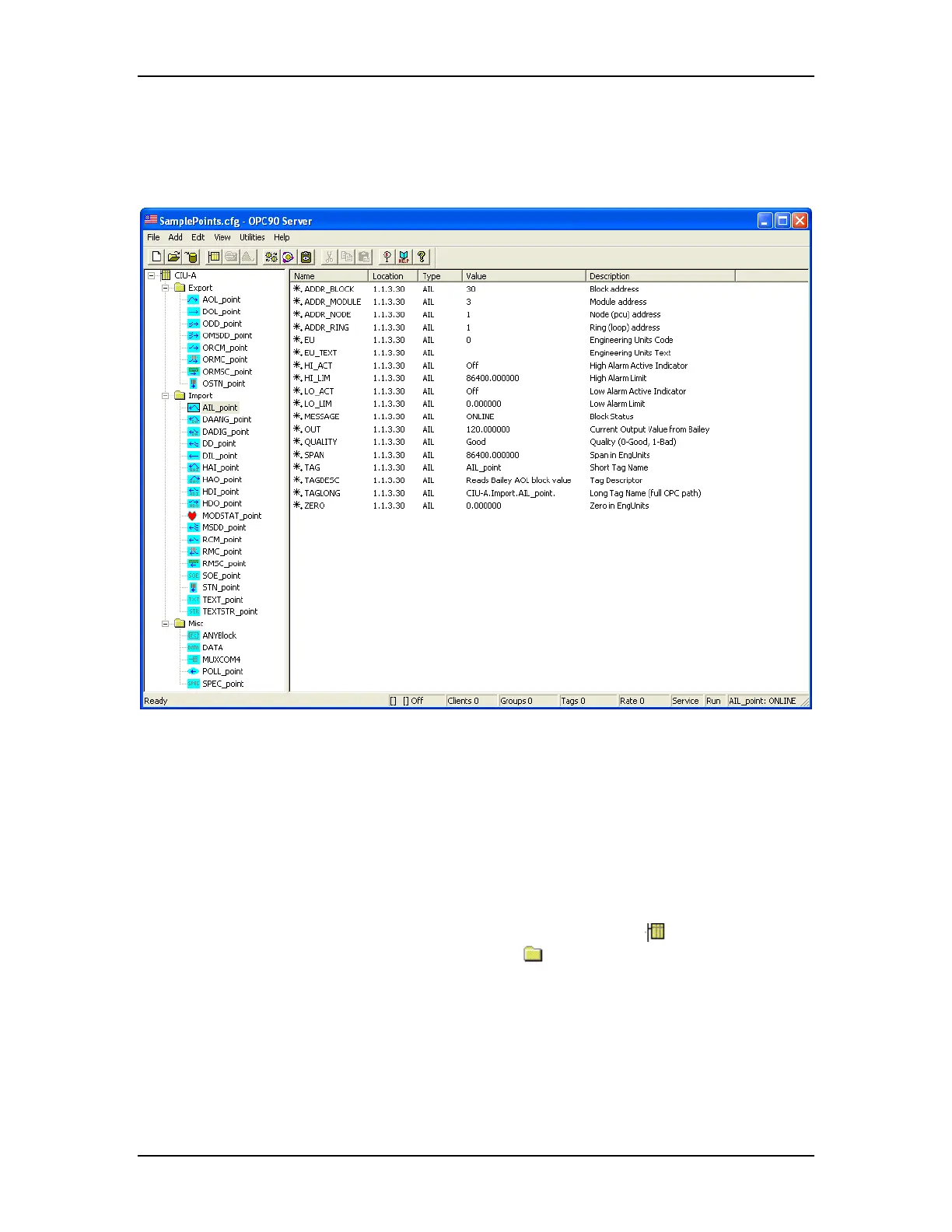
be viewed by selecting OPC90 File->Open. The following picture presents an
example of the sample point configuration:
port”
This example shows a device called “CIU-A”. Three groups have been
red unde c xpo
e
ABB Bailey system. The “Export” group
to the ABB Bailey system as the indicate sc”
tains s c ing iguration
information, multiplexing the COM6 port as a CIU port, polling a block output and
providing specification information for a pa
m th , ha
configu
group contains sample blocks for receivi
r this devi e called “E rt”, “Import” and “Misc”. The “Im
ng exception reported values from th
contains sample blocks for responding
d exception report block. The “Mi
group con ample blo ks for read / tuning ABB Bailey block conf
rticular block.
As noted fro is example the device s a unique symbol
identifying it as a
lder device. Groups are identified with the fo
symbol. Each block type h
of that block. Generally, blocks that
as a
unique symbol identifying the functionality
eption v ide
with an arrow pointing right (out from the
block in the following sub-sections inclu at
import exc
the device symbol). Blocks t
reported alues are
hat export exception reported values are identified
ntified with an arrow pointing left (into
device symbol). The definition of each
des the symbol associated with th
block.
The RoviSys Company Version 7.0 Page 38



 To Next Page