Operation
Instruction manual Folding system Page 46 of 100
5.10.2 Installation of FoldManager (inch)
To install the software you need the CD included in the scope of
delivery. Insert the CD in the PC drive. Normally, software installation
begins automatically. Should this not be the case, double-click the
"ROWE FoldManager" file on the CD to start it. This opens the Start
dialog, where you select "Install". Follow all further instructions.
5.10.3 FoldManager overview (inch)
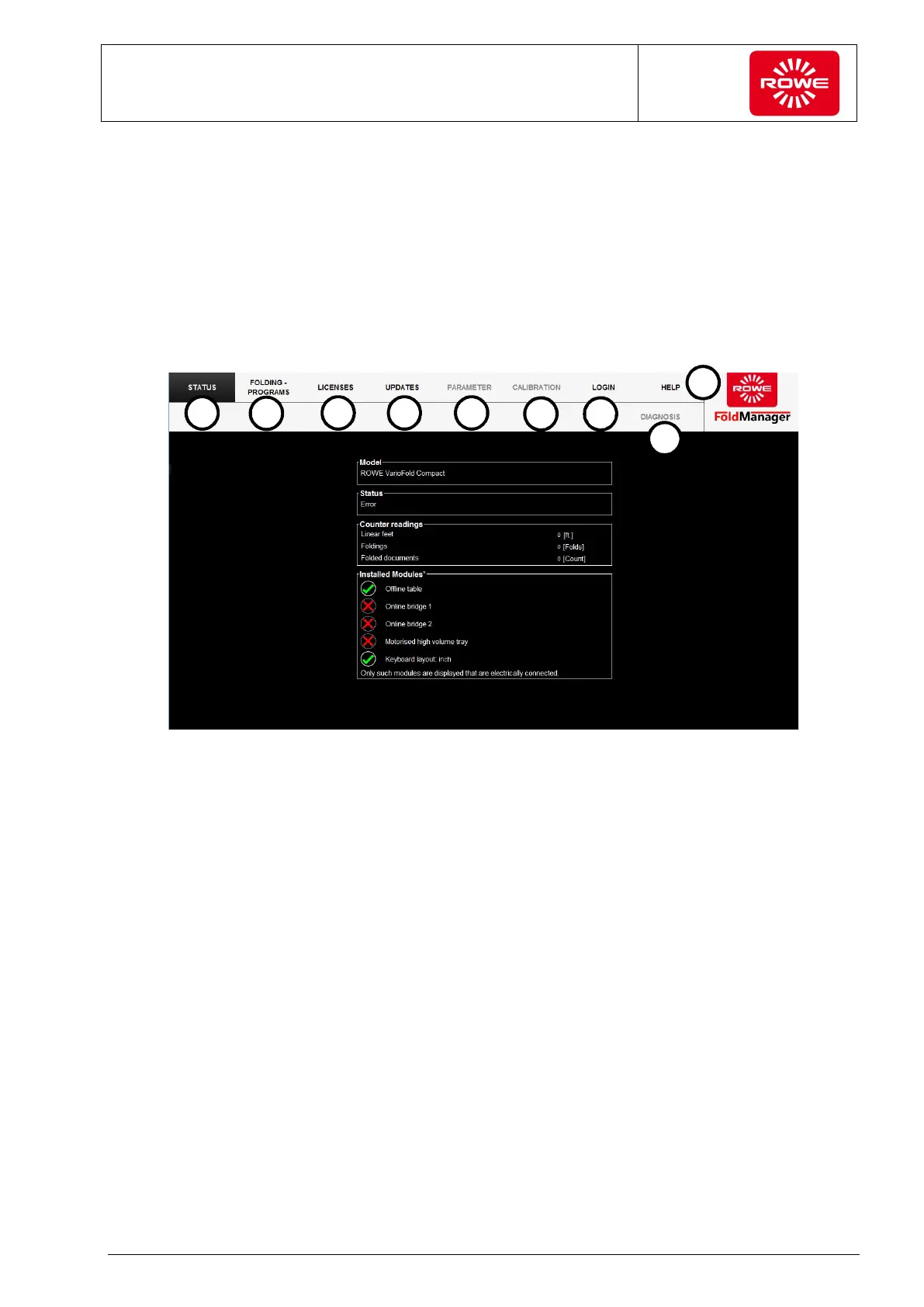
Screen - "ROWE FoldManager" overview
1. Status:
Folding system status, meter readings, overview of installed
modules
2. Folding program:
Create, edit, and delete custom folding programs, assign them to
Favorite keys, define the start folding program.
To create custom folding programs and define the start folding
program, you need at least one license for the FOLD APP SE.
3. Licenses:
Overview of valid service contracts and the installed connection kit
Overview of installed licenses, ordering of licenses and trial
licenses, installation of recently purchased licenses. Information
on remaining folding processes after installing a trial license.
4. Updates:
Download and install new firmware updates.


 To Next Page