Default IP Address – 192.168.0.100
460 Gateway User Manual Page 10
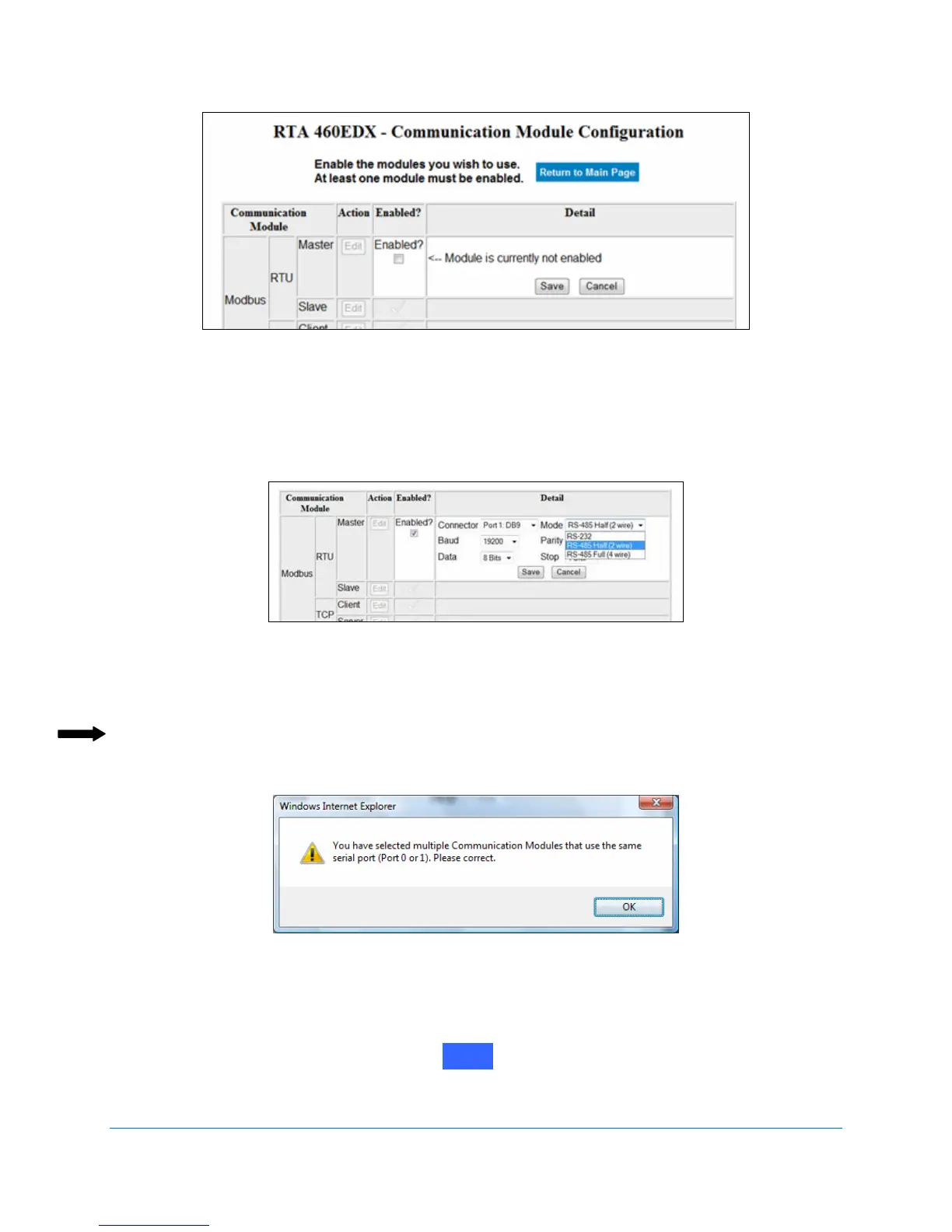
Figure 2-5 Enable Modbus RTU Master configuration
3. Click on the Enabled? checkbox.
The Module’s Detail options expand when enabled. See Figure 2-6.
Figure 2-6 Modbus RTU Master configuration details
4. Select the appropriate communication options from the drop-down menus.
Note: Only one RS232, RS485, or CAN port setting can be active per unit. For example, a
unit cannot have two ports set for RS232 or two ports set for CAN. If the same mode
is selected for two communication modules, a message similar to Figure 2-7 displays.
Figure 2-7 Serial port incompatibility error
5. Click on
Save.
The selections stay visible on the Communication Module Configuration screen, although
they are grayed out (until you select again). See Figure 2-8.
Edit



 To Next Page