声明:本说明书著作权归杭州睿登科技有限公司所有,未经允许任何单位或个人不得用于商业用途。
32
1.4 Operation Instruction
After power-on, it will show startup picture first, and then shows the main page.
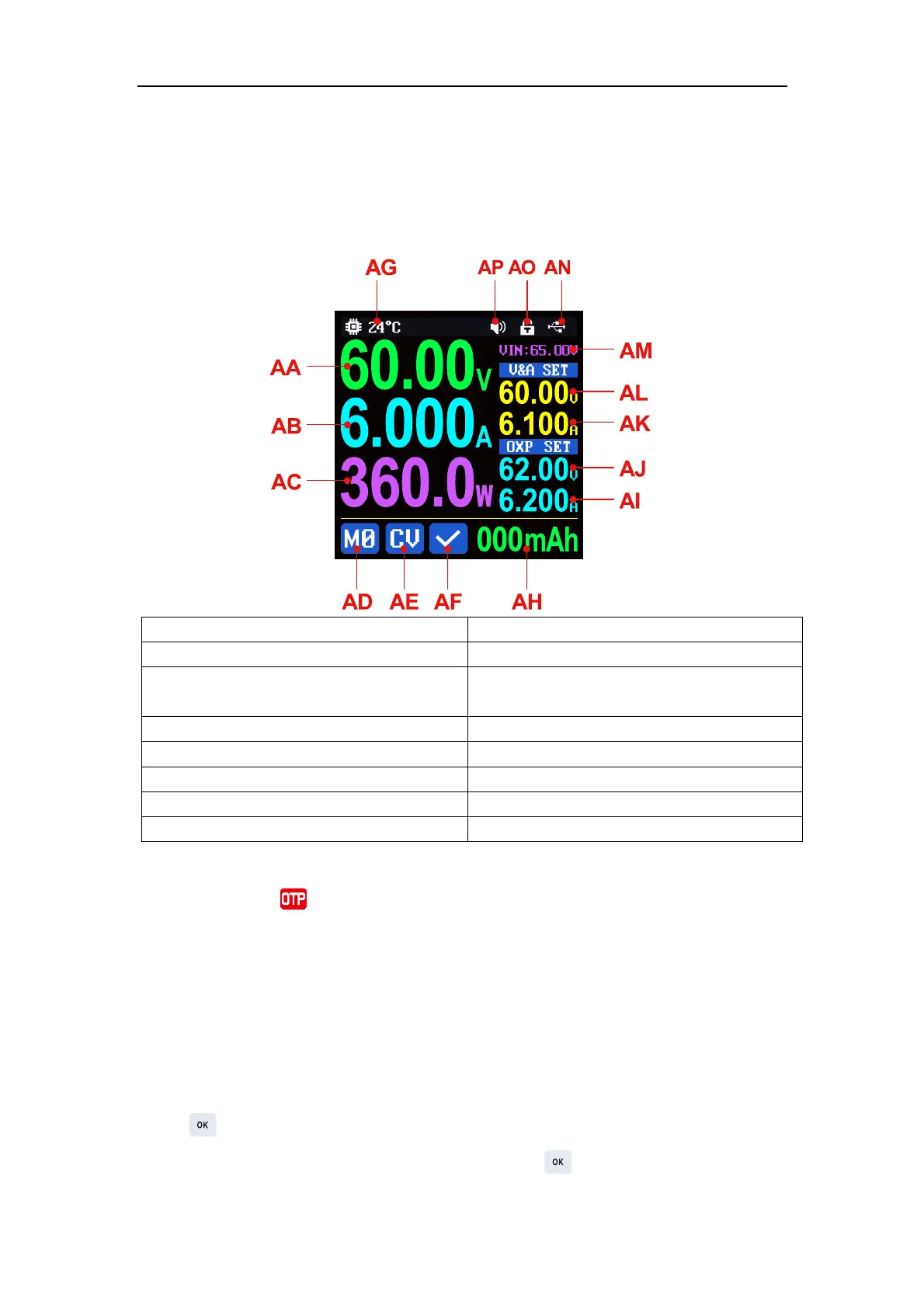
1.4.1 Main Page
AA: Actual output voltage value
AB: Actual output current value
AC: Actual output power value
AE: Constant voltage Constant current
status indicator
AF: Protection status indication
AG: System temperature value
AI: Over-current protection setting value
AJ: Over-voltage protection setting value
AK: Output current setting value
AL: Output voltage setting value
AN: Communication interface icon
AO: Button lock status icon
AP: Beeper ON/OFF status icon
When the AG: system temperature value is greater than 90℃, protection status
indication display and close output.
In the cyclic display area, capacity, energy are displayed cyclically. Capacity and
energy accumulation after power on, zero after power off, external temperature
sensor needs 10K NTC B3950 if you need that.
1.4.2 Operation Introduction
In the menu operation, the icon in red, the value with cursor or the option with
base color is the currently selected menu, press the rotary knob to switch the menu,
press to confirm or enter, press the direction button to move the cursor, rotate
the rotary knob to change the setting, press the button again to save the


 To Next Page
 Loading...