U11Pro User Manual
①
Place the drone on horizontal ground.
②
Push the Right Joystick into 5 o'clock position for 2-3 seconds.
③
All LED Lights are flashing quickly, then the LED Light of the drone is flashing slowly in turn.
You can continue with the next step.
①
It will automatically search for GPS signals after successful frequency matching, just wait
for 1-2 minutes(depends on the performance of smartphone and environment).
②
The searching GPS signal is done when the transmitter sound beep.
③
Notice the GPS signal on App, the Rear LED Light of the drone and the blue LED light of the
transmitter stays on at the same time, the transmitter sound beep, at that time searching
the GPS signal is successful. You can continue with the next step.
How to Take off/Landing
①
Push the Left Joystick up, the drone will take off directly. Push the Left Joystick down, the
drone will land directly.
②
Tap on RUKO GPS APP, the drone will take off directly. While flying within the visible
bounds, you also can tap it on RUKO GPS to land directly.
③
Tap on RUKO GPS APP or press the button on the remote control,
the drone will automatically return to the take-off point. Recommend to use RTH while flying
far away from the take-off point.
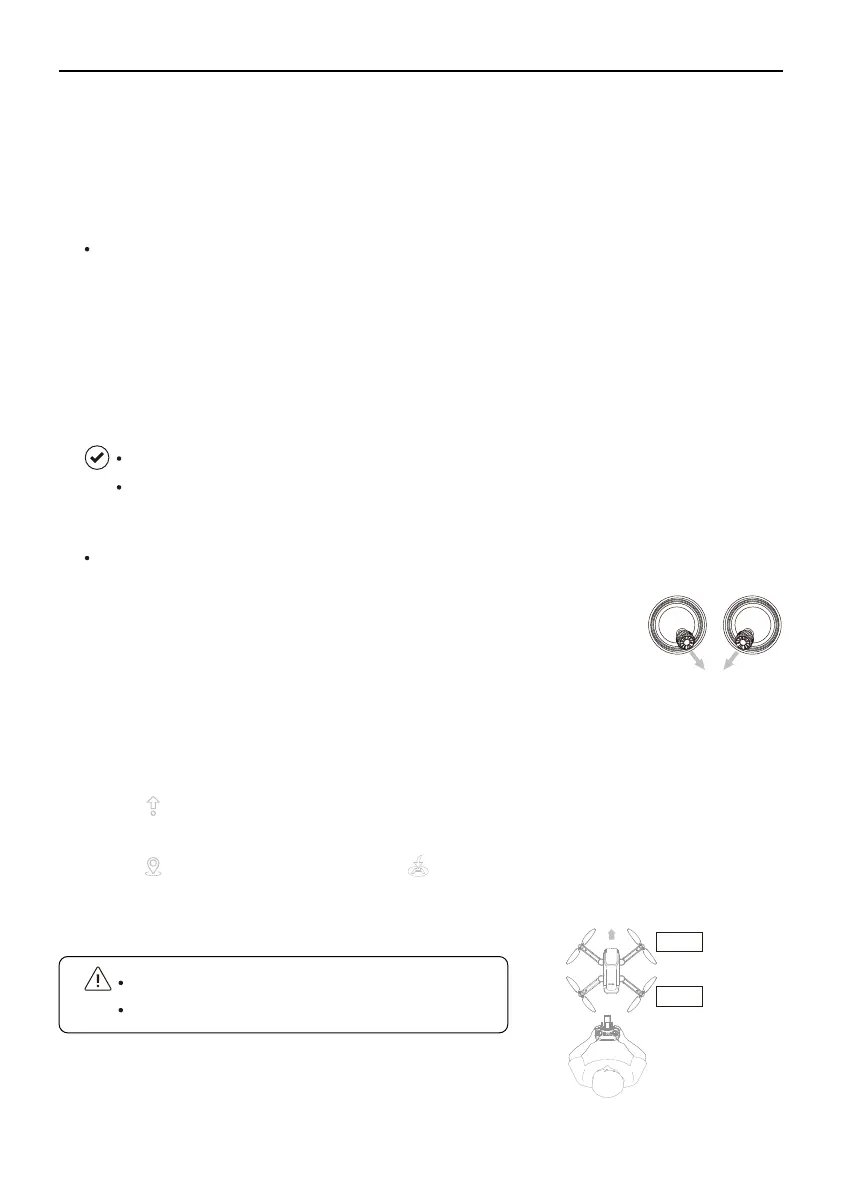
①
Starting the motors: Push the Left Joystick inward into the 5 o’clock
position and the Right Joystick inward into the 7 o’clock position at the
same time, hold on for 2-3 seconds and let go.
②
Stopping the Motors: Repeat the above step to stop the motors.
Copyright ©2021 Ruko All Rights Reserved. 27
Step 6: Searching GPS Signal
Step 7: Starting/Stopping the Motors
Please start the motor before take off.
Always keep the head of drone facing forward.
Front
Back
It is recommended to fly in an environment that the GPS signal is equal to or greater than 8.
DO NOT Long press the GPS button to turn off the GPS mode during flying outdoor, or it may
not work normally.



 To Next Page