MODEL 63504-F63C1/63604-F63C3/73504-F68C1/73604-F68C3
37
application; it is not suitable for small softener in residential application.
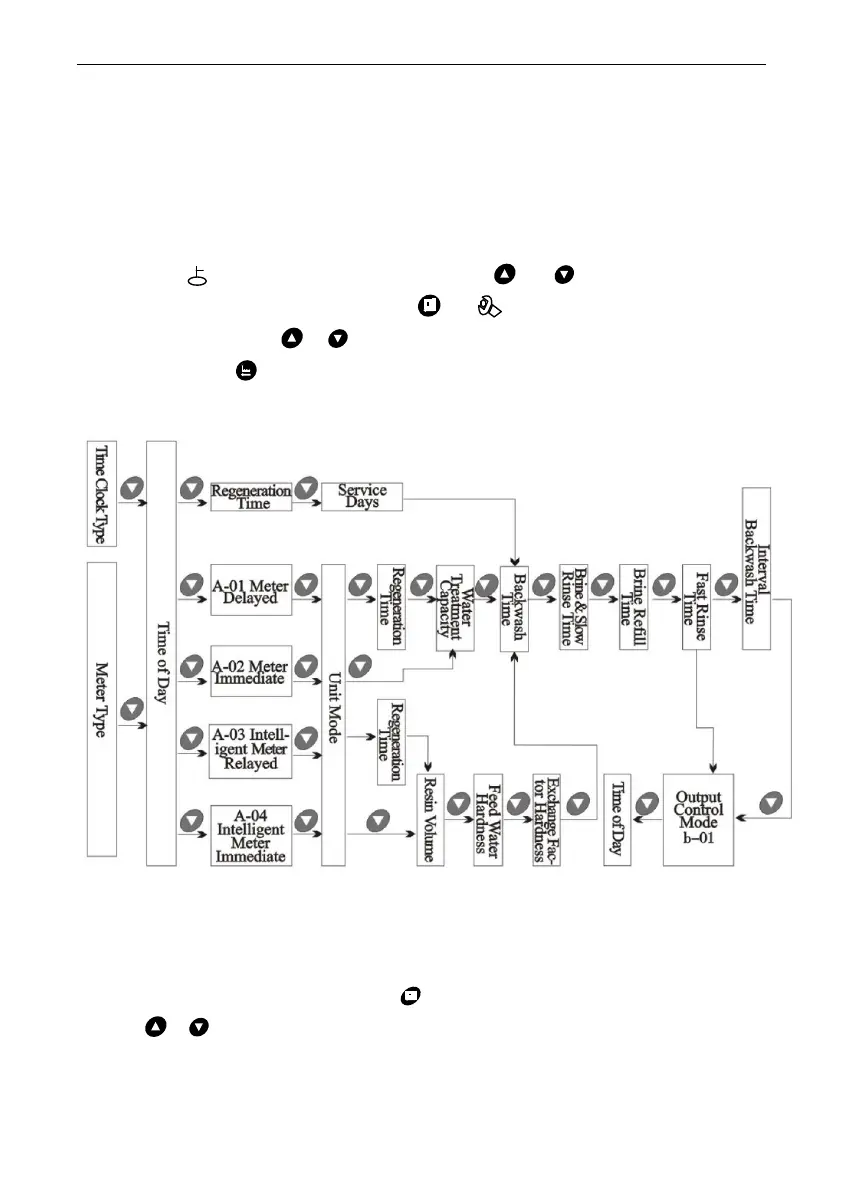
3.5. Parameter Enquiry and Setting
3.5.1. Parameter Enquiry
When light on, press and hold both and for 5 seconds to lift
the button lock status; then press and light on, enter to program
display mode; press or to view each value according to below
process.(Press exit and turn back to service status)
Attention: For the F68 valve, after enquiry “unit mode” or “regeneration
time”, it will show “F-00”, which indicates the interval backwash times
3.5.2. Parameter Setting
In program display mode, press and enter into program set mode.
Press or to adjust the value.
3.5.3. The steps of parameter setting


 To Next Page