10
USER
COMPONENT GUIDE
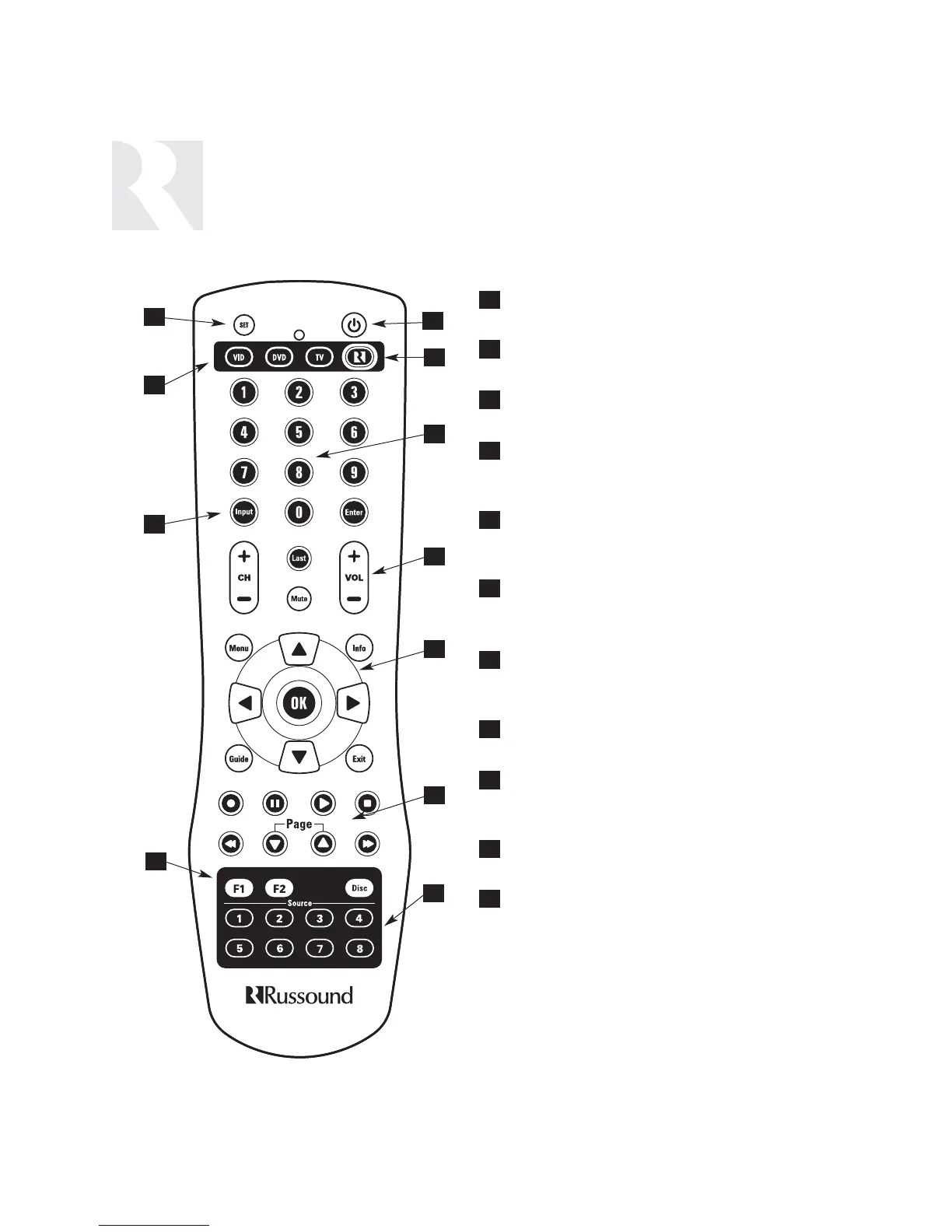
SRC2 Remote Control
1
4
4
7
7
2
5
8
3
3
6
9
11
10
6
9
1
2
5
8
10
11
POWER - Turns room or Local Source on and
off.
RUSSOUND DEVICE BUTTON - Used for
SRC2 control of zone keypad.
NUMBER BUTTONS - Buttons (0-9) for direct
selection of channels or discs.
VOLUME UP/DOWN - Raises and lowers the
volume for the room you are in, or for the
selected Local Device.
CURSOR KEYS - Issues IR commands for
source equipment, allowing movement
through menus and program screens.
COMMAND KEYS - Controls the selected
device (e.g., VCR, DVD, or CD player) with
these buttons.
SOURCE - Directly select sources connected to
the Russound controller while in the Russound
mode.
F1 AND F2 BUTTONS - Selects and saves
Favorite 1 or Favorite 2 preset selections.
INPUT - Scrolls through sources while in the
Russound mode, or switches inputs on
selected Local Source.
LOCAL DEVICE BUTTONS - Selects Local
Source to be controlled by SRC2.
SETUP - Use for programming SRC2 using
the built-in library or by learning-in codes.


 To Next Page