40
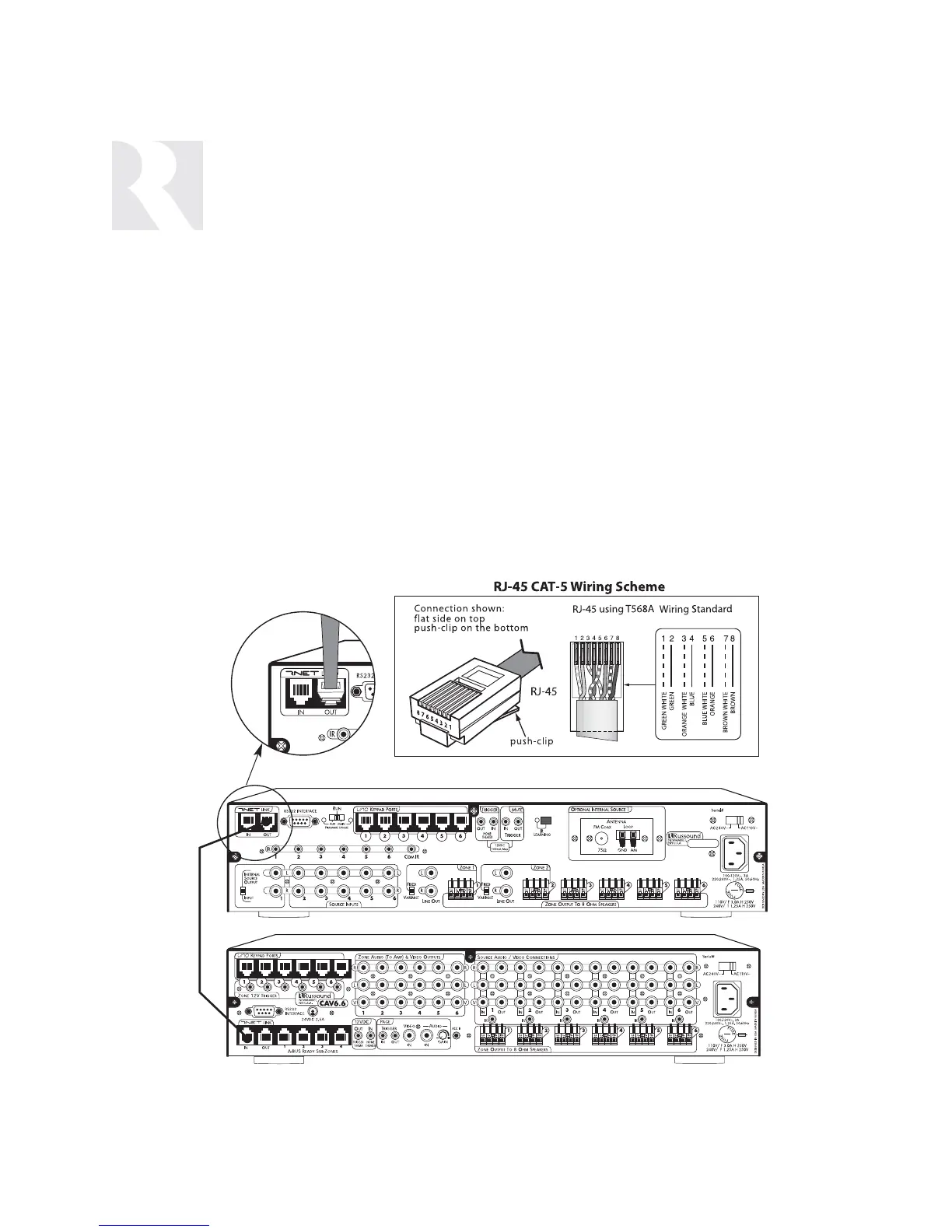
The RNET Link In and Link Out can be used to
connect two to six CAM6.6 or CAV6.6 con-
trollers. The connection is made using a CAT-5
patch cable from the Link Out of the master
CAM6.6 and into the Link In of the next con-
troller. Along with RNET data signals, the RNET
Link In and Link Out jack passes the six source
IR signals. These are only for source-specific IR
remote repeating, not codes initiated from the
controller’s internal IR library. The CAT-5 patch
cable should not exceed 18 inches in length to
avoid potential cross-talk between the source-
specific IR repeating signal lines.
The RNET Link In and Link Out is also used to
connect the CAM6.6 to other Russound prod-
ucts with RNET.
Note: If two or more CAM6.6 or CAV6.6 con-
trollers are connected using the RNET Link In
and Link Out ports, each controller must have a
unique Controller ID prior to being connected
through the RNET ports. The Controller ID
assignment must be performed during the
Controller Setup section of the Installation menu.
If using a CAM6.6T, be sure to set the Controller
ID under “Peripheral Setup” to “ALL CON-
TROLLERS” (page 50).
Note: It is not recommended to link together
two CAM6.6T controllers. If designing a CAM6.6
system with more then one tuner, use two
CAM6.6 controllers and a Russound ST2 Dual
Tuner (also ST2-XM, ST2-XM2, ST2S). See page


 To Next Page