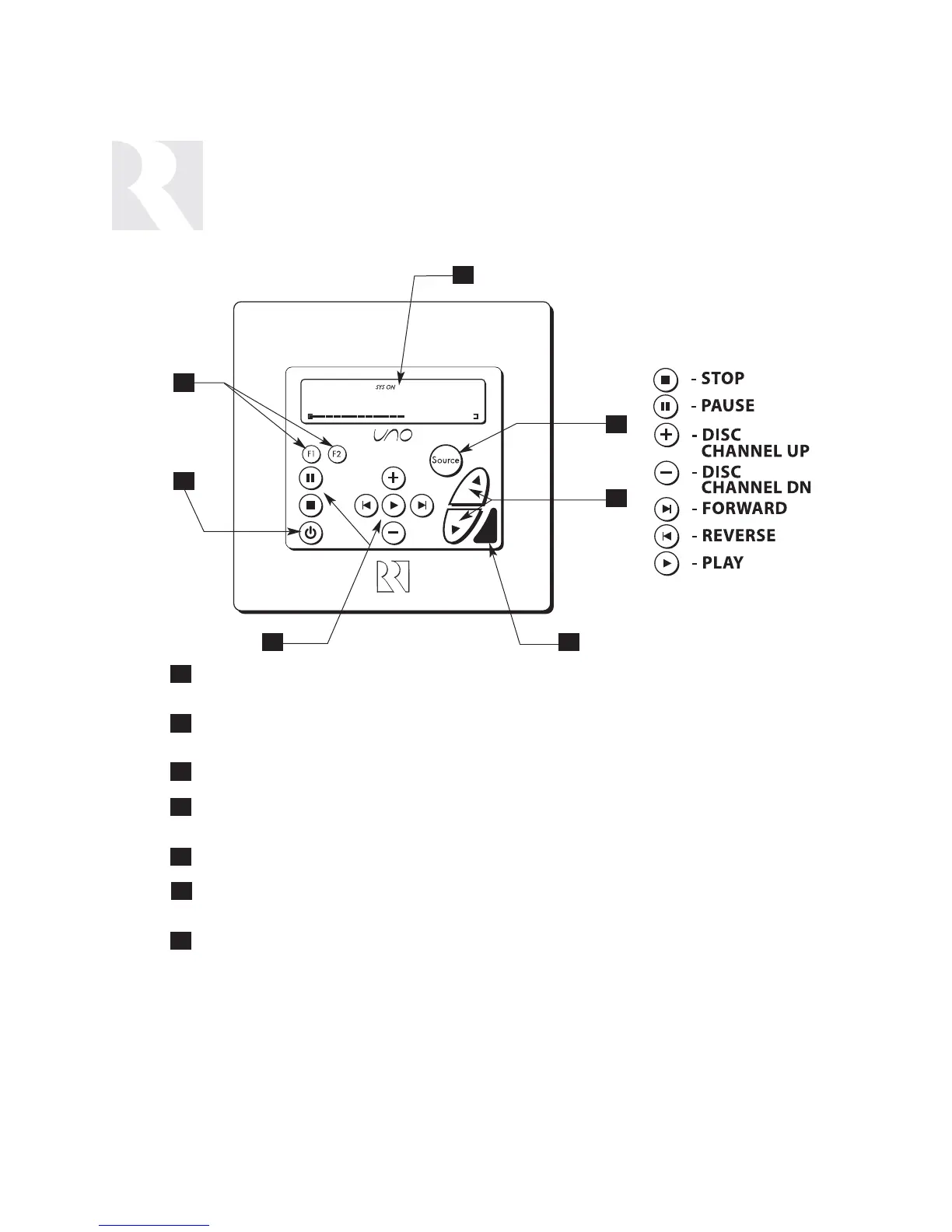
LCD PANEL - 12-character backlit display shows status of the room, source,
volume, and more
SOURCE SELECT BUTTON - Scrolls through the sources directly connected to the
CAM6.6. Press and hold brings up the USER MENU for loudness, bass, treble, etc.
VOLUME UP/DOWN BUTTONS - Raises and lowers the volume for the room
IR RECEIVER - Receives IR signals and passes them to the controller and source equip-
ment. Also used when operating the UNO Keypad by using the SRC2 remote
COMMAND KEYS - Pressing the command keys controls the source equipment
POWER BUTTON - Turns room ON or OFF when pressed once, press and hold a sec-
ond time will turn on or off all CAM6.6 rooms
F1 AND F2 BUTTONS - Selects Favorite 1 or Favorite 2 - preset user-selected
favorite settings per room
1
4
7
2
5
3
6
3
2
4
6
7
1
5
USER
COMPONENT GUIDE
UNO-S2 Keypad
Command Keys


 To Next Page