28
INSTALLER
COMPONENT GUIDE
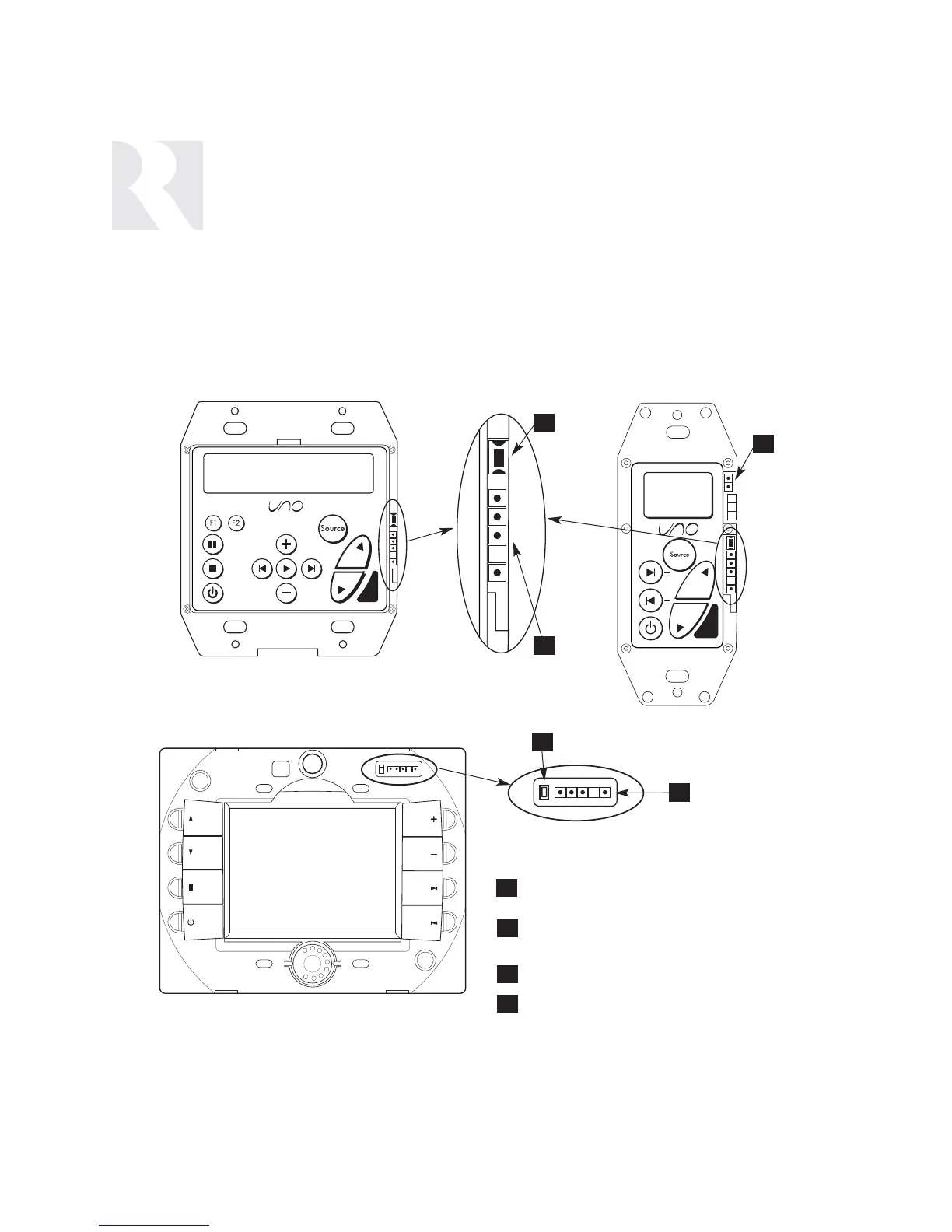
UNO Keypad Update Port
2
OS UPDATE PORT- Connection for programming
cable used to update UNO keypad OS software.
SETUP BUTTON - Activates Installer Setup mode
and accesses update menus
RESET BUTTON - Resets UNO-TS2 after update
OS UPDATE/RUN JUMPER - Pins are jumpered
during OS update, and removed during normal
operation.
Software Update
If a keypad update is released, it will be available
online at
www.russound.com
through the Document
Center, under RNET Systems. Before starting the
update procedure, download updates to a PC and con-
nect the correct programming cable from the PC to
the OS update port on the front of the keypad.
Required Russound Cable for Programming
UNO-S2, UNO-TS2
- use Programming Cable P/N 2500-121036
UNO-S1
- use Advanced Programming Cable P/N 2500-521065
(Do not put RS-232 level signals into the pins)
1
2
4
4
1
UNO-S2 Keypad
UNO-TS2 Touchscreen
UNO-S1 Keypad
OS Update Port
OS Update Port
3
3
1


 To Next Page