NEWMARKET, NH U.S.A.
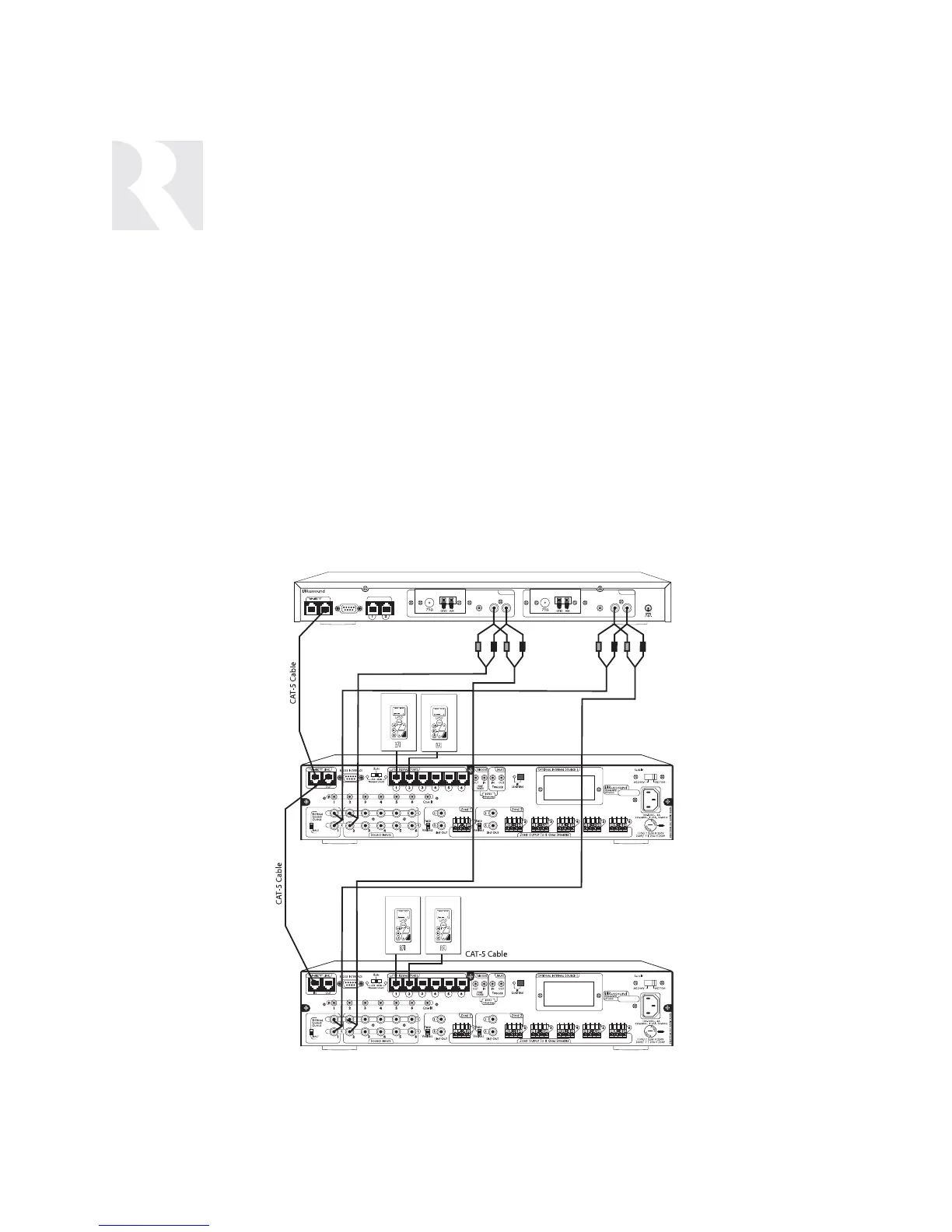
Sharing an ST2 Dual Tuner with multiple CAM6.6 con-
trollers (no built-in tuners)
The configuration below is suitable for 7 to 12 zones
that can all access the ST2 Dual Tuner. This configura-
tion uses RCA “Y” cables from the ST2 Tuner source
outputs to connect to both CAM6.6 source inputs.
CAM6.6 (no tuner installed) -
Controller Setup Menu: Controller ID = 1
Source Setup Menu: Basic Setup Procedure:
Source # = 1; Source Name = Tuner 1;
Command Type = Peripheral
Source # = 2; Source Name = Tuner 2;
Command Type = Peripheral
Output/Input Switch = Input
RCA cable connected from ST2 Tuner 1 audio output
to Source 1 input on CAM6.6 (1)
RCA cable connected from ST2 Tuner 2 audio output
to Source 2 input on CAM6.6 (1)
CAM6.6 (no tuner installed) -
Controller Setup Menu: Controller ID = 2
Source Setup Menu: Basic Setup Procedure:
Source # = 1; Source Name = Tuner 1;
Command Type = Peripheral
Source # = 2; Source Name = Tuner 2;
Command Type = Peripheral
Output/Input Switch = Input
RCA cable connected from ST2 Tuner 1 audio output
to Source 1 input on CAM6.6 (2)
RCA cable connected from ST2 Tuner 2 audio output
to Source 2 input on CAM6.6 (2)
SAMPLE CONFIGURATIONS
MULTIPLE CONTROLLERS WITH ST2 DUAL TUNER
110


 To Next Page