23
USER
INTERNAL SOURCE - AM/FM TUNER
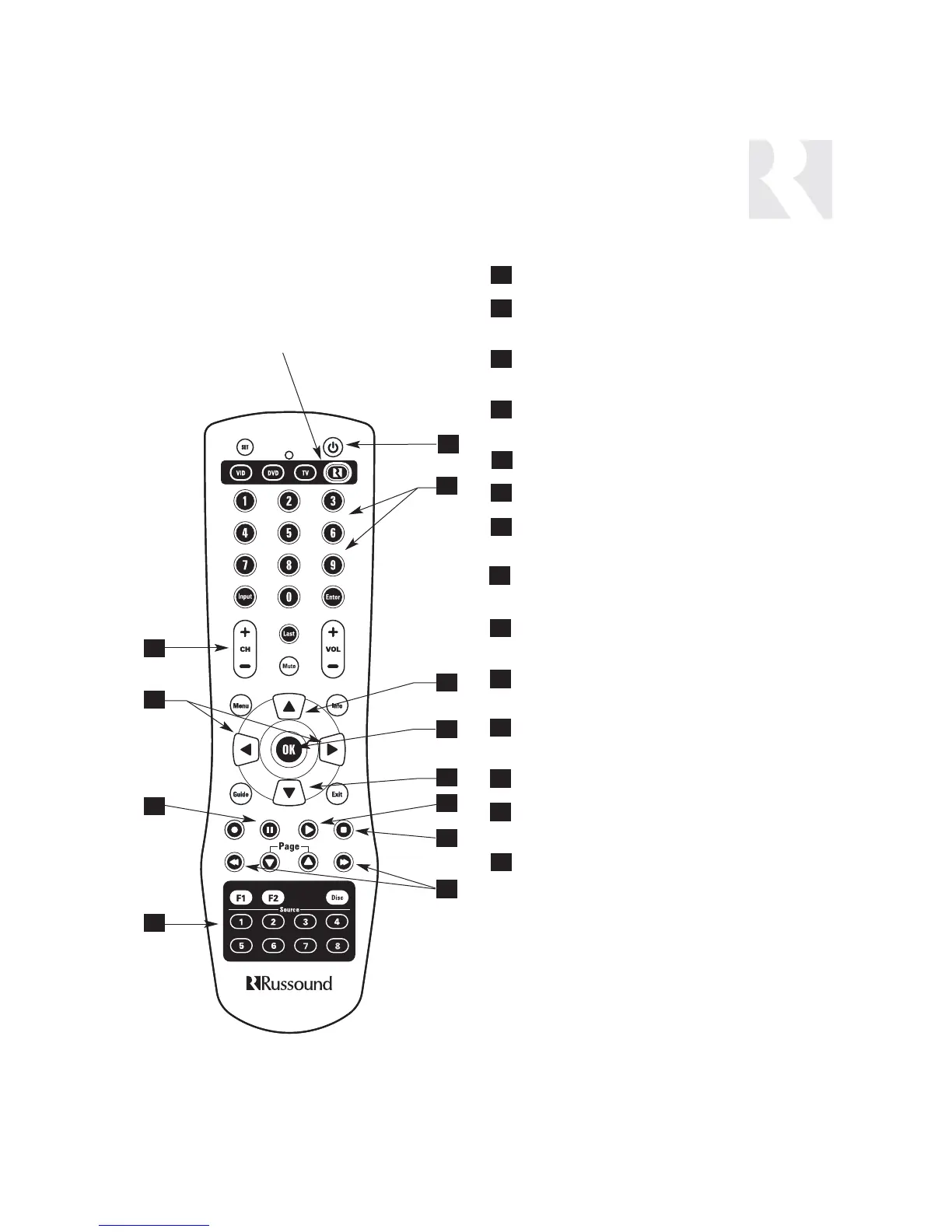
SRC2 Remote Control
POWER - Power managed by CAM6.6
NUMERIC INPUT - (press) Number buttons for
direct input of frequency
MEMORY PRESETS - (press and hold) Number
buttons (1-6) for saving memory presets
TUNE UP/DOWN - Incrementally scrolls through
channels or tuned stations
OK - Confirms numeric selection
PLAY - Selects AM or FM band
SCAN - (press and hold) Scans through tuned sta-
tions with 5-second preview before next station
SEEK UP/DOWN - (press) Seeks next tuned
station up or down
MEM UP/DOWN - (press) Scrolls through memory
presets for selected bank
BANK UP/DOWN - (press and hold) Used for bank
selection
TUNER SELECTION - Select AM/FM Tuner by its
assigned source number
PAUSE - Mutes/unmutes tuner audio output
SEEK UP/DOWN - Seeks next tuned station up or
down
TUNE UP/DOWN - Incrementally scrolls through
tuned stations
1
4
6
2
5
7
3
6
7
10
3
7
4
6
1
2
8
RUSSOUND SELECTION - “R” must be
the selected source for control of the
CAM6.6 and any connected compo-
nents. Select “R” before sending
SRC2 remote commands.
3
5
8
9
11
10
9
2
11


 To Next Page