English
8
86
8 PROGRAMMING AND MAINTENANCE MENU
This chapter contains
instructions on how to set
and change the
programming parameters
of the appliance.
Therefore it is necessary to
carefully read it and to
understand the exact
sequence of operations
before performing them.
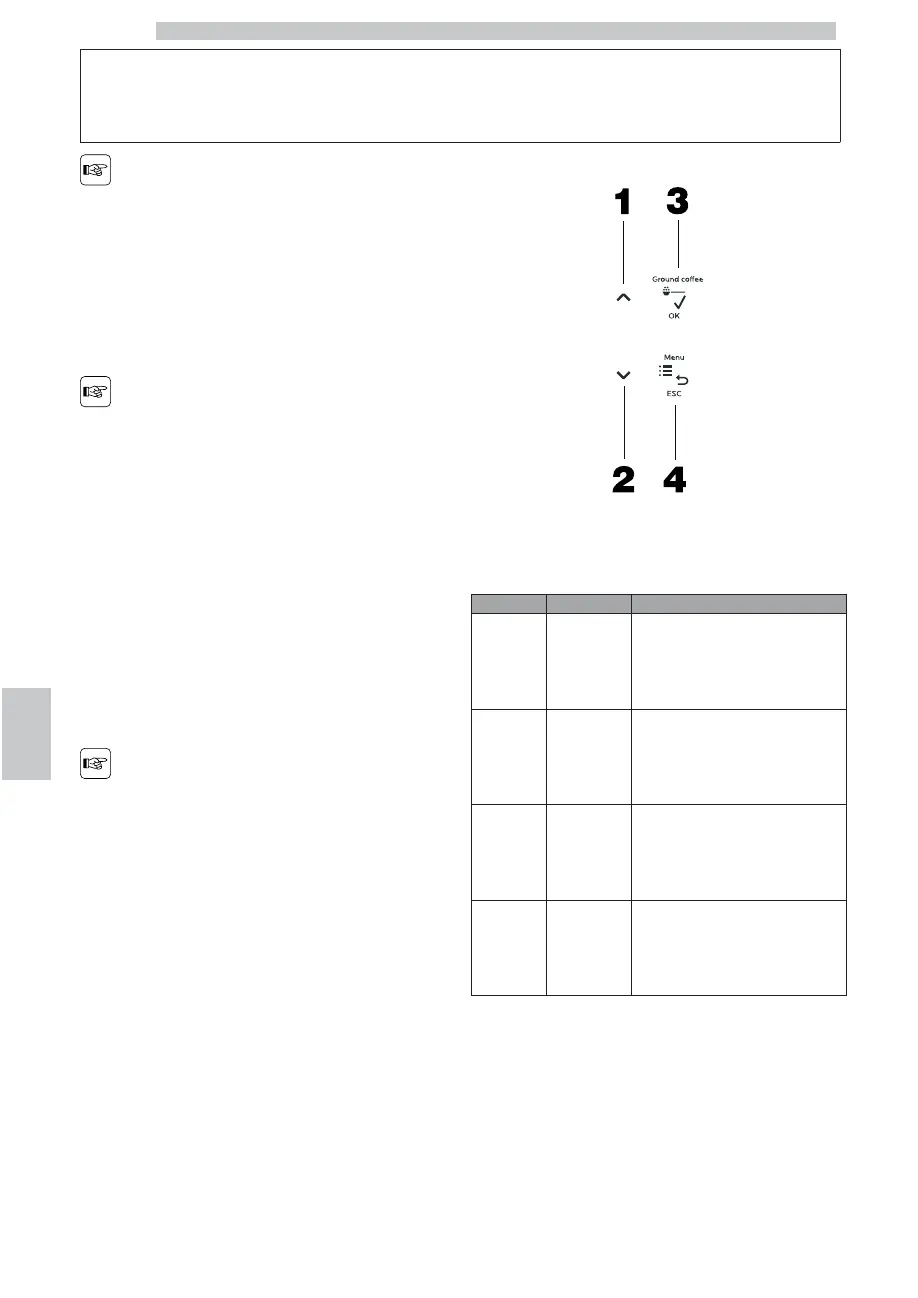
8.1 Description of Buttons for
Programming Phases
Use the buttons described below to scroll the appliance
menus.
During programming the
following buttons have a
different function than the
one they usually have
during machine use.
Some functions also enable to program one or more data
(already programmed on standard values).
BUTTON
Description
FUNCTION
1 Up
Go back to the previous option inside
the same programming level;
Increase the value of a datum to be
changed.
2 Down
Go on to the following option inside
the same programming level;
Decrease the value of the datum to
be changed.
3 OK
Move from a menu level to
another one;
Prepare a datum for the change;
Confirm a datum or a function.
4 Menu/Esc
Enter the programming menu;
Confirm the changes and go
back to the previous menu level
until exiting the menu.
To adjust the data values to be re-programmed:
• Select the function.
• Confirm the function with the “OK” button.
The cursor moves under the value to be changed.
• Press the “Up” or “Down” buttons to change its value.
• Confirm the modified datum with the “OK” or “Esc” button.









 To Next Page