35
English
EDOCEGASSEMESUACELBISSOPNOITULOS
1010
10
1010
RETAWONRETAWON
RETAWON
RETAWONRETAWON
ylppusretawehtninoitpurretniegakaelroegakcolbrofkcehc
40-3040-30
40-30
40-3040-30
DEKCOLBPUORGWERBDEKCOLBPUORGWERB
DEKCOLBPUORGWERB
DEKCOLBPUORGWERBDEKCOLBPUORGWERB
dekcolbsipuorgwerb
erusekam;puorgwerbfonoitisopkcehc
raelcsipuorgwerbdnuoraaera
5050
50
5050
RETEMWOLFONRETEMWOLFON
RETEMWOLFON
RETEMWOLFONRETEMWOLFON
:gninruttonsiretemwolf
gnikrowtonpmup-1
dekcolbevlavdionelos-2
deggolcenilretaw-3
ylreporpkrowtÕnseodretemwolf-4
noitcennoclacirtcelekcehc-1
egakcolbfoesuacevomerdnakcehc-2
golcevomer-3
retemwolfecalper-4
70-6070-60
70-60
70-6070-60
DEKCOLB.PSIDMRADEKCOLB.PSIDMRA
DEKCOLB.PSIDMRA
DEKCOLB.PSIDMRADEKCOLB.PSIDMRA
dekcolbmragnisnepsid
simragnisnepsiddnuoraaeraerusekam
raelc
8080
80
8080
SPUCONSPUCON
SPUCON
SPUCONSPUCON
ytpmeresnepsidpuc )41.4noitcesees(resnepsidpucotspucdda
9090
90
9090
LLUFKNATNIARDLLUFKNATNIARD
LLUFKNATNIARD
LLUFKNATNIARDLLUFKNATNIARD
llufknatniard)0.giF(41.ferknatecalperdnaytpme
0101
01
0101
DEKCOLB.PSIDPUCDEKCOLB.PSIDPUC
DEKCOLB.PSIDPUC
DEKCOLB.PSIDPUCDEKCOLB.PSIDPUC
dekcolbresnepsidpuc detaesyltcerrocsiresnepsidpucerusekam
21-1121-11
21-11
21-1121-11
.PSIDKCITSRITS.PSIDKCITSRITS
.PSIDKCITSRITS
.PSIDKCITSRITS.PSIDKCITSRITS
DEKCOLBDEKCOLB
DEKCOLB
DEKCOLBDEKCOLB
dekcolbresnepsidkcitsrits
nidecalpyltcerroceraskcitsritserusekam
resnepsid
4141
41
4141
RORREROSNES.PMETRORREROSNES.PMET
RORREROSNES.PMET
RORREROSNES.PMETRORREROSNES.PMET
elbuortrosneserutarepmetrosnesfonoitarepokcehc
5151
51
5151
RORREYEK-WHRORREYEK-WH
RORREYEK-WH
RORREYEK-WHRORREYEK-WH
dedrocertonyeknoitanyltcerrocyeknoitantresni
If the neon behind the front door graphic turns off and the first line of the di-
splay gives an alert message (e.g.: CALL FOR SERVICE - OUT OF ORDER
09), the machine is out of order. The number following the “OUT OF OR-
DER” message represents the code of the problem. To view on the display a
short description of the problem, follow these steps:
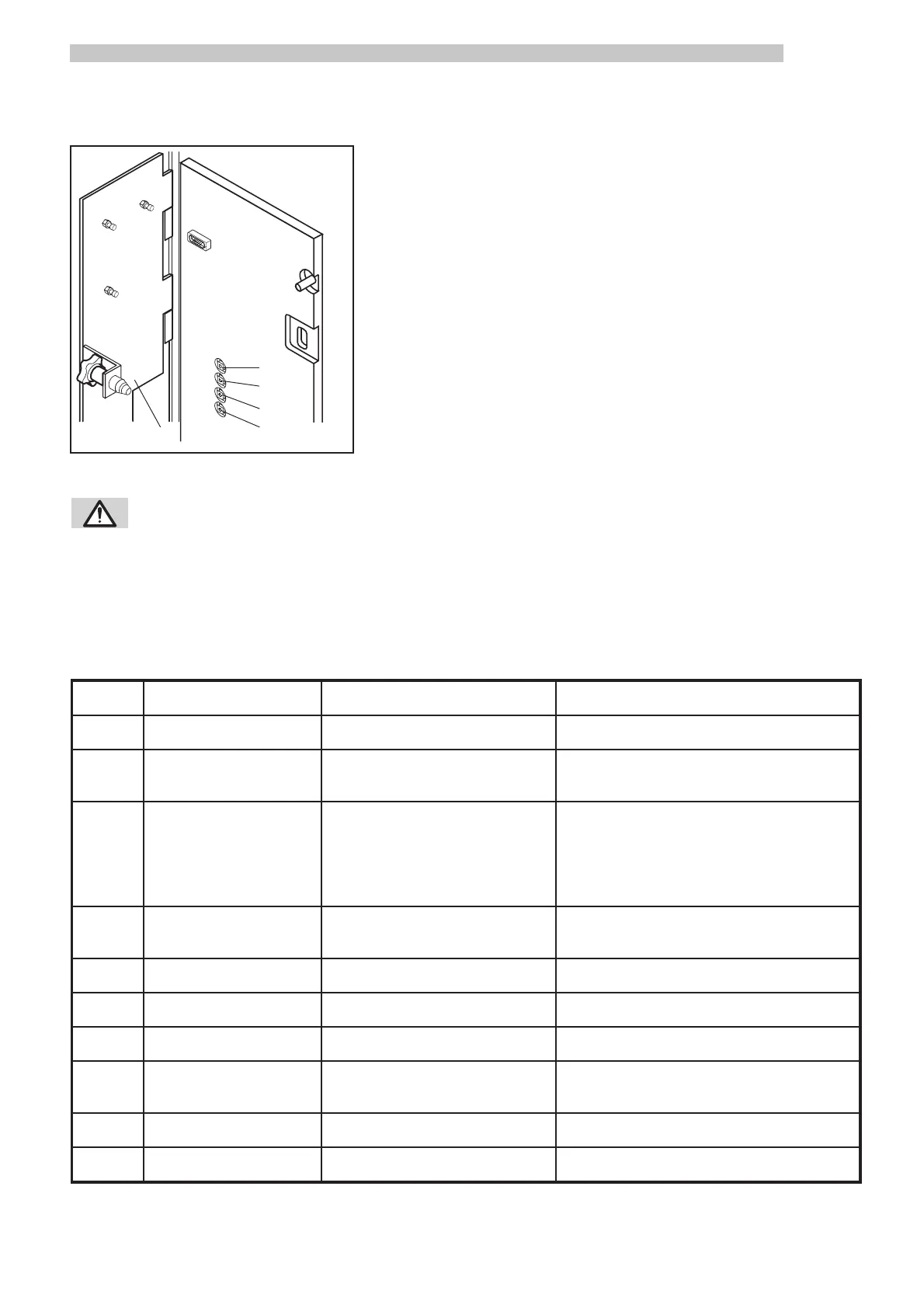
- Open the front door
- Remove the coiner cover ref. 1 (Fig. 22)
- Insert the safety disabling key ref. 23 (Fig. 0)
- Press the RESET button ref. 12 (Fig. 22)
- A short description regarding the problem is displayed (e.g.: CALL FOR
SERVICE - DRAIN TANK FULL)
After solving the problem, follow these steps:
- Press the RESET button ref. 12 (Fig. 22)
- Replace the coiner cover ref. 1 (Fig. 22)
- Remove the safety disabling key and close the front door ref. 23 (Fig. 0)
•
1
9
10
11
12
Fig.22
6.4 Diagnosis
WARNING: Execute caution when following this procedure, as the insertion of the safety
disabling key allows the machine to operate with the front door open, but at the same
time also disables the machine’s safety mechanisms. This procedure should be
performed only by trained and skilled personnel (maintenance technician).
The following troubleshooting guide describes the codes, out of order messages, probable causes, and possible solutions.
The trouble messages are always displayed in English.



 To Next Page