34
English
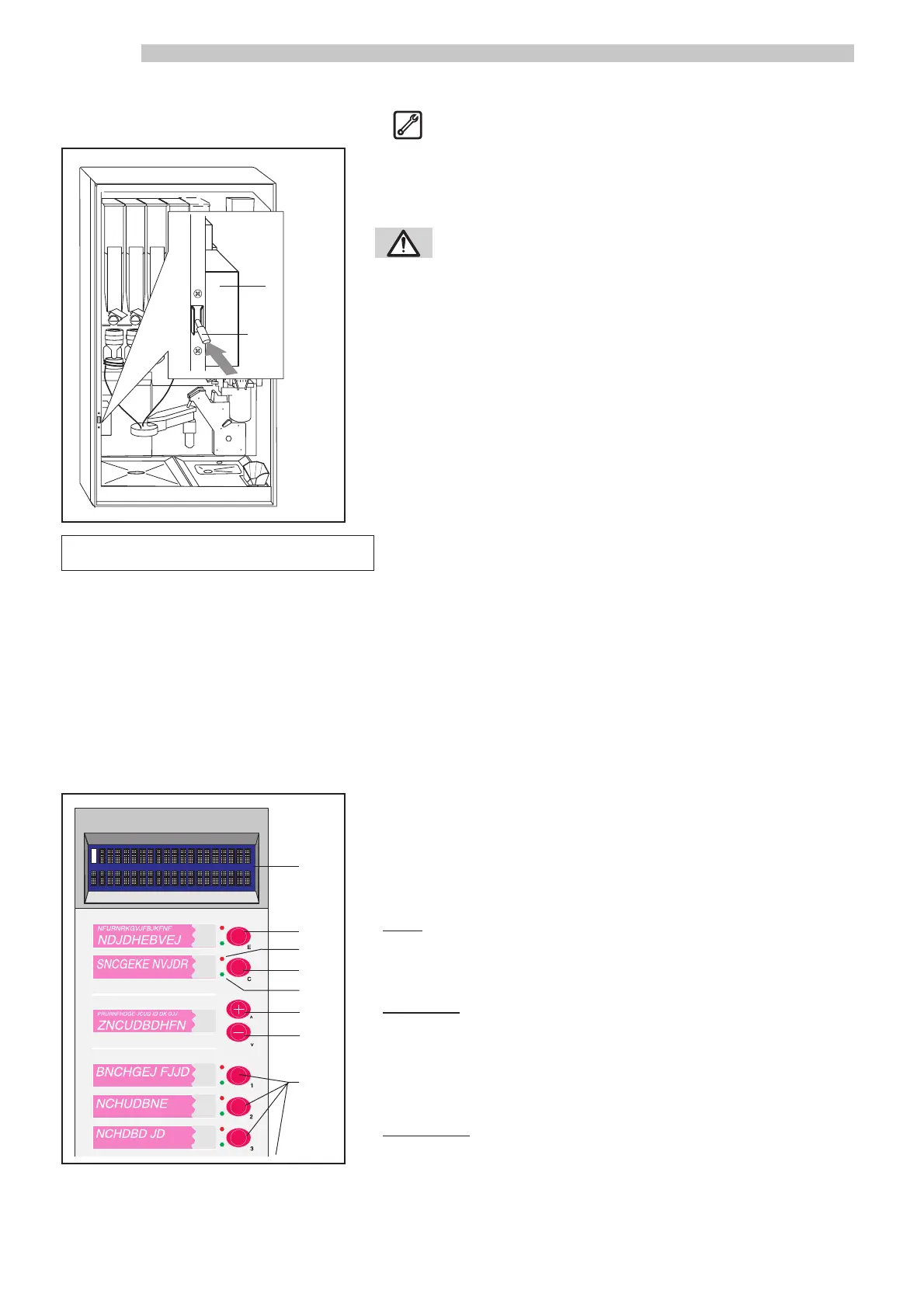
Parts that are potentially dangerous are located inside the machine, out of
the reach of users. A microswitch ref. 1 (Fig. 24) automatically discon-
nects the electrical supply whenever the front door is opened.
WARNING: The safety microswitch can be
disabled using the safety disabling key ref. 2
(Fig. 24). Use of the safety disabling key is
reserved for authorised personnel only.
5.5 Checking the safety system
The follow components should turn off when the front door is opened to
show that power to the machine has been interrupted: alphanumerical di-
splay and LEDs on the outside front door, and the neon light behind the
door graphic.
Fig.23
1
•
•
•
•
•
•
2
3
4
5
6
7
8
Fig.24
1
2
5.4 Safety system of the machine
☞
6 - MACHINE OPERATION
6.1 General precautions
NOTE: Before reading this paragraph, you should carefully read the instructions contained in Paragraph 1.1
“General safety precautions”, so that you are aware of the safety conditions required prior to operating
this machine.
6.2 Resetting and adjusting
The machine is programmed by the Manufacturer with standard values. To personalise the programming mode, follow the
instructions described in Paragraph 5.3 PROGRAMMING.
6.3 Beverage dispensing
To obtain a beverage, insert coins into the coiner, banknotes into the rea-
der, or apply the Saeco Card (if this payment system is available on the
machine). Then choose the desired beverage by pressing the correspon-
ding button on the selection panel ref. 2 (Fig. 23). Before pressing a beve-
rage button, you may want to pre-select one of the following options:
- Sugar: buttons ref. 3-4 (Fig. 23). The machine was pre-programmed
to dispense a certain quantity of sugar (or none at all). Use the
“+” and “-” buttons to increase or decrease the quantity of su-
gar that will be automatically dispensed into the beverage.
- Without cup: button ref. 5 (Fig. 23). If this button is pressed before selecting
a beverage, a cup is not dispensed. Therefore, make sure your
own cup is in the beverage dispensing area prior to pressing a
beverage selection button. If the “Without cup” button was
pressed in error, simply press the button again to cancel the
function (the LED switches off).
- Decaffeinated: button ref. 6 (Fig. 23). Press this button before selecting a be-
verage to automatically substitute the coffee beans with decaf-
feinated soluble coffee in any beverage programmed with cof-
fee. If the “Decaffeinated” button was pressed in error, simply
press the button again to cancel the function (the LED switches
off). The end of dispensing is signalled by a beeping sound.



 To Next Page