20
ENGLISH
2
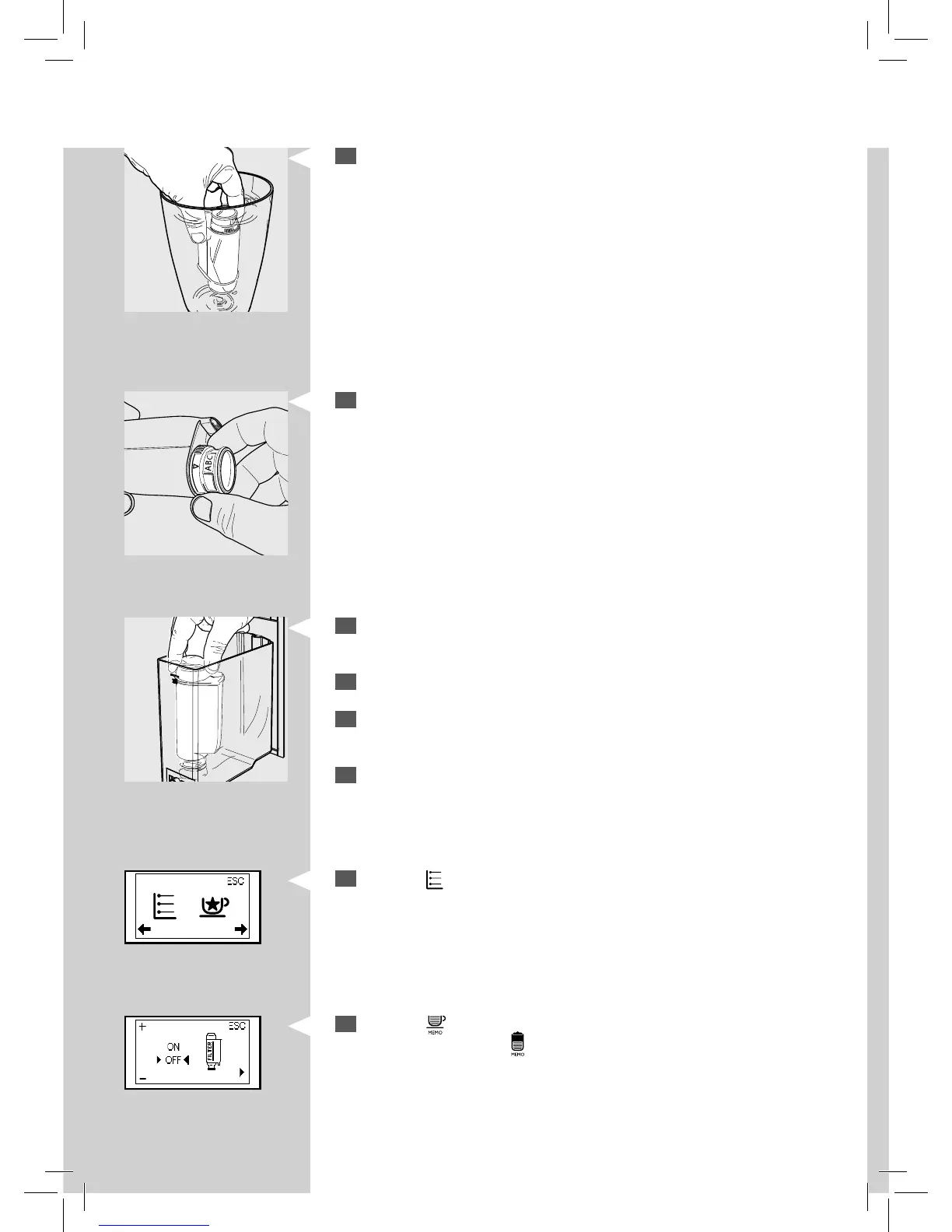
Remove the “INTENZA+” water lter from its packaging, immerse it ver-
tically (with the opening positioned upwards) in cold water and gently
press the sides so as to let the air bubbles out.
3
Set the “INTENZA+” water lter according to the measurements per-
formed (see previous chapter) and indicated on the base of the lter:
A = soft water – equals 1 or 2 on the test strip
B = hard water (standard) – equals 3 on the test strip
C = very hard water – equals 4 on the test strip
4
Insert the “INTENZA+ “water lter into the empty water tank. Press it
until it cannot move further down.
5
Fill the water tank with fresh water and reinsert it into the machine.
6
Dispense all the water of the tank by using the hot water function (see
chapter “Hot water dispensing”).
7
Fill the water tank again.
Green
8
Press the “ ” MENU button. The machine shows this display.
Yellow
9
Press the “ ” button to access the programming menu. Scroll the
pages by pressing the “
” button until the following icon is displayed.







 To Next Page