38
ENGLISH
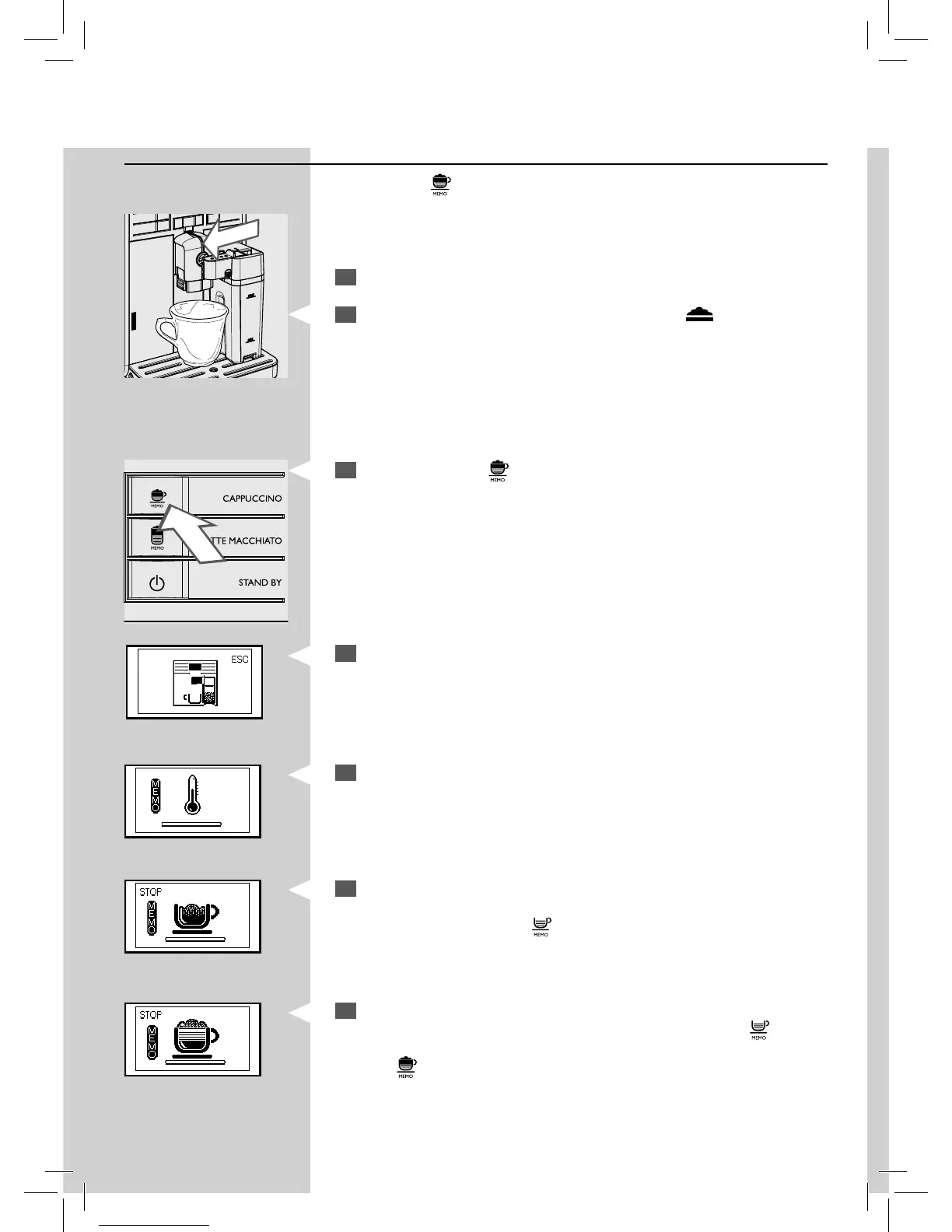
Adjusting the cappuccino length
Each time the “ ” button is pressed, the machine pours a pre-set quantity
of cappuccino into the cup.
The machine allows you to adjust the amount of brewed cappuccino ac-
cording to your taste and the size of your cups.
1
Fill the milk carafe with milk and install it into the machine.
2
Pull the milk carafe dispenser to the left up to the " " icon. Place a
cup under the dispensing spout.
3
Press and hold the “ ” button until the “MEMO” icon appears on the
display. Then release the button. The machine is now programming.
5
The following icon is displayed during pre-heating time required by
the machine.
YellowGreen
6
When the machine shows the following icon, the machine starts to
dispense milk froth into the cup. When the desired amount of frothed
milk is reached, press the “
” button.
7
Once the milk froth has been poured, the machine starts brewing cof-
fee. When the desired co ee quantity is reached, press the “
” button.
Now the “
” button is programmed. Every time it is pressed, the machine
will brew the same amount of cappuccino that was programmed.
Green
Green
4
The machine reminds you to insert the carafe and pull out the milk
carafe dispenser.







 To Next Page