25
ENGLISH
25
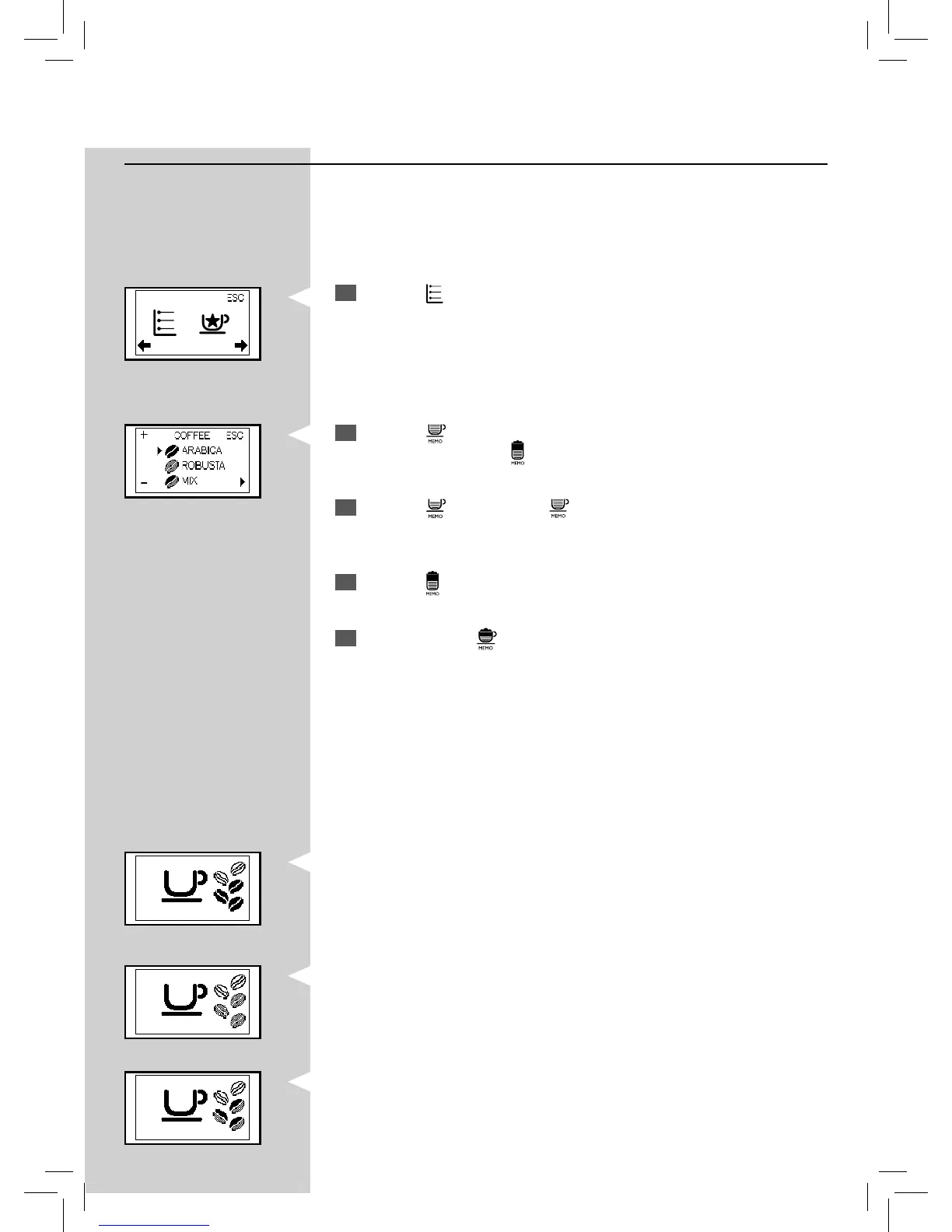
Co ee bean selection
This function allows you to optimize the grinding for selected type of cof-
fee beans.
YellowGreenGreen Green
2
Press the “ ” button to access the programming menu. Scroll the
pages by pressing the “
” button until the following icon is displayed.
3
Press the “ ” button or the “ ” button to select the type of co ee
beans in the co ee bean hopper.
4
Press the “ ” button to con rm the setting.
5
To exit, press the “ ” button.
The machine is now programmed to optimise the grinding of your co ee
beans.
The display shows the type of co ee beans chosen when the machine is
ready for brewing.
- for “ROBUSTA” co ee beans
- for a “MIX” of co ee beans.
Green
1
Press the “ ”
MENU button. The machine shows this display
- for “ARABICA” co ee beans







 To Next Page