1 2 3
2.1 language
English
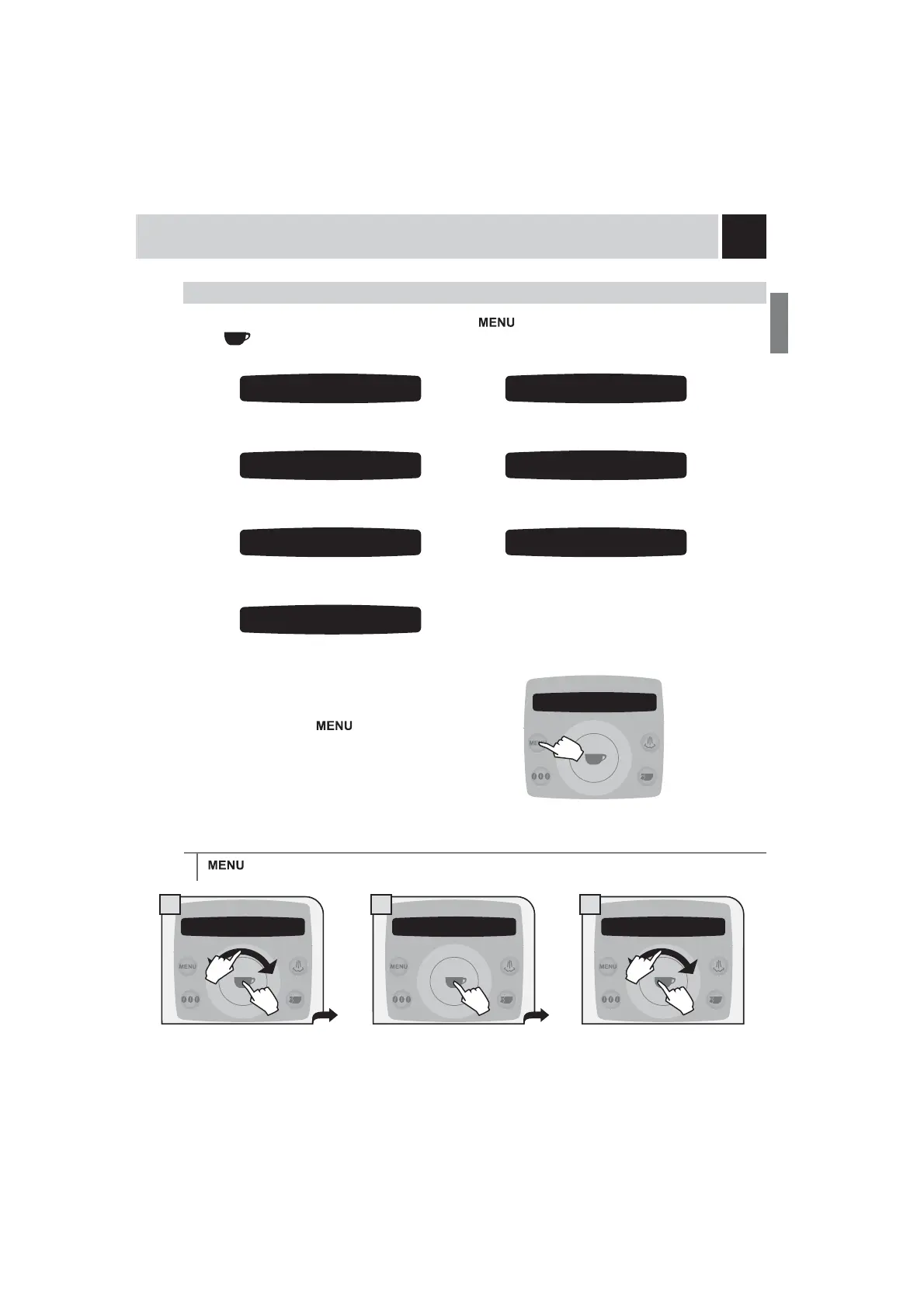
“LANGUAGE” MENU
MACHINE SETTINGS
To change the machine’s operation settings, press the button, select “machine settings” and press
the
EXWWRQ1DYLJDWHWKHFOLFNZKHHOZLWK\RXU¿QJHUWR
set the menu
language.
activate/deactivate the “Aqua Prima”
ZDWHU¿OWHUDODUP
set the water hardness.
set the coffee circuit rinse cycle.
set/activate the acoustic
alarms.
To exit any level of “machine settings” without saving the
changes made, press the
button. For example:
Select the desired language. After
selected, the machine displays all the
messages in the language selected.
> machine settings > language . To change the language of the display.
activate/deactivate the operation of
the cup warming surface
To set the current time, date and hour
format to display.
2.1 language
English
2.6 cup-warming surface
off
2.3 acoustic alarm
on
2.4 filter alert
on
2.2 water hardness
3
2 machine settings
1 beverage settings
1.
2.
1.
2.










 To Next Page