20
3
1 2
1
2
3 4 5
“ACOUSTIC ALARM” MENU
> machine settings > acoustic alarm
To turn on/off a tone each time a button is pressed.
Select by navigating the click
ZKHHOZLWK\RXU¿QJHU
It is possible to set:
- on
- off
Press the
button to save.
PROGRAMMING THE MACHINE
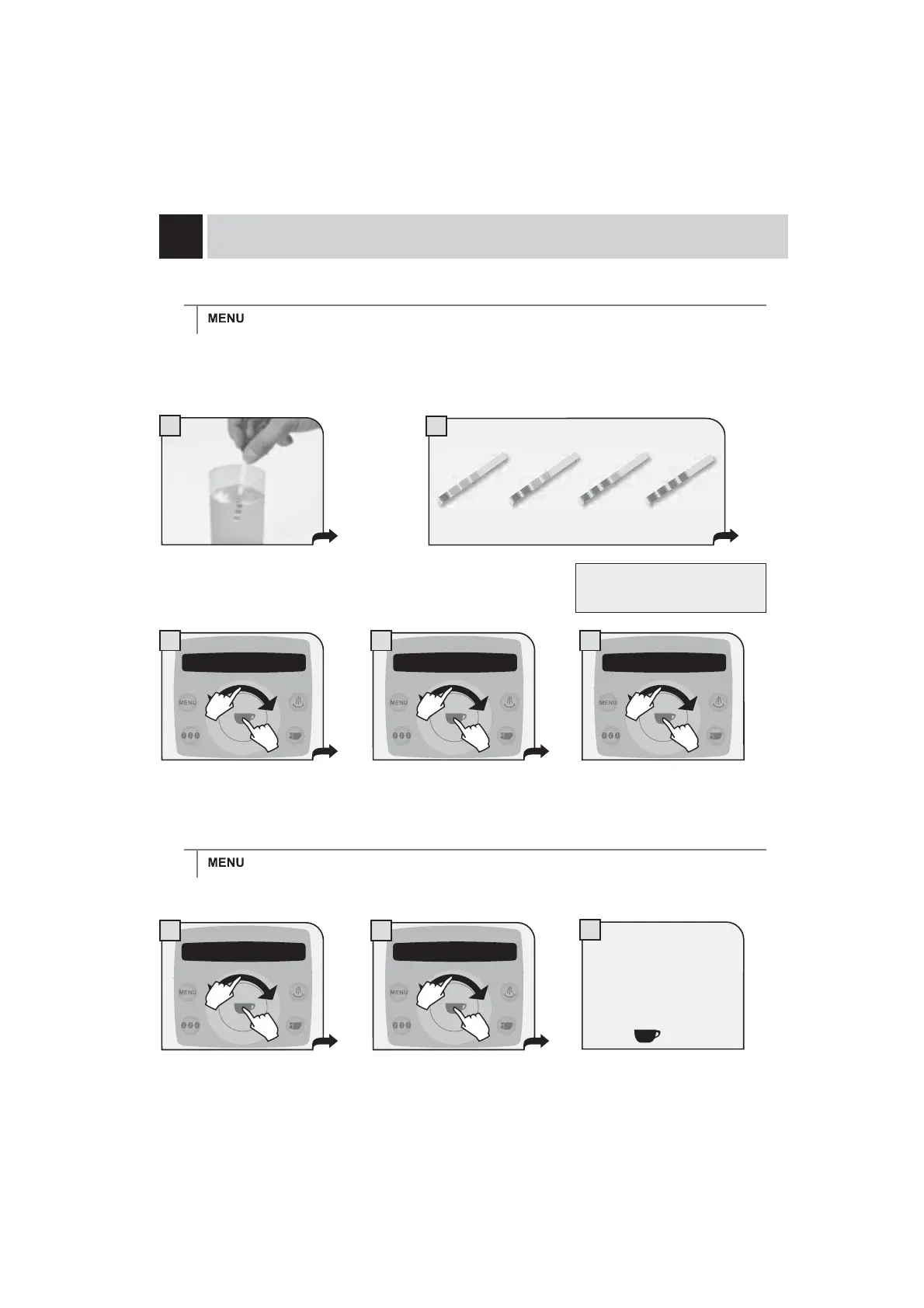
Immerse the water hardness tester included
with the machine in water for one second.
Check the value.
The test can be used for one
measurement only.
“WATER HARDNESS” MENU
> machine settings > water hardness
With the “Water hardness” function you can adapt your machine to the degree of hardness of the water you
use, so that the machine will request descaling at the right moment.
Hardness is expressed on a scale from 1 to 4. The machine is preset at value 3.
Set the water hardness obtained
from the test and save it.
2 machine settings 2.2 water hardness
3
2.2 water hardness
3
2 machine settings 2.3 acoustic alarm
on
1.
2.
1.
2.
1.
2.
1.
2.
1.
2.
1234










 To Next Page