FUNCTIONS
DEFROST
If not required, the function will not be activated and the display will alternate between showing the defrosting
symbol and the message “NOT REQUIRED”, accompanied by the sound of the buzzer.
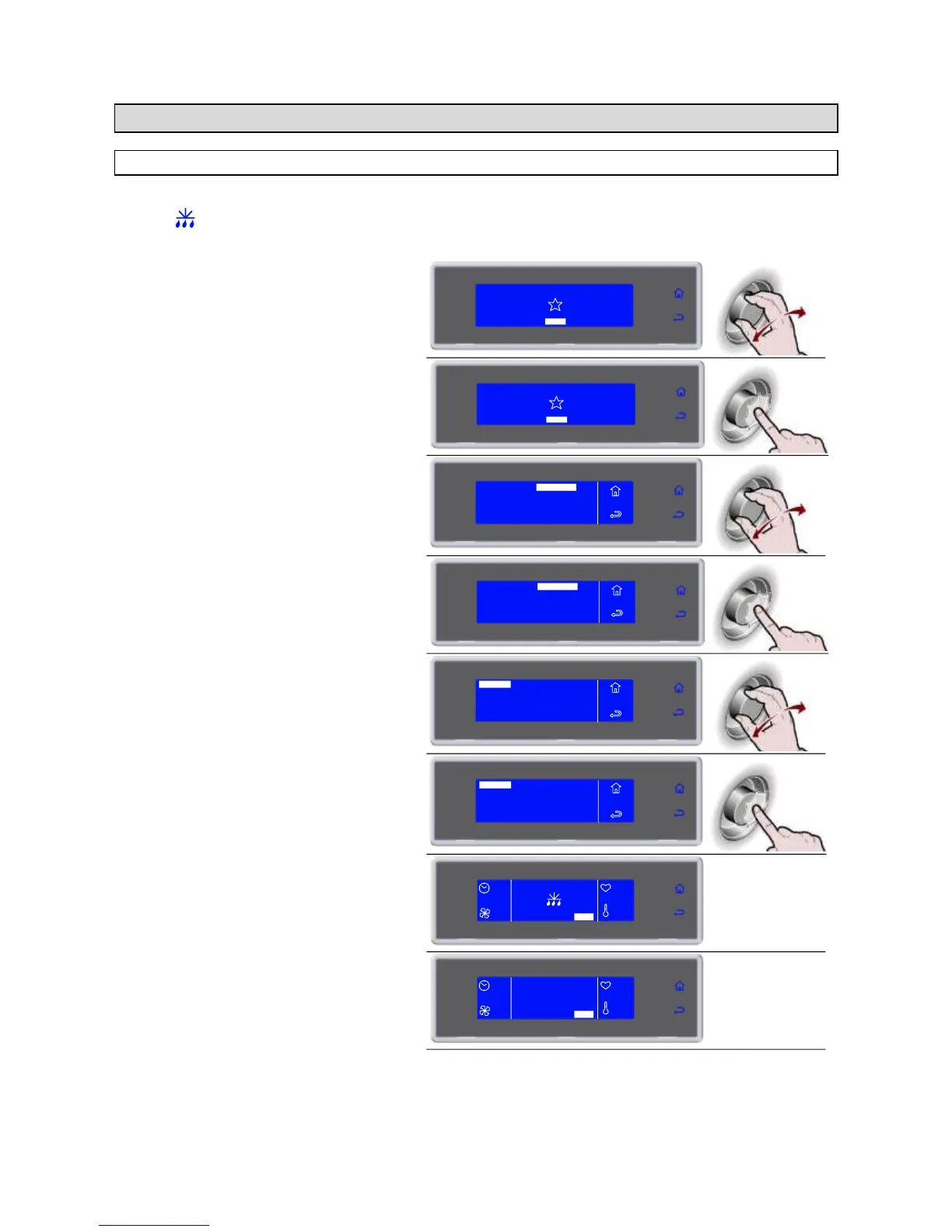
1. Select MENU by rotating the knob
SOFT -18°C
HARD -18°C
IFR INFINITY
SOFT +3°C
HARD +3°C
MENU
2. Press the knob to enter section MENU
SOFT -18°C
HARD -18°C
IFR INFINITY
SOFT +3°C
HARD +3°C
MENU
3. Select FUNCTIONS by rotating the knob
AUTOMATIC
MULTY
COOLING
STORED
SETTING
SERVICE
HACCP
FUNCTIONS
MENU
4. Press the knob to enter section
FUNCTIONS
AUTOMATIC
MULTY
COOLING
STORED
SETTING
SERVICE
HACCP
FUNCTIONS
MENU
5. Select DEFROST by rotating the knob
DEFROST
STORAGE
THAWING
SANITATION
MENU
FUNCTIONS
PROBE HEATING
PROVING
6. Press the knob to activate the selected
cycle
During the cycle it is possible
- to view and modify the default parameters by
selecting SET (see page 40)
- to stop the cycle by selecting STOP
Note: the modified parameters will be saved only
for the cycle in progress
MENU
FUNCTIONS
DEFROST
STORAGE
THAWING
SANITATION
PROBE HEATING
PROVING
END CYCLE
CONSERVE
--
SET STOP
--
--
--
STOP



 To Next Page