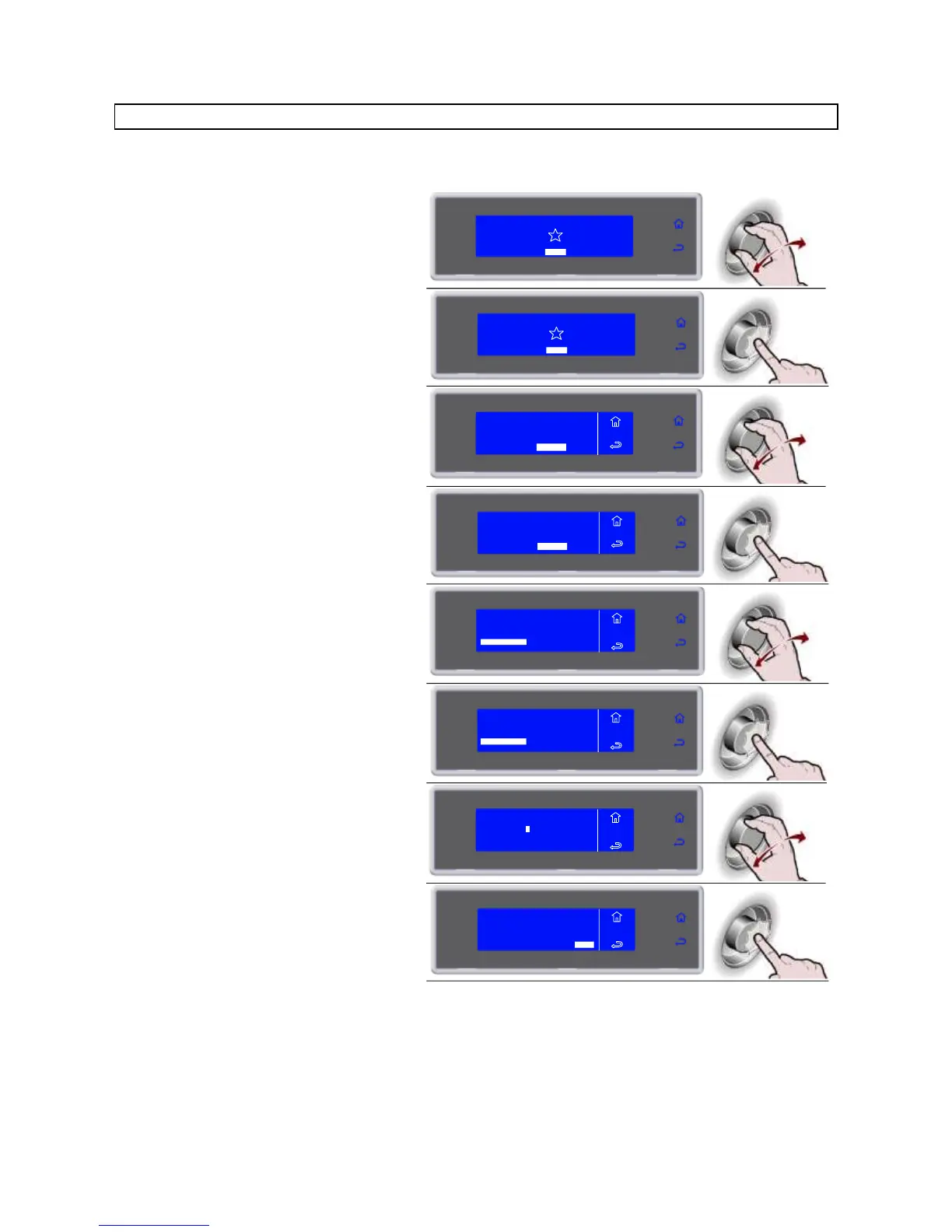
PARAMETERS
ATTENTION: in case of use of this function as a user, contact the manufacturer.
1. Select MENU by rotating the knob
SOFT -18°C
HARD -18°C
IFR INFINITY
SOFT +3°C
HARD +3°C
MENU
2. Press the knob to enter section MENU
SOFT -18°C
HARD -18°C
IFR INFINITY
SOFT +3°C
HARD +3°C
MENU
3. Select SERVICE by rotating the knob
AUTOMATIC
MULTY
COOLING
STORED
SETTING
SERVICE
HACCP
FUNCTIONS
MENU
4. Press the knob to enter section
SERVICE
AUTOMATIC
MULTY
COOLING
STORED
SETTING
SERVICE
HACCP
FUNCTIONS
MENU
5. Select PARAMETERS by rotating the
knob
MENU
SERVICE
MULTY
ALARMS
FIRMWARE
ALARMS RESET
INPUTS OUTPUTS
RESTORE
PARAMETERS
6. Press the knob to enter section
PARAMETERS
MENU
SERVICE
MULTY
ALARMS
FIRMWARE
ALARMS RESET
INPUTS OUTPUTS
RESTORE
PARAMETERS
7. Enter the password by turning the knob
and press to confirm the value and
move to the next one until ENTER is
selected
Request the password from SERVICE
MENU
SERVICE
_ _ _ _
PASSWORD
ENTER
8. Press the knob to confirm and enter
section PARAMETERS
MENU
SERVICE
_ _ _ _
PASSWORD
ENTER
* * * *



 To Next Page