EasyManua.ls Logo

Sagi IF101S - Firmware Update

Default Icon
68 pages
Print Icon
To Next Page IconTo Next Page
To Previous Page IconTo Previous Page
Loading...
65
3222180_GB
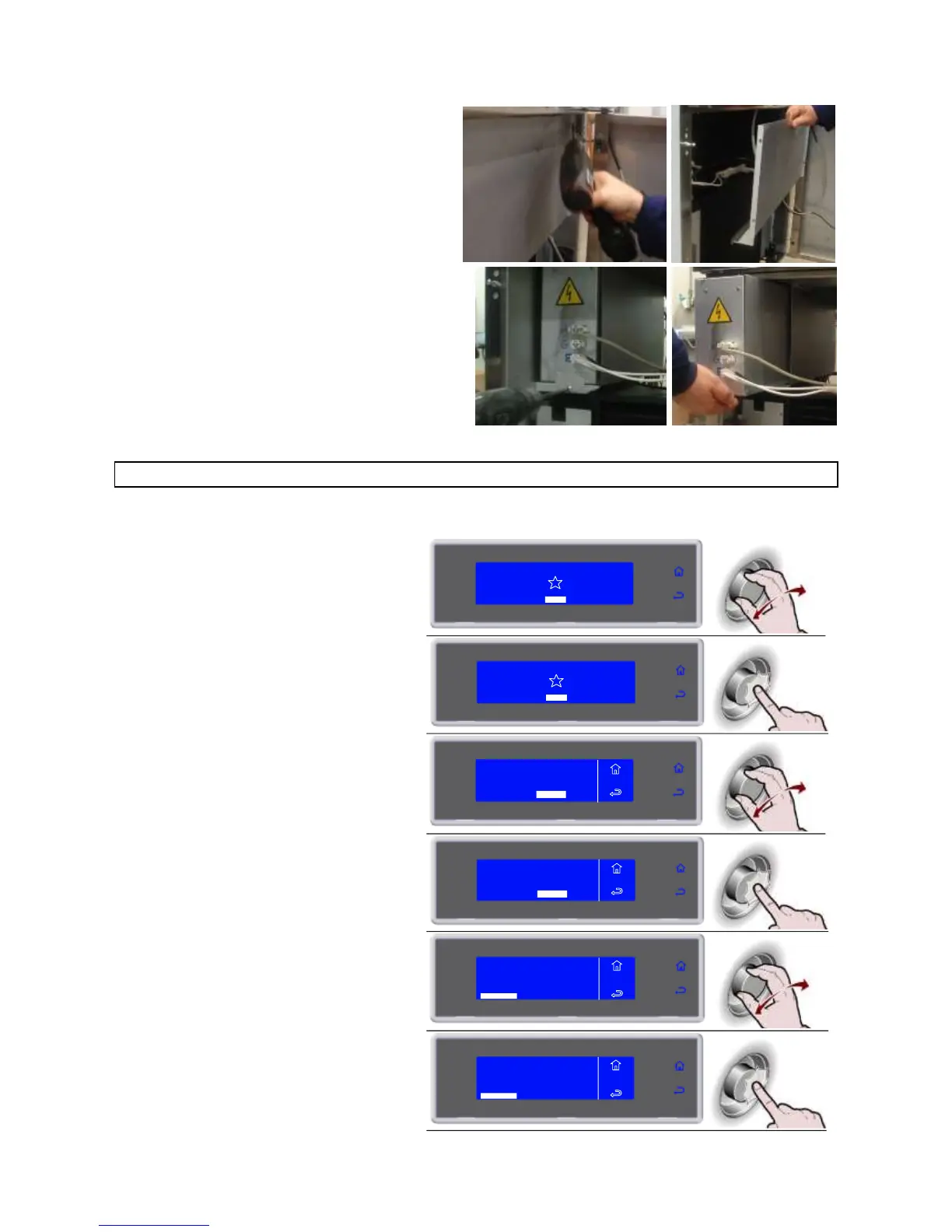
Remove the closing panel screws.
Remove the closing panel.
Remove the electrical panel locking screw.
Move the electrical panel box along the slide.
UPDATING THE FIRMWARE (SOFTWARE) OF THE ELECTRONIC CIRCUIT BOARDS
Check the firmware versions of the unit’s circuit boards.

1. Select MENU by rotating the knob
SOFT -1C
HARD -18°C
IFR INFINITY
SOFT +C
HARD +C
MENU
2. Press the knob to enter section MENU
SOFT -18°C
HARD -18°C
IFR INFINITY
SOFT +3°C
HARD +3°C
MENU
3. Select SERVICE by rotating the knob
AUTOMATIC
MULTY
COOLING
STORED
SETTING
SERVICE
HACCP
FUNCTIONS
MENU
4. Press the knob to enter section
SERVICE
AUTOMATIC
MULTY
COOLING
STORED
SETTING
SERVICE
HACCP
FUNCTIONS
MENU
5. Select FIRMWARE by rotating the knob
MENU
SERVICE
MULTY
ALARMS
FIRMWARE
ALARMS RESET
INPUTS OUTPUTS
RESTORE
PARAMETERS
6. Press the knob to view the FIRMWARE
MENU
SERVICE
MULTY
ALARMS
FIRMWARE
ALARMS RESET
INPUTS OUTPUTS
RESTORE
PARAMETERS

Related product manuals