EasyManua.ls Logo

Sagi IF101S - Set Date;Clock

Default Icon
68 pages
Print Icon
To Next Page IconTo Next Page
To Previous Page IconTo Previous Page
Loading...
51
3222180_GB
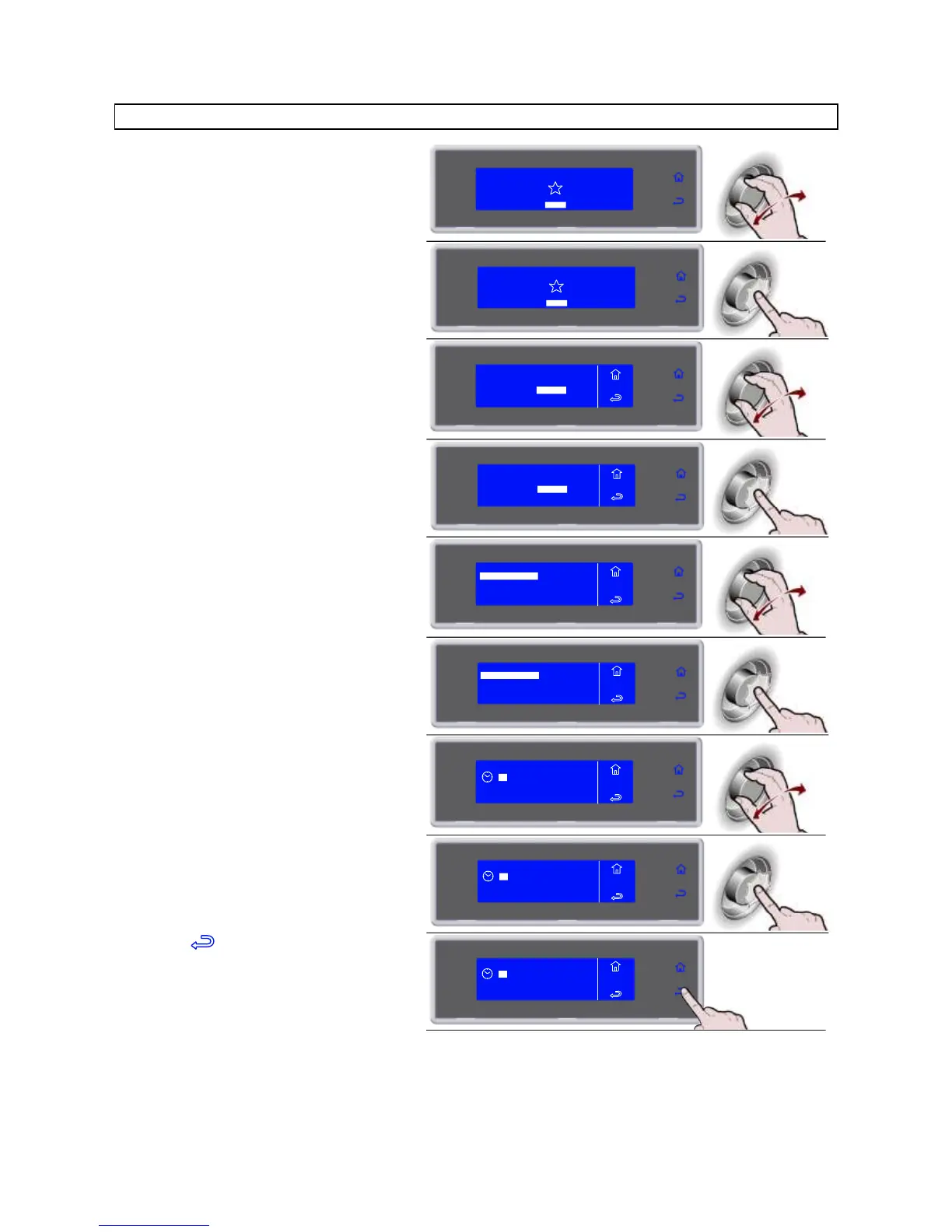
SET DATE/CLOCK
1. Select MENU by rotating the knob
SOFT -18°C
HARD -18°C
IFR INFINITY
SOFT +3°C
HARD +3°C
MENU
2. Press the knob to enter section MENU
SOFT -18°C
HARD -18°C
IFR INFINITY
SOFT +3°C
HARD +3°C
MENU
3. Select SETTING by rotating the knob
AUTOMATIC
MULTY
COOLING
STORED
SETTING
SERVICE
HACCP
FUNCTIONS
MENU
4. Press the knob to enter section
SETTING
AUTOMATIC
MULTY
COOLING
STORED
SETTING
SERVICE
HACCP
FUNCTIONS
MENU
5. Select DATA/CLOCK by rotating the
knob
LANGUAGE
SECTOR
SET DATE/CLOCK
MULTY
MENU
SETS
CYCLE CONTROL
6. Press the knob to enter section
DATA/CLOCK
MENU
SETS
LANGUAGE
SECTOR
SET DATE/CLOCK
MULTY
CYCLE CONTROL
7. Select the new value by rotating the
knob
10
MENU
SETS
DATE/CLOCK
: 46
05 MAR 2012
8. Press the knob to confirm the new value
and move to the next one
10 : 46
05 MAR 2012
MENU
SETS
DATE/CLOCK
9. Select to confirm and exit from the
function
10 : 46
05 MAR 2012
MENU
SETS
DATE/CLOCK
Sagi IF101S - Set Date;Clock