EasyManua.ls Logo

Sagi IF101S - View;Edit Cycle Parameters

Default Icon
68 pages
Print Icon
To Next Page IconTo Next Page
To Previous Page IconTo Previous Page
Loading...
40
3222180_GB
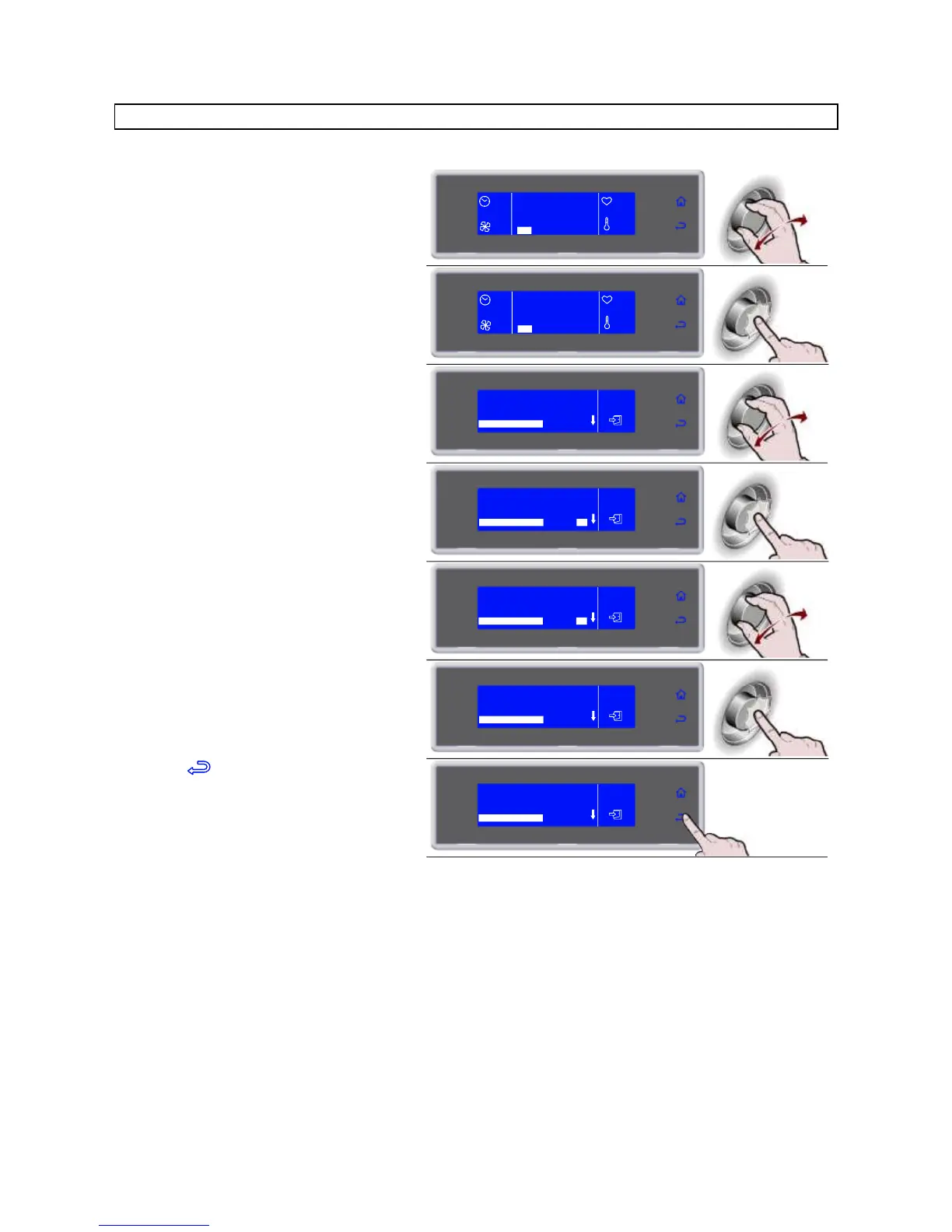
** VIEW / EDIT PARAMETERS CYCLE
1. During the cycle, select SET by rotating
the knob
90'
HARD +3°C
100%
+27°C
+24°C
SET STOP
2. Press the knob to enter the parameters
list
90'
HARD +3°C
100%
+27°C
+24°C
SET STOP
3. Select the parameter to be modified by
rotating the knob
HARD +3°C
END CYCLE NEEDLE
HARD PHASE AIR
HARD PHASE NEEDLE
HARD PHASE TIME
3°C
-15°C
30°C
45'
4. Press the knob to modify the value
HARD +3°C
3°C
-15°C
30°C
45'
END CYCLE NEEDLE
HARD PHASE AIR
HARD PHASE NEEDLE
HARD PHASE TIME
5. Select the new value, by rotating the
knob
HARD +3°C
3°C
-15°C
30°C
40'
END CYCLE NEEDLE
HARD PHASE AIR
HARD PHASE NEEDLE
HARD PHASE TIME
6. Press the knob to confirm the new value
HARD +3°C
3°C
-15°C
30°C
40'
END CYCLE NEEDLE
HARD PHASE AIR
HARD PHASE NEEDLE
HARD PHASE TIME
7. Press to exit the parameters list
HARD +3°C
3°C
-15°C
30°C
40'
END CYCLE NEEDLE
HARD PHASE AIR
HARD PHASE NEEDLE
HARD PHASE TIME

Related product manuals