EasyManua.ls Logo

Sagi IF101S - Multy

Default Icon
68 pages
Print Icon
To Next Page IconTo Next Page
To Previous Page IconTo Previous Page
Loading...
53
3222180_GB
MULTY
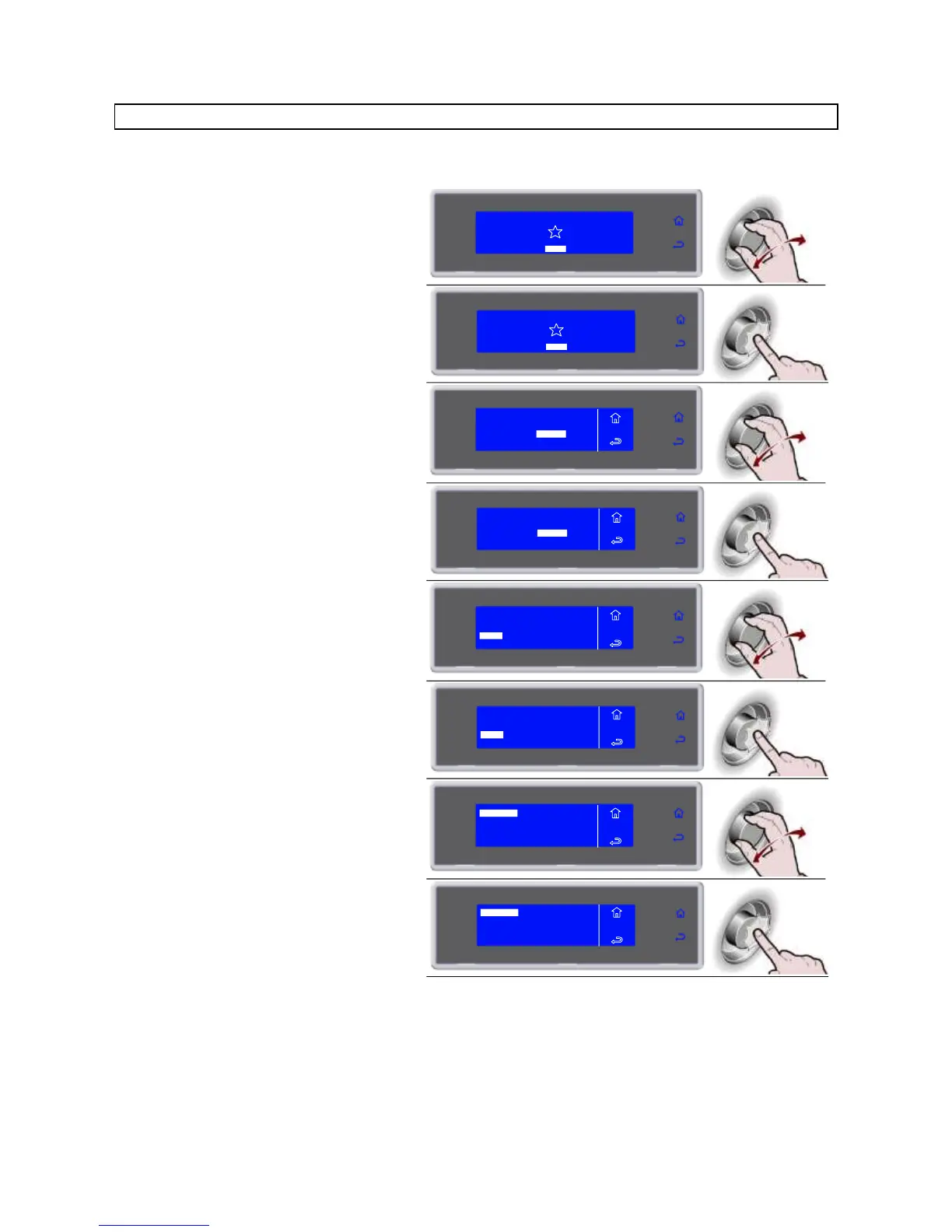
The number of levels available varies depending on the equipment.
1. Select MENU by rotating the knob
SOFT -1C
HARD -18°C
IFR INFINITY
SOFT +C
HARD +C
MENU
2. Press the knob to enter section MENU
SOFT -18°C
HARD -18°C
IFR INFINITY
SOFT +3°C
HARD +3°C
MENU
3. Select SETTING by rotating the knob
AUTOMATIC
MULTY
COOLING
STORED
SETTING
SERVICE
HACCP
FUNCTIONS
MENU
4. Press the knob to enter section
SETTING
AUTOMATIC
MULTY
COOLING
STORED
SETTING
SERVICE
HACCP
FUNCTIONS
MENU
5. Select MULTY by rotating the knob
LANGUAGE
SECTOR
SET DATE/CLOCK
MULTY
MENU
SETS
CYCLE CONTROL
6. Press the knob to enter section MULTY
MENU
SETS
LANGUAGE
SECTOR
SET DATE/CLOCK
MULTY
CYCLE CONTROL
7. Use the knob to select the number of
levels corresponding to the equipment
used
MENU
SETS
MULTY
5 LEVELS
20 LEVELS
10 LEVELS
8. Press the knob to confirm
MENU
SETS
MULTY
5 LEVELS
20 LEVELS
10 LEVELS

Related product manuals