BeforeYouDrive
Voicecontrol,Bluetoothphone,steeringwheel
heatingandcustomizedswitch
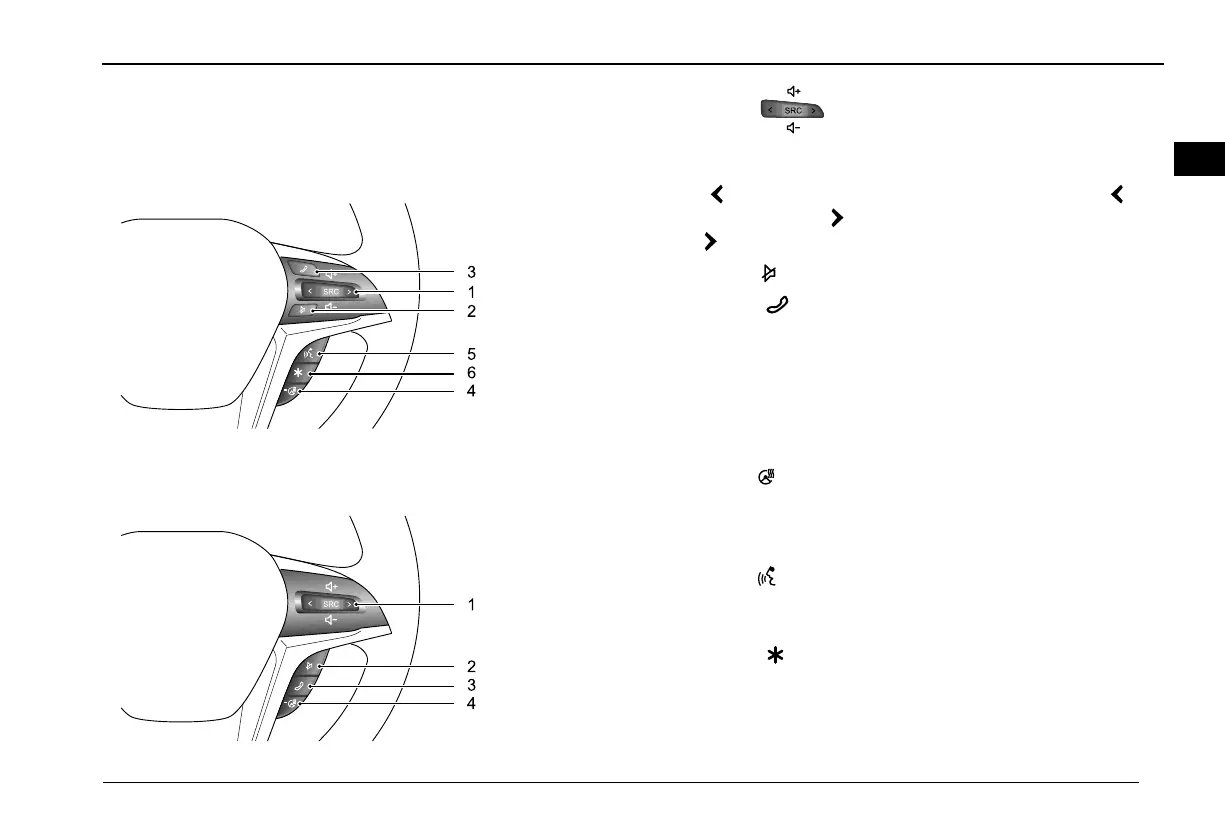
TypeI
TypeII
Position1–:audiosourceswitch.PressSRCtoswitch
betweentheradioandMP3playbackinterfaces,pressupto
increasethevolume,pressdowntodecreasethevolume;short
press
,switchtopreviousband/MP3track,longpress,fast
rewind;shortpress,switchtonextband/MP3track,long
press,fastforward.
Position2–:Muteswitch.
Position3–
:Bluetoothphoneswitch.WhenBluetoothis
connected,thisbuttonistheBluetoothphoneansweringswitch.
Inthegeneralcallingstate:Incaseofanincomingcall,short
pressthisbuttontoanswer;longpressthisbuttontohangup;
duringacall,shortpressthisbuttontohangup.Inthecall
waitingstate:Shortpressthisbuttontohungupthecallwaiting;
longpressthisbuttontoanswerthecallwaiting.
Position4–
:steeringwheelheatingswitch.Pressthisbutton
toactivatethesteeringwheelheatingfunction,anditsindicator
illuminates.Pressitagaintodisablethesterringwheelheating
function.
Position5–:Voicedialoguesystemswitch.Pressthisbutton
toenablevoicerecognitionfunction;pressthisbuttontodisable
voicerecognitionfunction.
Position6–:Customsettingswitch.Pressthisbuttonto
conductcustomsetting.
81
10



 To Next Page