BeforeYouDrive
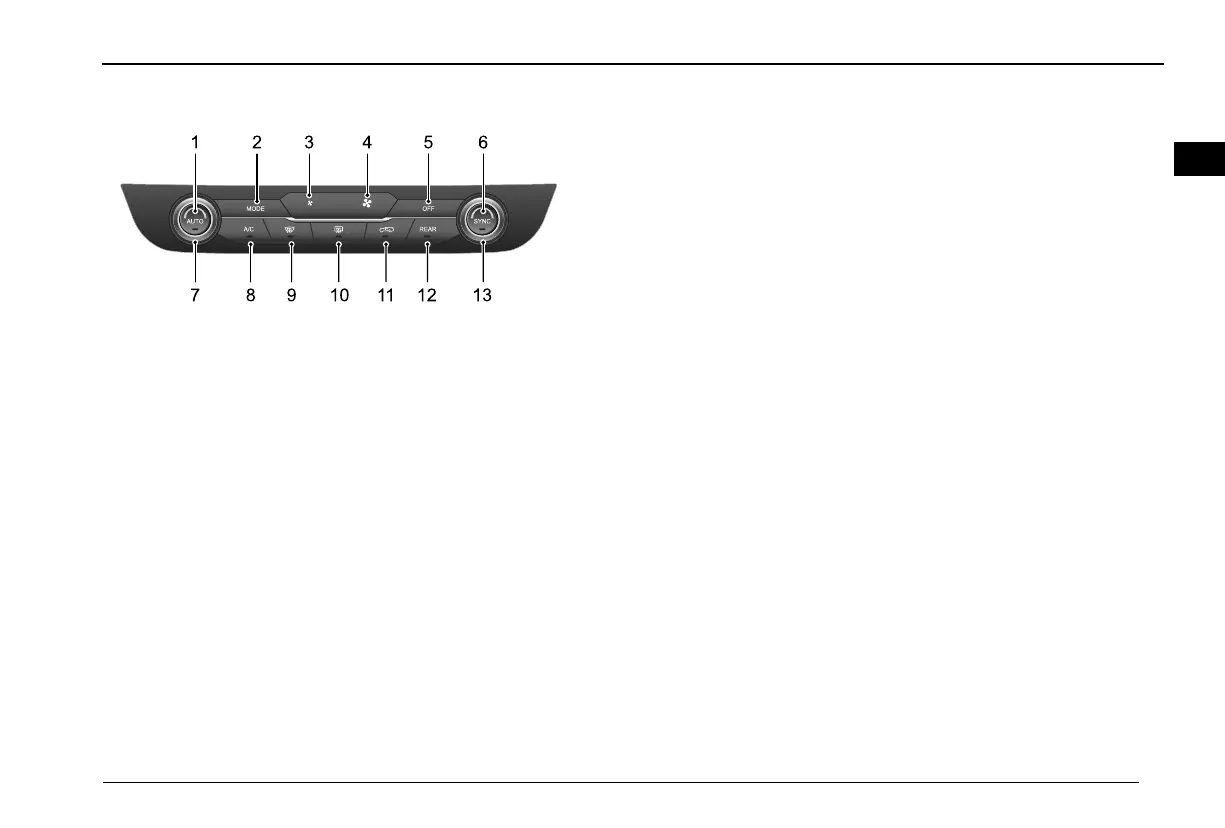
AutomaticA/Cfrontcontrolpanel
M O D E
A /C
A U T O
O F F
R E A R
S Y N C
21
87
6
1 39 1 0 1 1 1 2
3 4 5
1AUTObutton
2MODEbutton
3FrontA/Cairvolume-selectionbutton
4FrontA/Cairvolume+selectionbutton
5OFFbutton
6SYNCbutton
7Lefttemperatureselectionknob
8A/Cbutton
9Frontdefrostbutton
10Reardefrostbutton
11Internal/externalcirculationbutton
12RearA/Ccontrolbutton
13Righttemperatureselectionbutton
AUTObutton
Thisistheautomaticairconditioningcontrolmodebutton.
PresstheAUTObuttontoenterthefullAUTOstate,eachcontrol
willentertheautomaticworkingstate,theAUTOindicator
illuminates,inthefullAUTOstate,presstheAUTObuttonagain
todisableit.
IntheAUTOstate,operatetheMODE,airvolume,A/Cbuttons,
thepanelwillexitthefullAUTOstate,theAUTOindicatorgoes
out,andtherelevantfunctionsenterthemanualcontrolstate,
whileotherfunctionsthatarenotoperatedremaininautocontrol.
IntheAUTOstate,operatethetemperaturecontrolknob,the
panelstillremainsinthefullAUTOstate,andtheAUTOindicator
stayson.
IntheAUTOstate,operatetheinternal/externalcirculation
button,therelevantfunctionsenterinthemanualcontrolstate,
theAUTOindicatorstayson,whileotherfunctionsthatarenot
operatedremaininautocontrol.
IntheAUTOstate,operatethefrontdefrostbutton,theA/C
entersthefrontdefroststate,andtheAUTOindicatorgoesout.
MODEbutton
Adjusttheairdistributionmode.
IfMODEbuttonispressedintheONstate,A/Cwillswitchtothe
DistributiontoFace,DistributiontoFaceandFeet,Distribution
toFeet,DistributiontoFeetandDefrostmodeinturn,andthe
85
10


 To Next Page