BeforeYouDrive
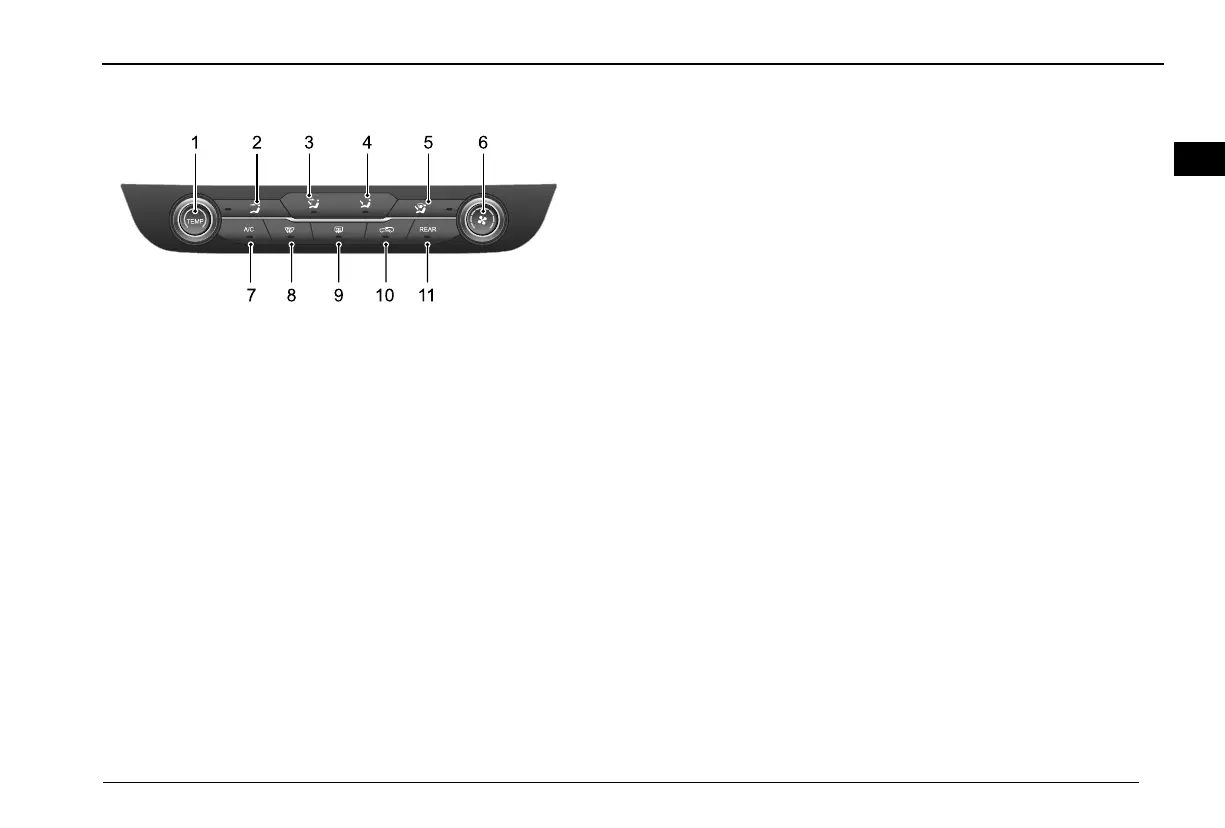
ElectronicA/Cfrontcontrolpanel
A /C
T E M P
R E A R
2
87 9 1 0 1 1
3 4 5 61
1Temperatureselectionknob
2DistributiontoFacemodebutton
3DistributiontoFaceandFeetmodebutton
4DistributiontoFeetmodebutton
5DistributiontoFeetandDefrostbutton
6Airvolumeadjustingknob
7A/Cbutton
8Frontdefrostbutton
9Reardefrostbutton
10Internal/externalcirculationbutton
11RearA/Ccontrolbutton
Temperatureselectionknob
AdjusttheA/Csettemperature.
Thetemperatureselectionknobcanberotatedandadjustedin
15levels,ifitisrotatedcounterclockwise,thesettemperatureis
graduallyreduced;ifitisrotatedclockwise,thesettemperature
isgraduallyrising.
DistributiontoFacemodebutton
AdjusttheairdistributionmodetoDistributiontoFace.
IntheONstate,iftheDistributiontoFacemodebuttonis
pressed,thecorrespondingindicatorcomesonanditbecomes
theDistributiontoFacemode,theoperationoftheDistribution
toFacemodebuttonisinvalidatthistime,anditwillchangeto
othermodesifanothermodebuttonispressed.
DistributiontoFaceandFeetModeButton
AdjusttheairdistributionmodetoDistributiontoFaceandFeet.
IntheONstate,iftheDistributiontoFaceandFeetMode
buttonispressed,thecorrespondingindicatorcomesonandit
becomestheDistributiontoFaceandFeetMode,theoperation
oftheDistributiontoFaceandFeetModebuttonisinvalidat
thistime,anditwillchangetoothermodesifanothermode
buttonispressed.
DistributiontoFeetModeButton
AdjusttheairdistributionmodetoDistributiontoFeet.
89
10



 To Next Page