Chapter 2: Installation
6 Installing the Control Panel
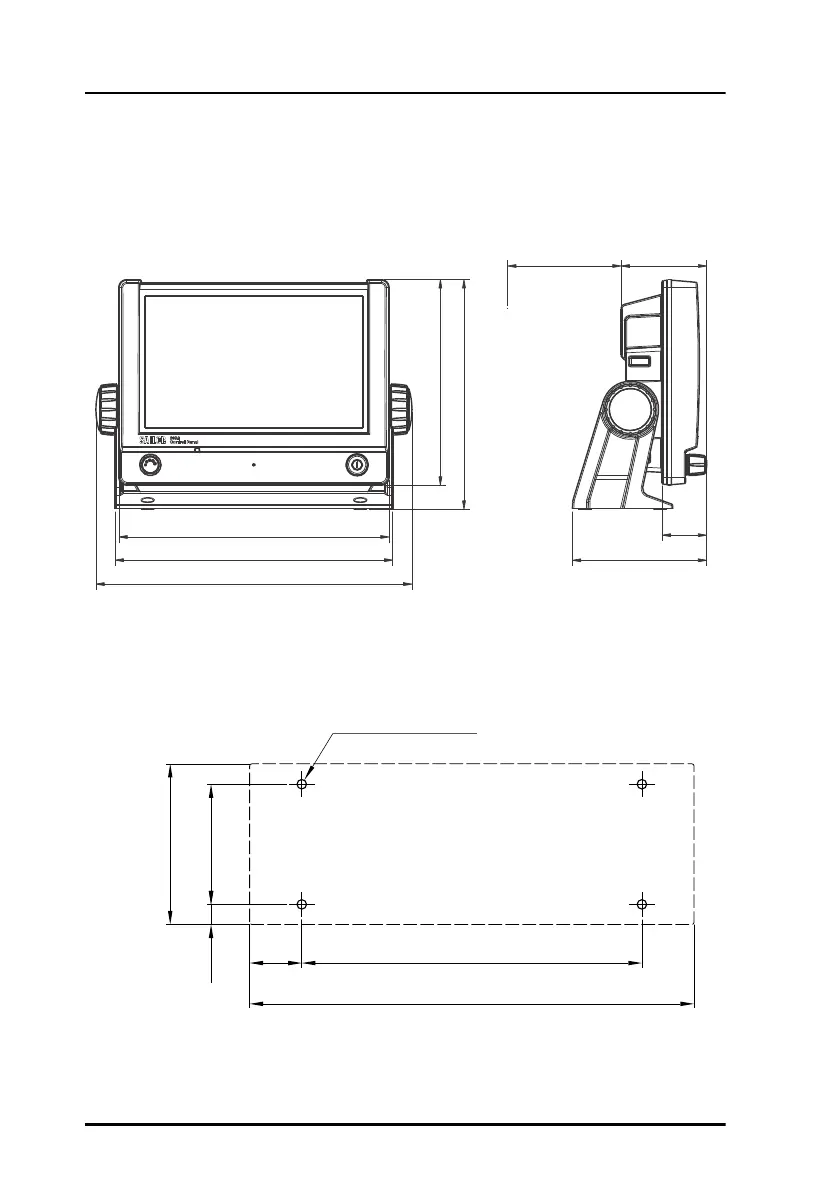
To mount the Control Panel using the mounting bracket, do as follows:
1. Find a suitable location to mount the Control Panel. Make sure there is
minimum 80 mm of free space for cable access behind the Control Panel.
2. Use the four holes to fasten the mounting bracket to the mounting surface,
see the drilling plan below. Screws are included with the mounting
bracket.
3. Place the Control Panel in the mounting bracket.
162 mm
145 mm
191 mm
196 mm
223 mm
Space for
cable entry
60.5 mm
95 mm
32 mm
80 mm
99-130249
4 x M4 or hole for
self-tapping ø3.9
150mm
53mm
71mm
196mm
23mm
9mm
ControlPanel.book Page 6 Thursday, January 3, 2013 12:28 PM



 To Next Page