Revised 5/19/2010 3.11
System Setup
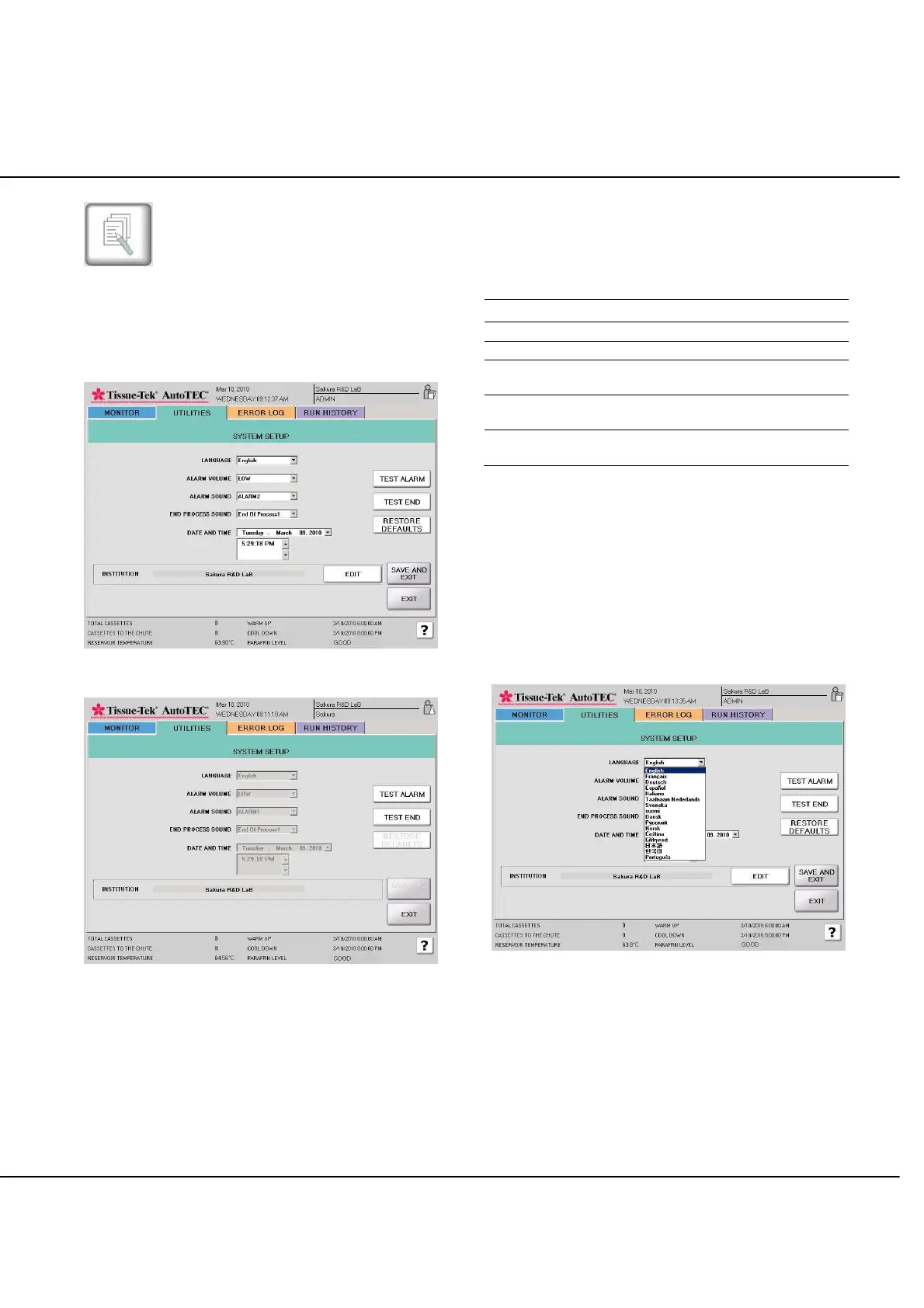
The System Setup screen (Figure 3-S) enables the
administrator to set a variety of system parameters.
Operators can only view the operator view of the System
Setup screen (Figure 3-T).
Figure 3-S: Administrator view, System Setup screen
Figure 3-T: Operator view of the System Setup screen
To set system parameters:
The RESTORE DEFAULTS restores all settings to their
defaults.
Set-up parameters, defaults, and functions are as follows:
Parameter Default Function
Alarm Volume High Sets the volume level for alarms
Alarm Sound Alarm 4
Selects alarm sound from
seven options
End Process
Sound
End Process 5
Sets sound for end process
indication from seven options
Date and Time --
Enables the date and time to be
set
The following pages review in details each of the user-
defined parameters.
Languages Setup
As shown in Figure 3-U, in addition to English, the
following 15 language choices can be selected: French,
Dutch, Spanish, Italian, German, Swedish, Finnish,
Danish, Greek, Norwegian, Czech, Russian, Japanese,
Korean, and Portuguese.
Figure 3-U: Languages Setup screen



 To Next Page