CUSTOMIZATION OF SETTINGS
3.12 Revised 5/19/2010
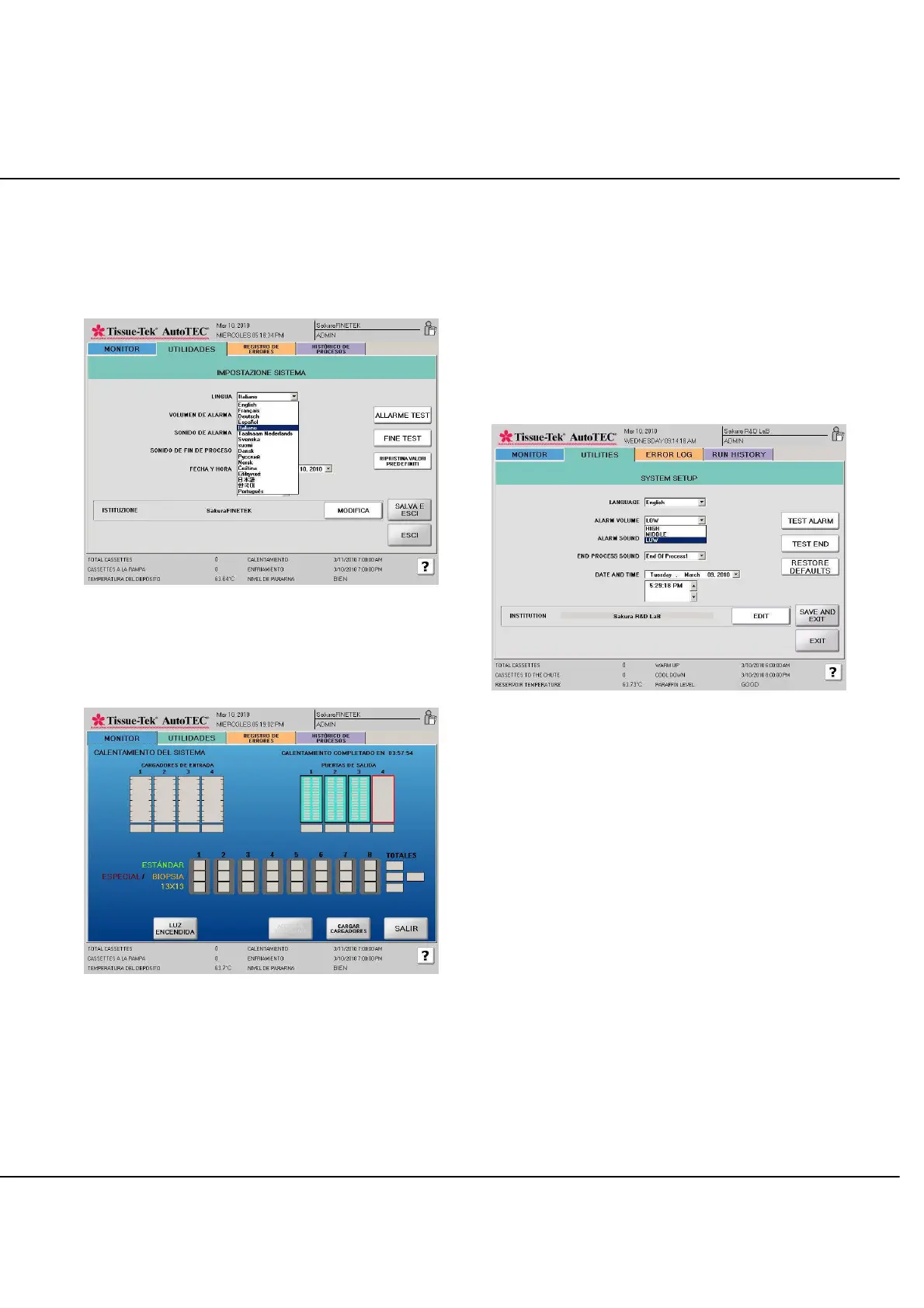
Once a language selection is made from the drop down
list, the System Setup screen will be displayed in the
selected language immediately (Figure 3-V). However,
the selection is not saved until the “SAVE AND EXIT”
button is pressed.
Figure 3-V: System Setup screen in selected language
The selected language will be used in all other screens. It
will take a few seconds for all the screens to be updated
(Figure 3-W).
Figure 3-W: Screen Updated in Selected Language
Audible Alarm Setup
As shown in Figure 3-X, System Setup screen, there are
three alarm attributes that can be modified. Select
between three volume levels (High, Middle, Low), eight
different alarm sounds labeled as Alarm 1 though Alarm 8,
and eight different end of process sounds labeled as End
Process 1 through End Process 8.
Select the down arrow to activate the pull down list then
scroll to highlight the selection. The following screen
shows how to set Alarm volume to LOW.
Figure 3-X: System Setup screen, Alarm Volume
Select the TEST ALARM or TEST END PROC button will
output an audible sample of the current selection.
Select SAVE AND EXIT to save the changes. Select EXIT
to abort the changes.



 To Next Page