40
English
SALMSON 08/2016
Parametrization of <2.0.0.0> and <5.0.0.0> menu
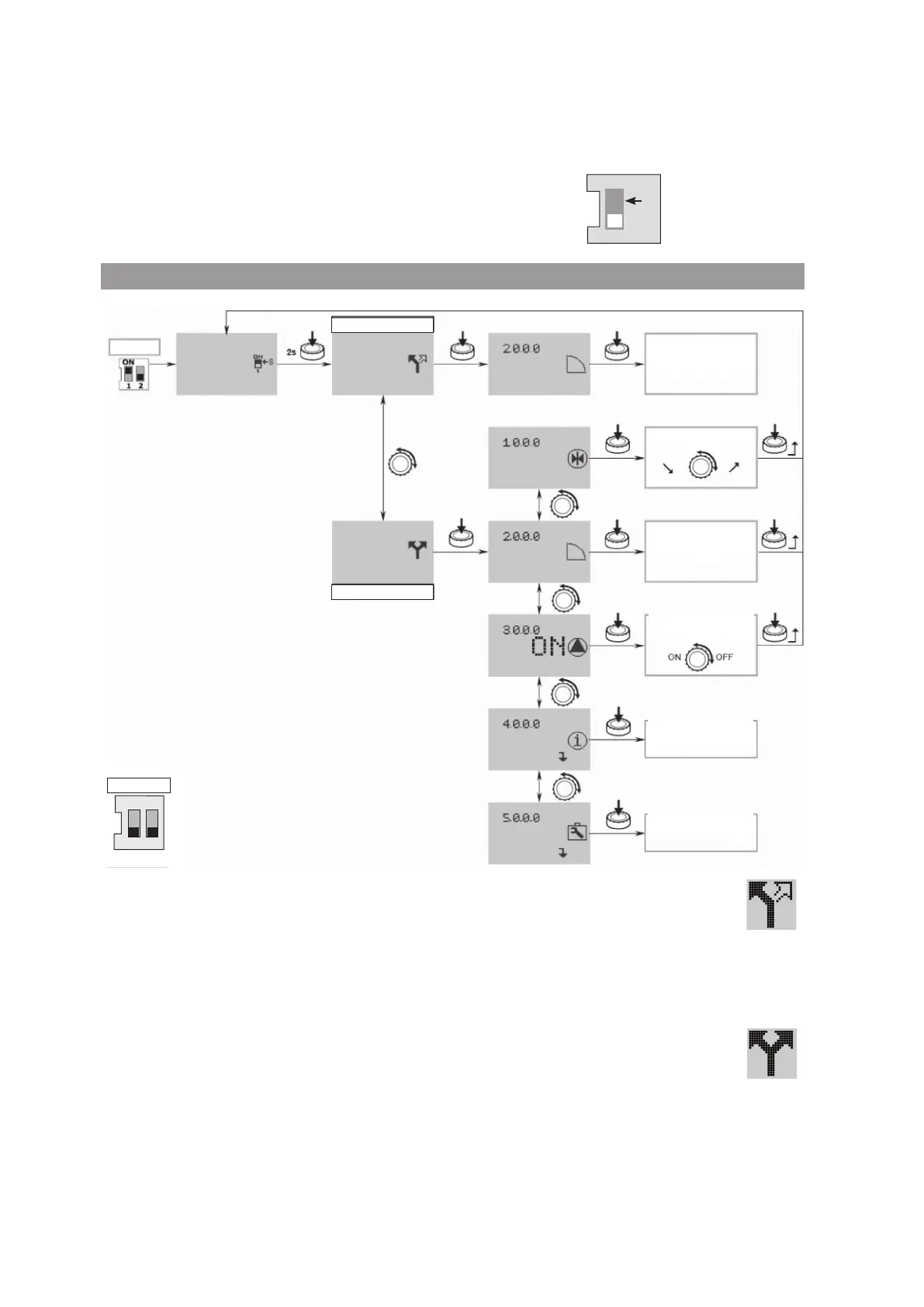
In « SERVICE » mode, the menu parameters <2.0.0.0> and <5.0.0.0> can be modied.
Two setting modes exist:
• The « Easy Mode » : fast mode to get access to the 3 operating modes.
• The « Expert Mode » : mode to get access to all parameters.
• Put the switch 1 on ON position (Fig. 3, item S).
• The « SERVICE » mode is activated.
This symbol blinks on the status page of the display (g. 13).
ON
1
S
Easy Mode
• Press the encoder during 2 seconds. The symbol « Easy Mode » appears (g. 13).
• Press the encoder to validate this choice. The display changes to menu number <2.0.0.0>.
The « Easy Mode » allows, quickly, the setting of the 3 operating modes (g. 14)
• Speed control »
• « Constant pressure »
• « P.I.D. control »
• After setting, put the switch 1 on OFF position (g. 3, item S).
Expert Mode
• Press the encoder during 2 seconds. Go to the expert mode, the symbol « Expert Mode »
appears (g. 13).
• Press the encoder to validate this choice. The display changes to menu number <2.0.0.0>.
At rst, select the operating mode in menu <2.0.0.0>.
• « Speed control »
• « Constant pressure »
• « P.I.D. control »
Then in menu <5.0.0.0>, the expert mode gives access to all the converter parameters (g. 15).
• After setting, put the switch 1 on OFF position (Fig. 3, item S).
Fig. 13
EASY Mode
EXPERT Mode
SERVICE
Control type
EASY Mode
Control type
EXPERT Mode
Pump
Information
Service
Setting point
ON
1 2
OPERATION




 To Next Page