CANCELLING HOLIDAY OVERRIDE MODE
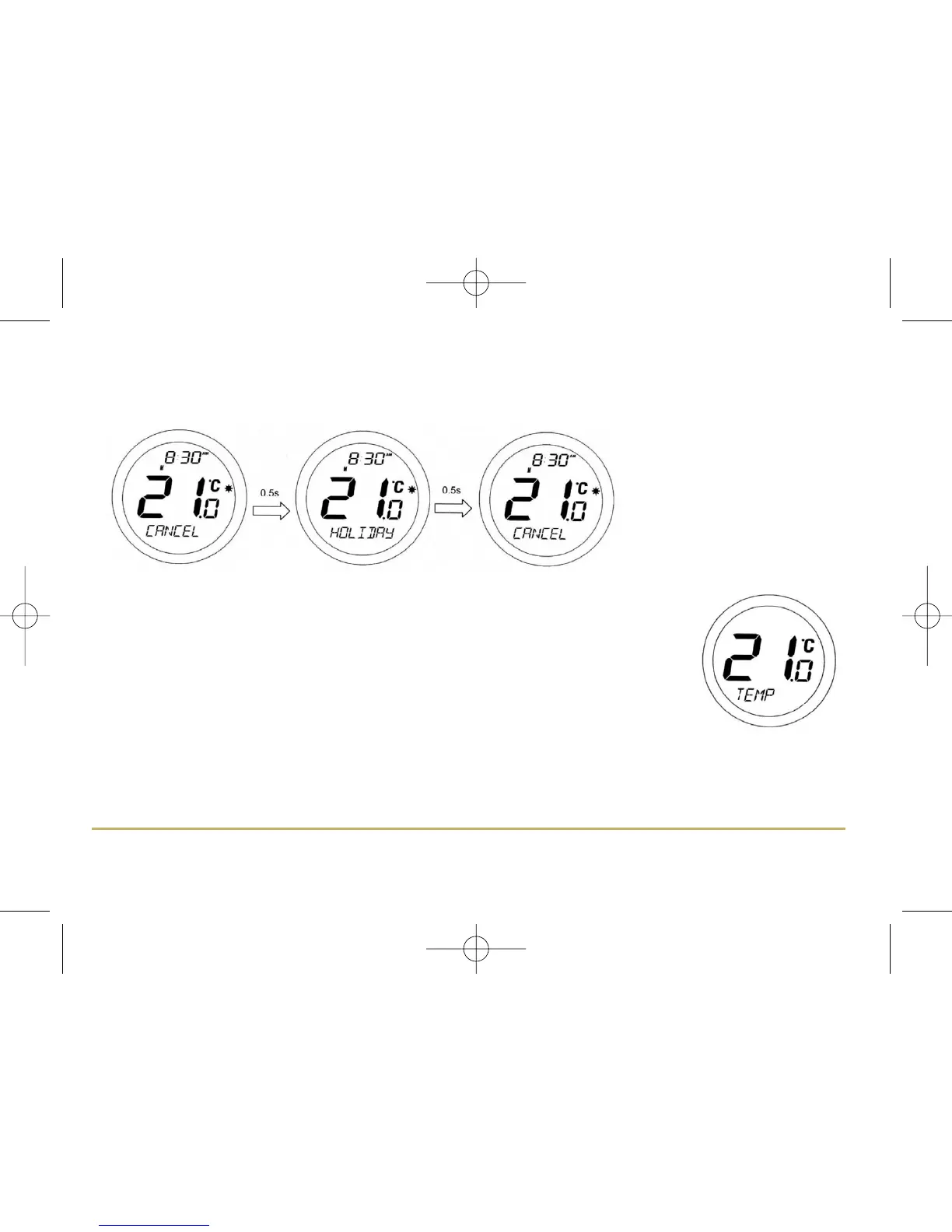
When in HOLIDAY mode, pressing the OK key will make the display change between CANCEL and HOLIDAY every
0.5 seconds as shown below:
Pressing the OK key will cancel
HOLIDAY mode and return the
ST620RF to AUTO mode. Pressing
the Arrow key leaves the
programmable thermostat in
HOLIDAY mode.
REVIEWING THE SET TEMPERATURE
NORMAL mode is when the thermostat is displaying the room temperature; if you press the
Touch Ring anywhere except the OK and Arrow keys when the ST620RF is in NORMAL mode
you can check the set temperature setting.
This will display the current set temperature. The set temperature will be displayed for two
seconds before the LCD changes to display the room temperature again.
The ST620RF will go back to NORMAL mode without changing the set temperature after 10
seconds of inactivity, or after pressing the Arrow key.
25ST620RF INSTRUCTION MANUAL



 To Next Page