23
Function
Prompts
The controller reports on the main screen
prompts alarm indicating the status of the
controller and damage the sensors, so that
the user can take appropriate steps to
eliminate damage or preventing a hazardous
situation.
Reported by the controller prompts are:
1. Damage heating circuit sensor
temperature.
2. Damage sensor external temperature.
3. Damage sensor return temperature.
4. Damage sensor heat source temperature.
5. Frost protection active!.
6. Cooling boiler!.
Heating circuit
Settings for heating circuit without
weather sensor.
Should disable the external temperature
sensor in the External sensor from the service
menu and then It is necessary to manually set
the required water temperature in the heating
mixer circuit using parameter Preset mixer
temp., e.g. at a value of 50°C. The value
should allow to obtain the required room
temperature. After connecting room
thermostat, it is necessary to set a value of
decrease in preset temperature by thermostat
(parameters Decrease of thermostat) e.g. at
5°C. This value should be selected by trial and
error. The room thermostat can be a
traditional thermostat (NO-NC). Upon
activation of the thermostat, the preset mixer
circuit temperature will be decreased, which,
if proper decrease value is selected, will stop
growth of temperature in the heated room.
Settings for heating circuit with weather
sensor.
Shouldn’t disable the external temperature
sensor in the External sensor from the service
menu.
Using parameter Curve parallel move, set
preset room temperature following the
formula: Preset room temperature = 20°C +
Curve parallel move.
In this setup, it is possible to connect a room
thermostat which will equalize the inaccuracy
of selecting heating curve, if the selected
heating curve value is too high. In such case,
it is necessary to set the value of parameter
Decrease by thermostat, e.g. at 2°C. After
opening of the thermostat contacts, the preset
mixer circuit temperature will be decreased,
which, if proper decrease value is selected,
will stop growth of temperature in the heated
room.
Weather control.
For the heating circuit can be turned on
weather control, which requires the
connection of external temperature sensor. It
should enable the external temperature
sensor by setting:
Service settings → External sensor = ON
- cause additional menu Weather control.
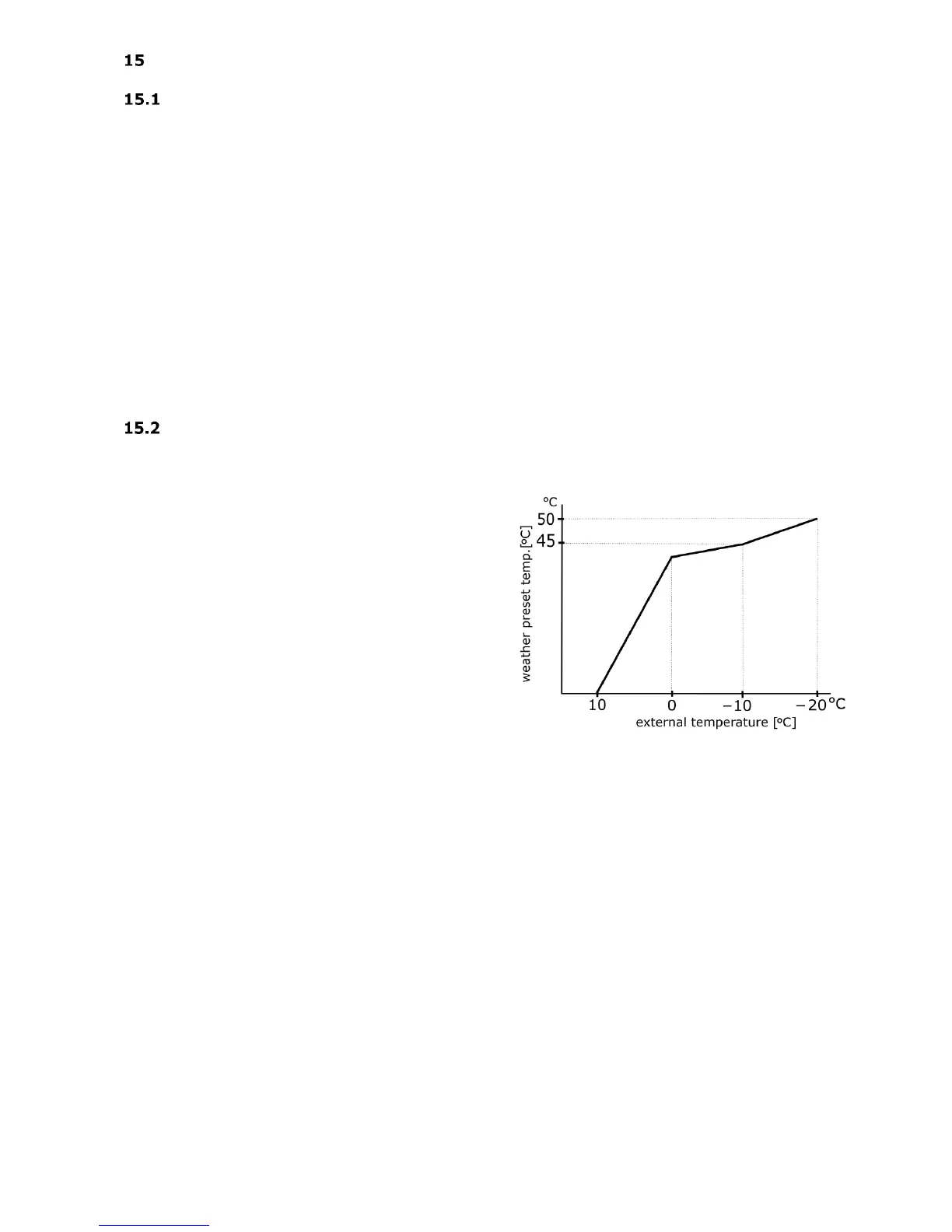
The heating circuit water preset temperature
is calculated basing on the temperature
prevailing outside the building. The colder it is
outside, the higher water temperature in the
heating circuit is. This relation is shown in the
controller in the form of heating curve.
The heating curve can be changed in a graph
from the system menu, within the range for
the weather preset temperature. It is a
reflection of the thermal characteristics of the
building. If the building is less insulated then
the heating curve should be greater. Heating
curve should be selected experimentally by
changing it in a few day intervals. During trial
and error selection of appropriate heating
curve, it is necessary to exclude influence of
the room thermostat on regulator operation
(regardless of whether the room thermostat is
connected or not), by setting the parameter:
Service settings → Room thermostat =
OFF.
After choosing the proper heating curve, the
circuit preset temperature is calculated
according to the outside temperature. As a
result if the heating curve is appropriate for



 To Next Page