54
5-2
A Tank Washing facility is installed which enables the EMPTY tank and booms to be flushed with clean water
prior to leaving the field.
Tank washing can be accomplished in two ways - either from the operators seat or the rear left of the sprayer. If
a ‘double’ wash is preferred (where by half the clean water is washed through in one operation and then the
remaining half washed through in a second operation, then they will need to be performed from the rear of the
sprayer so that the Clean Water Tank sight gauge is visible.
Performing Tank Wash from the rear of the sprayer:
Ensure the Automatic Spray Control is in ‘manual mode’, set the Main Spray on/off control to OFF and the
spray pump to Pump Speed 2.
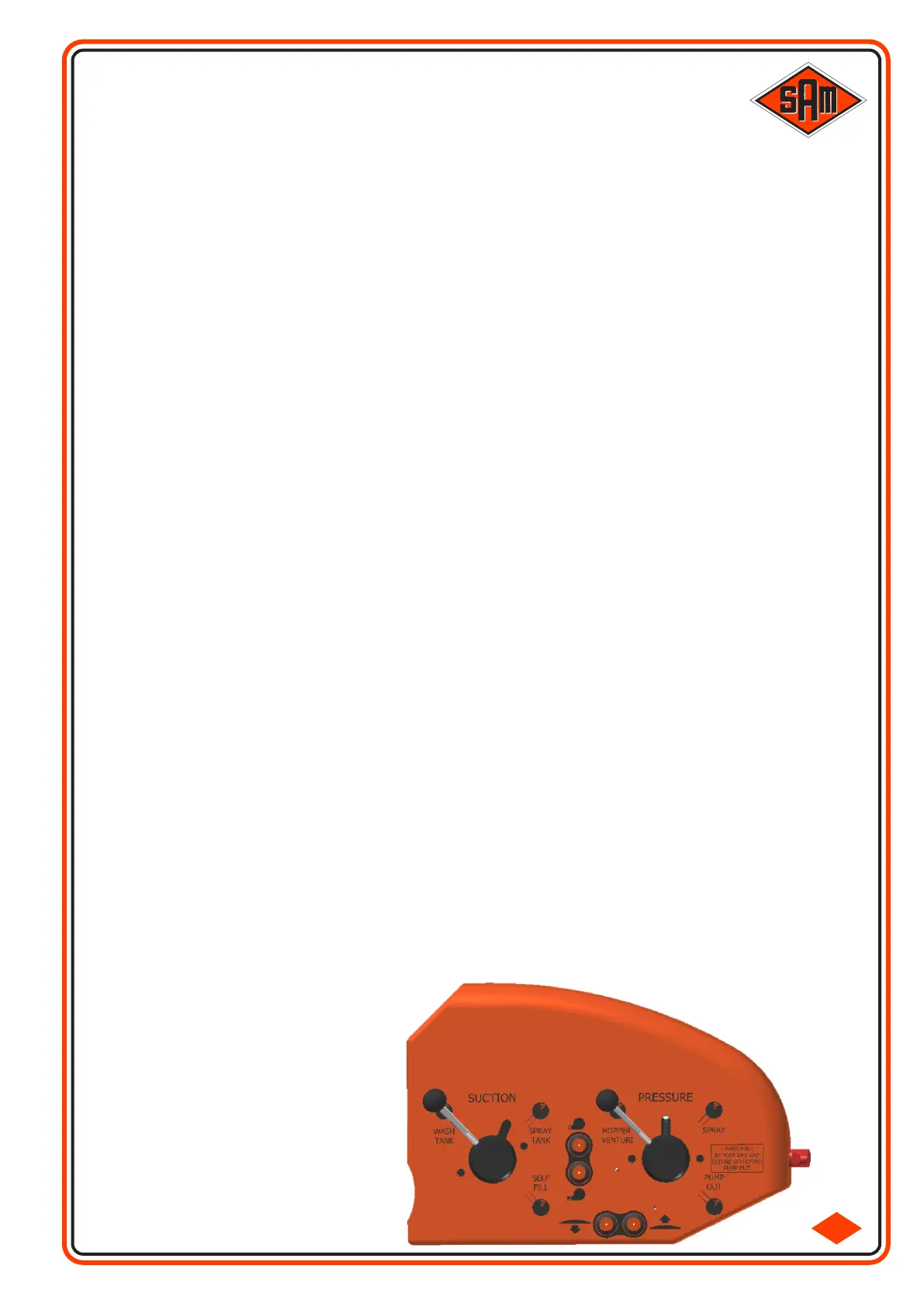
At the rear left of the sprayer, set the rotary 'suction' tap to wash tank and the 'pressure' tap to 'spray'. The
clean water will be transferred into the Main Tank. On completion of the transfer rotate the suction tap to 'Spray
Tank'.
If performing a ‘double wash’ rotate the suction tap back to ‘Spray Tank’ when the Clean Water Tank sight
gauge shows ‘half’.
Press the ‘Tank Wash’ button on the Armrest Control Console.
Manually increase the spray pressure of the Spray Control system (close the Butterfly Valve) until approx
4Bar is reached.
The Main Spray Tank and Spraylines are now being washed. When you are satisfied that the Tank and
Spraylines are clean, reduce the pressure to zero and switch of the Tank Wash button.
Now switch on all the Boom Sections and the Main On/Off to ON. Also remember to select ‘Forward Spray
Nozzles or ‘Both Forward & Rearward Spray Nozzles’ (depending on the nozzle body fitted) to ensure all
nozzles are washed.
Again increase the spray pressure manually to approx 4Bar - great care should be taken not to over
pressure the system!
When Tank Washing is complete, reduce the spray pressure back to zero and switch off the Main On/Off,
Spray Pump, Boom Sections etc.
Performing Tank Wash from the operators seat:
Ensure the Automatic Spray Control is in ‘manual mode’, set the Main Spray on/off control to OFF and the
spray pump to Pump Speed 2.
Press the ‘Clean Water Tank’ button on the Armrest Control Console. The clean water will be transferred into
the Main Tank. On completion of the transfer press the ‘Main Spray Tank’ button..
Press the ‘Tank Wash’ button.
Manually increase the spray pressure of the Spray Control system (close the Butterfly Valve) until approx
4Bar is reached.
The Main Spray Tank and Spraylines are now being washed. When you are satisfied that the Tank and
Spraylines are clean, reduce the pressure to zero and switch of the Tank Wash button.
Now switch on all the Boom Sections and the Main On/Off to ON. Also remember to select ‘Forward Spray
Nozzles’ or ‘Both Forward & Rearward Spray Nozzles’ (depending on the nozzle body fitted) to ensure all
nozzles are washed.
Again increase the spray pressure manually to approx 4Bar - great care should be taken not to over
pressure the system!
When Tank Washing is complete, reduce the spray pressure back to zero and switch off the Main On/Off,
Spray Pump, Boom Sections etc.
The spraying system can now be considered 98% clean and will require only a quick flush through on
returning to the yard.
Clean and replace the suction filter element.
WASHING OUT THE SPRAY TANK



 To Next Page