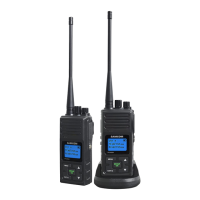
NOTE:ThereisnoneedtochangethedefaultGROUPnumberunlessyoueither:
●
Areexperiencinginterferenceorcrosstalkfromotherradiosorintercomsintheareaonthecurrentgroupchannel,or
●
Desireadvancedfunctionallybyorganizingyourradiosintogroupsthatcallallreceiveseparategroup
communications.Forexample,ifyouwantthreedifferentbuildings,eachwithitsowngroupnumber.
Thiswouldbeamoreadvancedconfigurationandisnotneededforyouraveragehomeorsmalloffice.
To change the GROUP Number
●PresstheMENUkey3times,GROUPwithgroupchannelnumberwillflash.
●
Press
or toselectnewGroupChannel
●PresstheGROUP/OKorPTTkeytoconfirmandrevertbacktothemainscreen,ortheMENUkeytoconfirm
andcontinuenextfunctionsetting.
12. VOX (Hands-Free Function)
Theunithasabuilt-inVoiceActivatedCircuit(VOX)function.YoucanenjoytalkingandlisteningwithoutpressingPTT
key.Tohavebetterperformance,youcanusethisfunctionwiththeexternalearphone(optionalaccessories).
●PresstheMENU key 4 times, LCD displays
iconandVOXsensitivitydigitwillflash.
●
Press
or
keytoselectsensitivitylevelfrom“,1,2,3”for“OFF,Low,MediumandHighrespectively.
AfterturningontheVOXfunction,LCDwilldisplay icon.PresstheGROUP/OKorPTTkeytoconfirm
andrevertbacktothemainscreen,ortheMENUkeytoconfirmandcontinuenextfunctionsetting.
PleasespeakclosetothemicinordertoactivateVOXfunction.
14. SELECTING CALL TONE
●
Pressthe
MENU
key5times,LCDwilldisplay iconandcalltonenumberwillflash.
●
Press
or toscrollbetween1to10and toselectacalltoneorturnofftheCALLfunction.
●PresstheGROUP/OKorPTTkeytoconfirmandrevertbacktothemainscreen,ortheMENUkeytoconfirm
andcontinuenextfunctionsetting.
15 KEY BEEP ON/OFF
Theunithasthefunctiontoturnthekeybeeponoroff.
●
Pressthe
MENU
key6times,LCDdisplaystheicon.
●
Press
or toturnthekeybeeponoroff
●
Pressthe
GROUP/OK
or
PTT
keytoconfirmandrevertbacktothemainscreen,orthe
MENU
keytoconfirm
andcontinuenextfunctionsetting.
16. ROGER BEEP
TherogerbeepfunctionenablesashorttonesignalwhichistransmittedafterreleasingthePTTbutton.
●PresstheMENU key7times,LCDdisplaystheicon.
●
Press
or toturntheRogerbeeponoroff


 To Next Page