Overview
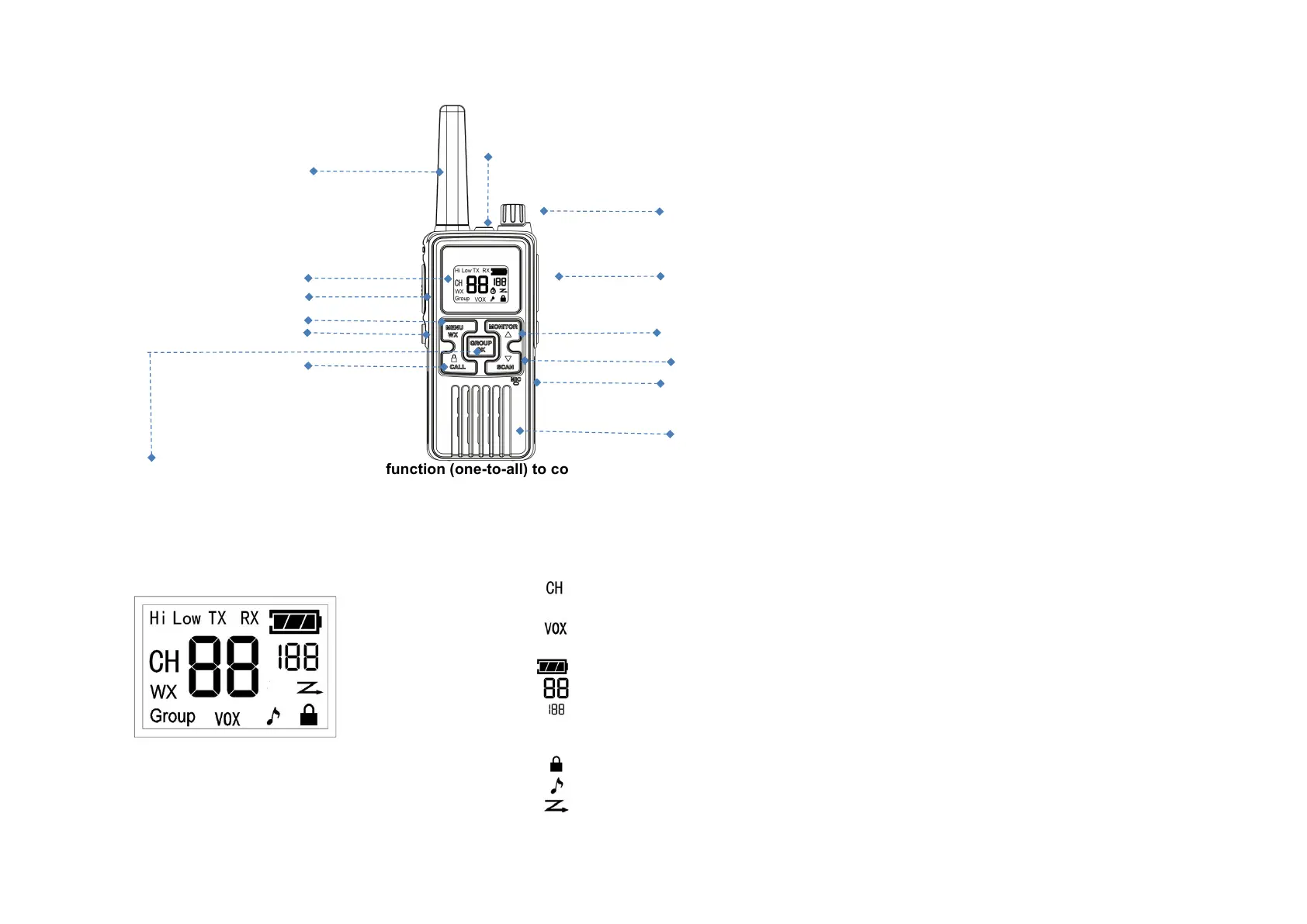
12 1. LCDdisplay
2. Earphone&ChargerJack
6 3. Push-To-Talk(PTT)key
4. Up/Monitorkey
5. Down/Scankey
1 2 6. Power/VolumeKnob
3 7. Group/Okkey
8 8. Menu/WXkey
14 4 9. CallTone/Key-Lockkey
10. Microphone
9 5 11. Speaker
10 12. Antenna
13.FlashlightLED
11 14.Flashlightkey
● GROUP Button – A broadcasting function (one-to-all) to communicate with all other radios that are
programmed to monitor the same group channel (default group = CH 8). Great for home/office wide announcements or
check ins.
LCD Display Icons
1 RX :Receivingstatus
2 TX :Transmittingstatus
3 :Main(Foreground)Channel
4 Group :Group(Background)Channel
5 :VOX(Voice-activiatedTX)
6 WX :WeatherReceiver
7 : BatteryLevel
8 :ChannelNumber
9 :CTCSS/CDCSSCodeNumber
10 Hi :HighTXPower
11 Low :LowTXPower
12 :KeyLock
13 :KeyBeep
14 :ChannelScan


 To Next Page