Index revision : H 19 6336
6.5. Main screen “A”
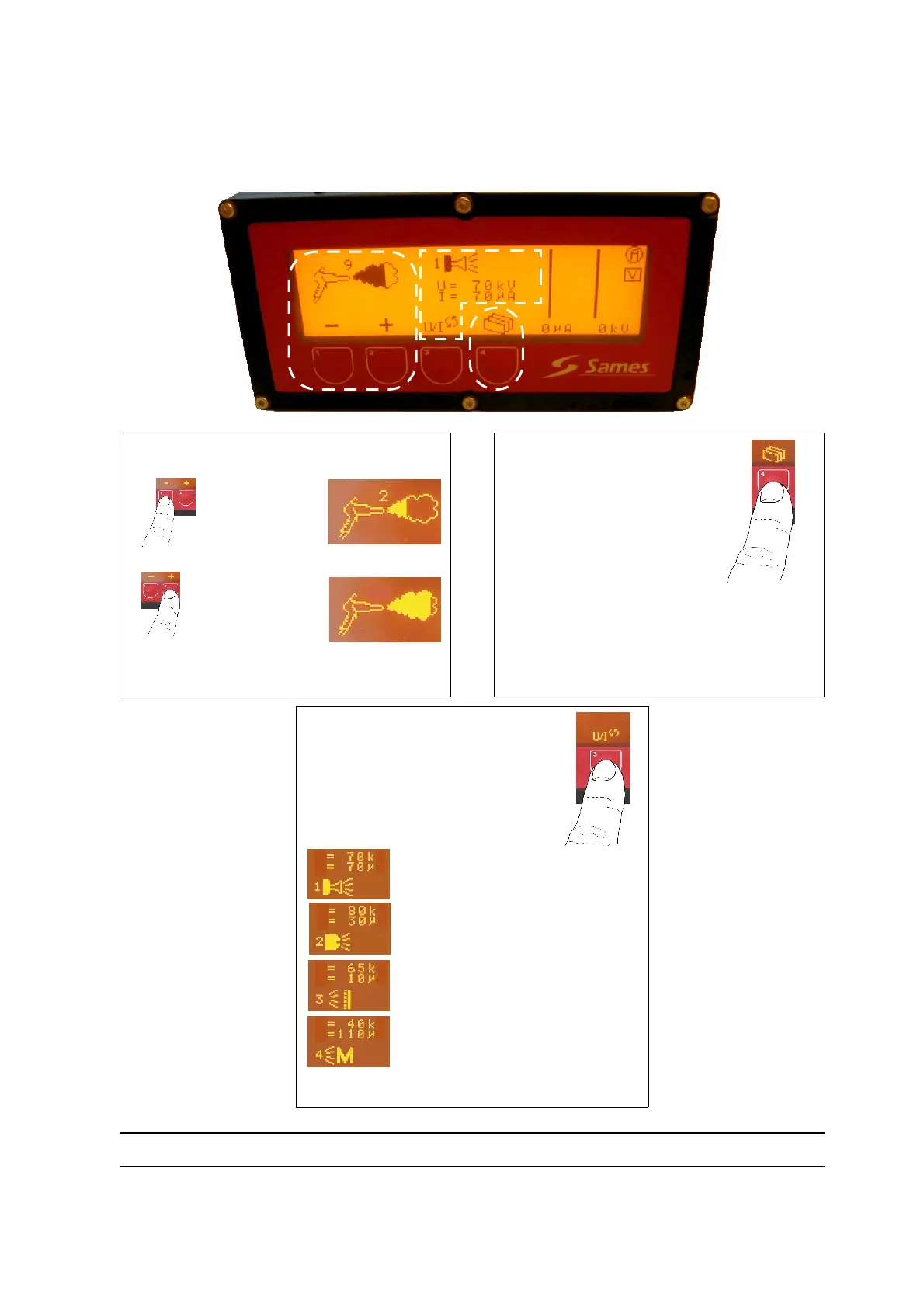
This screen enables selection of work parameters and display of spray gun operation. From the
keyboard, the operator can select the powder flow rate and a pre-set characteristic (U/I).
[
[
1
1
]
]
: Powder flow rate can be adjusted in
this area.
Less
powder.
More
powder.
There are 13 different flow rates (from 0 to 12)
(0 corresponds to a zero flow rate).
[
[
3
3
]
]
: This button enables
switching to the following
menu or positioning on the
cleaning screen by pressing
the button for more than two
seconds.
Pressing the button validates the parameters,
the U/I characteristic remains unchanged and
the operator has access to the next menu, “B.”
[
[
2
2
]
]
: This button enables
selection of a pre-set character-
istic (U/I).
Pressing this button
gives a looped display
of the following logos.
Use of a round spray nozzle.
Use of a fan spray nozzle.
“Over-powder-coating” applica-
tion.
Metallic powder application.
1
1
2
2
3
3
1
11
DES02511
U
A
V
I
U
A
V
I
U
A
V
I
U
A
V
I


 To Next Page