Index revision : H 22 6336
6.7. Screen “C”
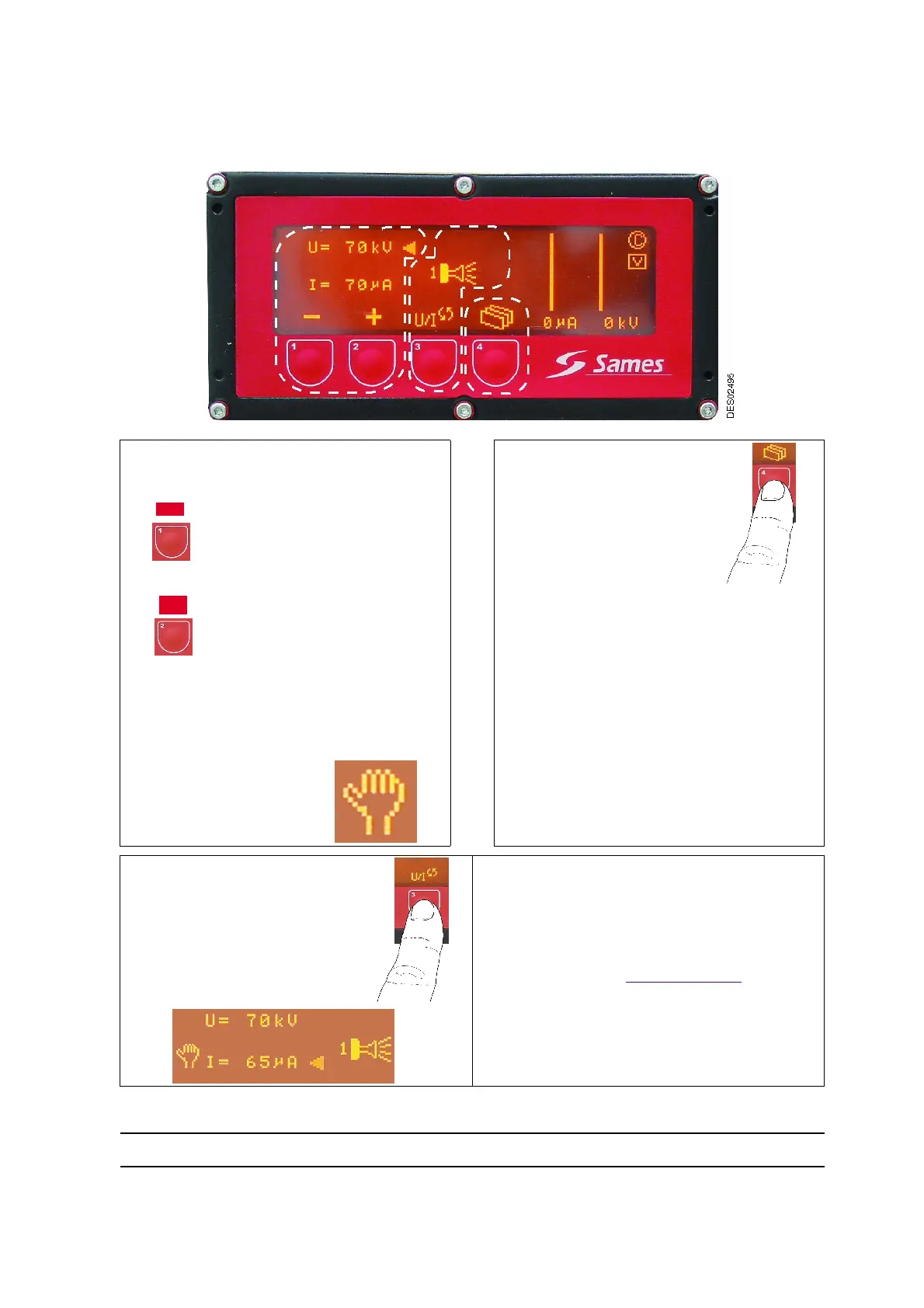
It is used to modify the voltage and current settings of the characteristic selected in menus A and B.
[
[
1
1
]
]
: Voltage or current can be modified in
this area.
The voltage or current value
decreases when the flashing
cursor is opposite the parame-
ter to be modified.
The voltage or current value
increases when the cursor is
opposite the parameter to be
modified.
When values are modified, the hand logo
appears (see [
[
2
2
]
]
)
)
.
The hand logo disappears on return to factory
parameters.
[
[
3
3
]
]
: This button enables
switching to the following
menu or positioning on the
cleaning screen by pressing
the button for more than two
seconds.
Pressing the button validates the parameters
and the operator has access to the next
menu, “D”.
If no action is taken, the display switches
automatically to screen “A” after one minute.
[
[
2
2
]
]
: This button pinpoints the
parameter (U or I) to be modi-
fied.
If U is to be increased, I decreases
automatically if positioned on the envelope curve
of the characteristic (see § 3.1 page 8) and vice-
versa.
1
1
2
2
3
3
1
-
+
ES02512


 To Next Page