6-6 EB 8310-6 EN
Start-up
6.3.1 Extending the actuator
stem manually
1. Loosen the lock nut (A66) to unlock the
handwheel (A60).
2. Turn the handwheel clockwise to extend
the actuator stem.
3. To change from manual to automatic op-
eration, put the handwheel into the neu-
tral position by aligning the pointer
(A55) with the groove on the stem con-
nector (A51).
4. Tighten the lock nut (A66) to lock the
handwheel.
6.3.2 Retracting the actuator
stem manually
1. Loosen the lock nut (A66) to unlock the
handwheel (A60).
2. Turn the handwheel counterclockwise to
retract the actuator stem.
3. To change from manual to automatic op-
eration, put the handwheel into the neu-
tral position by aligning the pointer
(A55) with the groove on the stem con-
nector (A51).
4. Tighten the lock nut (A66) to lock the
handwheel.
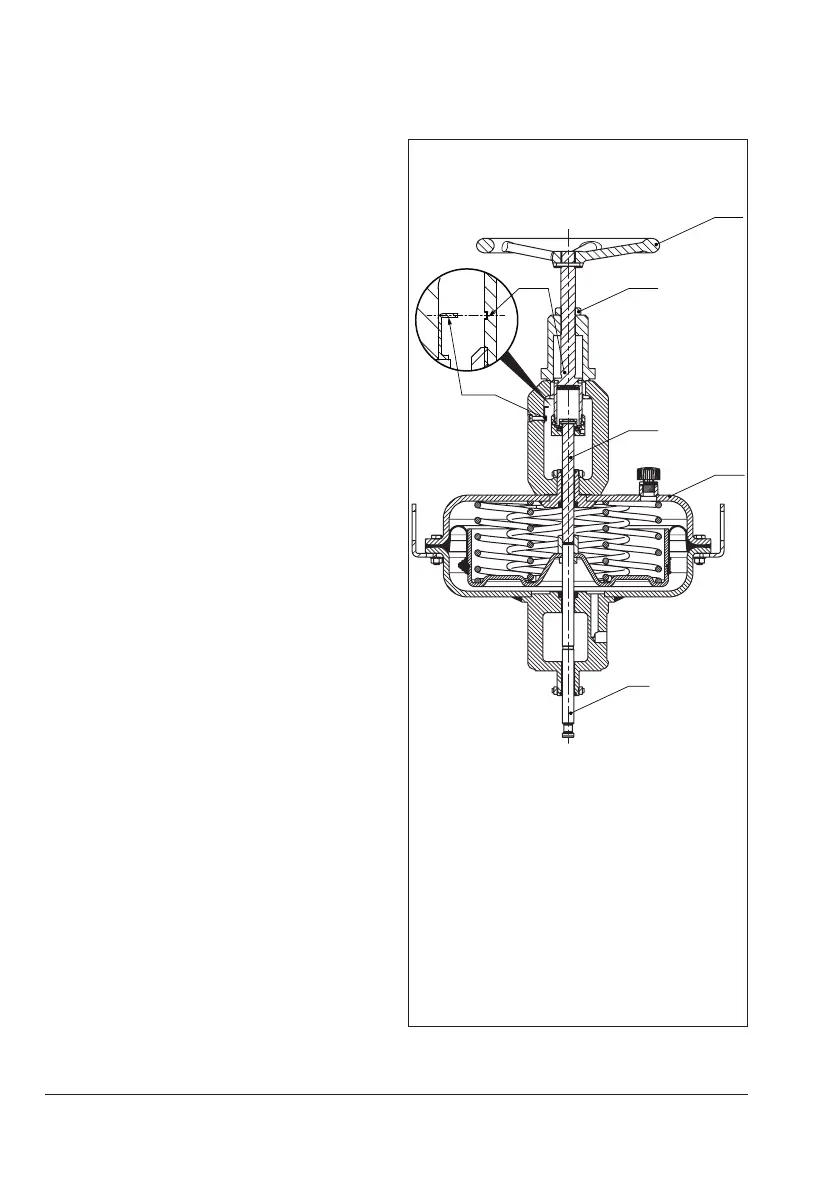
A7 Actuator stem
A50 Top actuator stem
A51 Stem connector
A55 Pointer
A60 Handwheel
A66 Lock nut
A75 Top diaphragm case
A66
A51
A50
A55
A7
Fig.6-3: Pneumatic actuator with handwheel



 To Next Page