Using
the
LINE
OUT
Jack
The
XP106
LINE OUT
jack
allows
you
to connect the XP106
with any powered
speaker to expand your system or
link
two
XP106
systems together and share
all
inputs between the two units.
You
can
also use the jack to receive audio
from another speaker without using
an
input
channel.
Daisy
Chain
Speaker
Using a standard shielded
1
14
instrument
cable, connect the
LINE OUT
on
the
XP106
to a line level
input
of second powered speaker. The
XP106 will send a
mix of all
inputs,
including
Bluetooth® audio. Each
channel LEVEL will control
corresponding
output
level
to the
LINE OUT
jack.
Linking
Two
XP1
06
Systems
To
use two XP106's
as
one system is
simple.
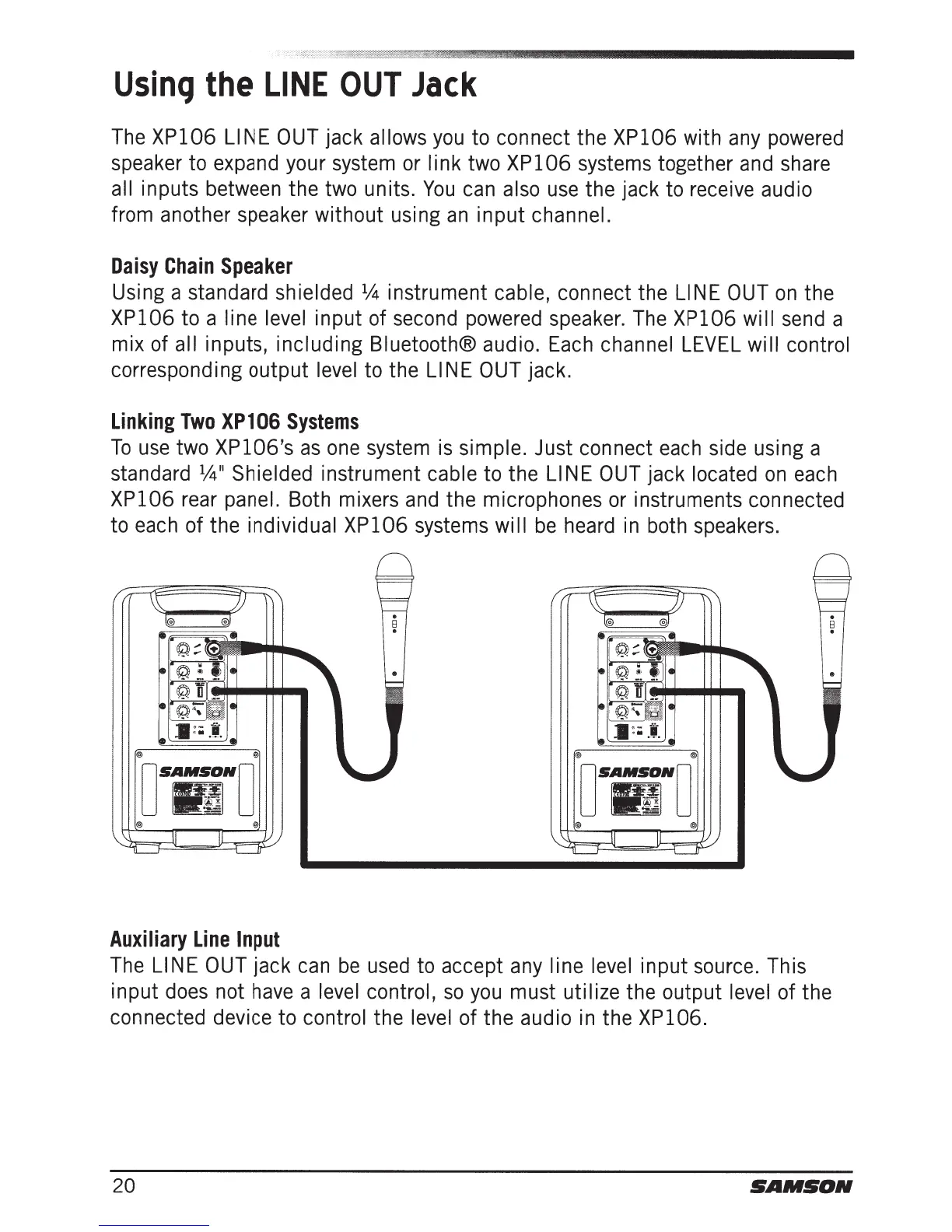
Just connect each side using a
standard
1
!4
11
Shielded
instrument
cable to the
LINE OUT
jack
located
on
each
XP106
rear
panel.
Both mixers and the microphones or instruments connected
to each of the
individual XP106 systems
will
be
heard in both speakers.
@ @
D
SAM~No
!liD
~
@ @
Auxiliary
Line
Input
The LINE OUT
jack can
be
used to accept any
line level
input
source. This
input
does not have a
level control,
so
you must utilize
the
output
level
of the
connected device to
control
the
level
of the audio in the
XP106.
20
SAMSON







 To Next Page