English - 25
Changing the Color Space
Color space is a color matrix composed of red, green and blue colors.
Select your favorite color space to experience the most natural color.
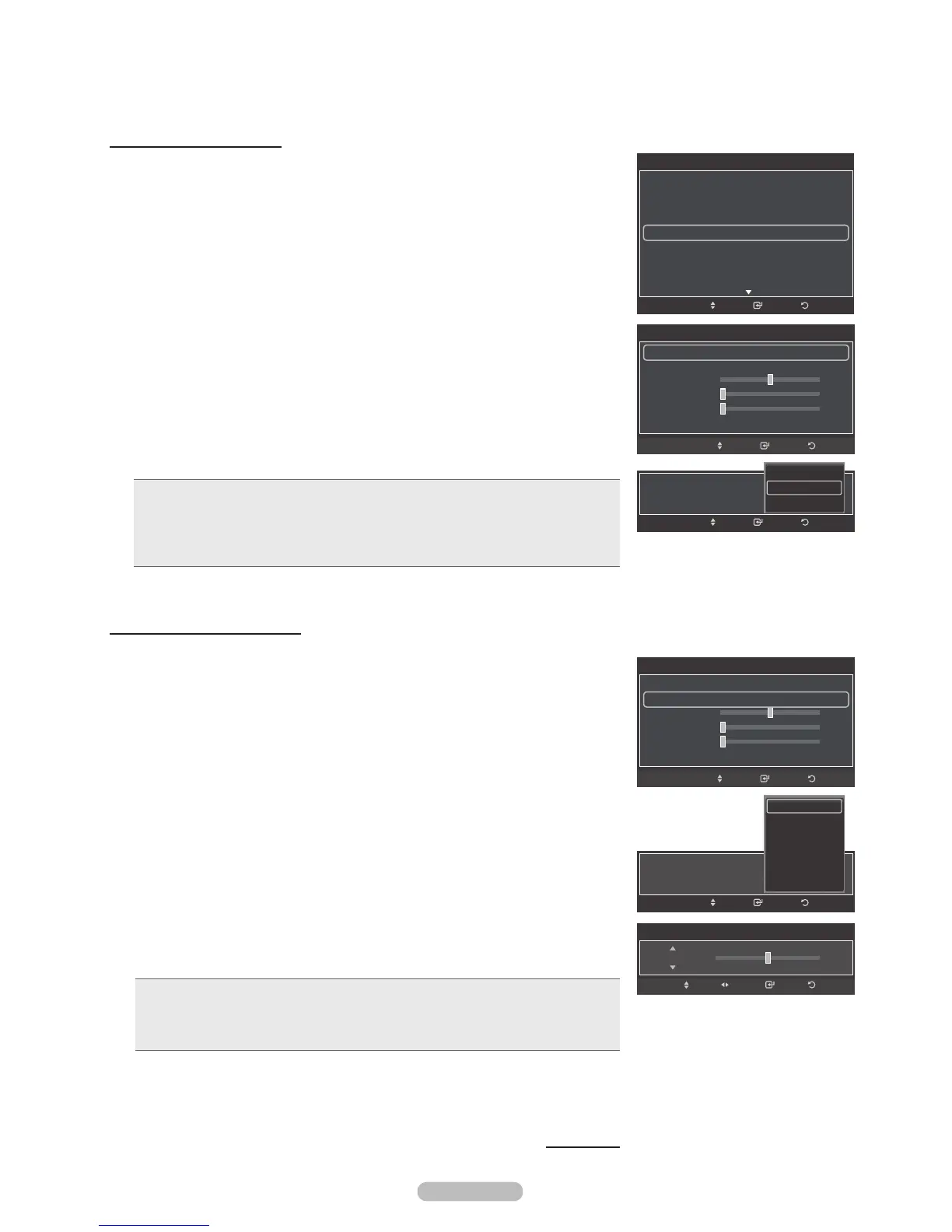
10 Press the or button to select Color Space, then press the ENTER button.
11 Press the ENTER button again to select Color Space.
12 Press the or button to select Auto, Native or Custom.
Press the ENTER button.
• Auto: Auto Color Space automatically adjusts to the most natural color tone
based on program sources.
• Native: Native Color Space offers deep and rich color tone.
• Custom: Adjusts the color range to suit your preference. (see “Customizing the
Color Space”)
Customizing the Color Space
13 Press the or button to select Color, then press the ENTER button.
®
Color is available when Color Space is set to Coustom.
14 Press the or button to select Red, Green, Blue, Yellow, Cyan or
Magenta.
Press the ENTER button.
15 Press the or button to select Red, Green or Blue to change it.
Press the ENTER button.
16 Press the or button to decrease or increase the value of a particular item.
Press the ENTER button.
®
In Color, you can adjust the RGB values for the selected color.
®
To reset the adjusted RGB value, select Reset.
• Red: Adjusts the red saturation level of the selected color.
• Green: Adjusts the green saturation level of the selected color.
• Blue: Adjusts the blue saturation level of the selected color.
• Reset: Resets the color space to the default values.
®
Changing the adjustment value will refresh the adjusted screen.
®
Settings can be adjusted and stored for each external device you have
connected to an input of the TV.
Continued...
Color Space
50
Color Space : Native
Color : Red
Red
Green
Blue
Reset
0
0
ReturnEnterMove
Color Space : Low
ReturnEnterMove
Auto
Native
Custom
Color Space
50
Color Space : Custom
Color : Red
Red
Green
Blue
Reset
0
0
ReturnEnterMove
Color : Low
ReturnEnterMove
Red
Green
Blue
Yellow
Cyan
Magenta
Color Space
50Red
Enter ReturnAdjustMove
Detailed Settings
Black Adjust : Off
Dynamic Contrast : Medium
Gamma : 0
Color Space : Native
White Balance
Flesh Tone : 0
Edge Enhancement : On
ReturnEnterMove






 To Next Page