English - 26
Flesh Tone
You can emphasize the pink flesh tone in the picture.
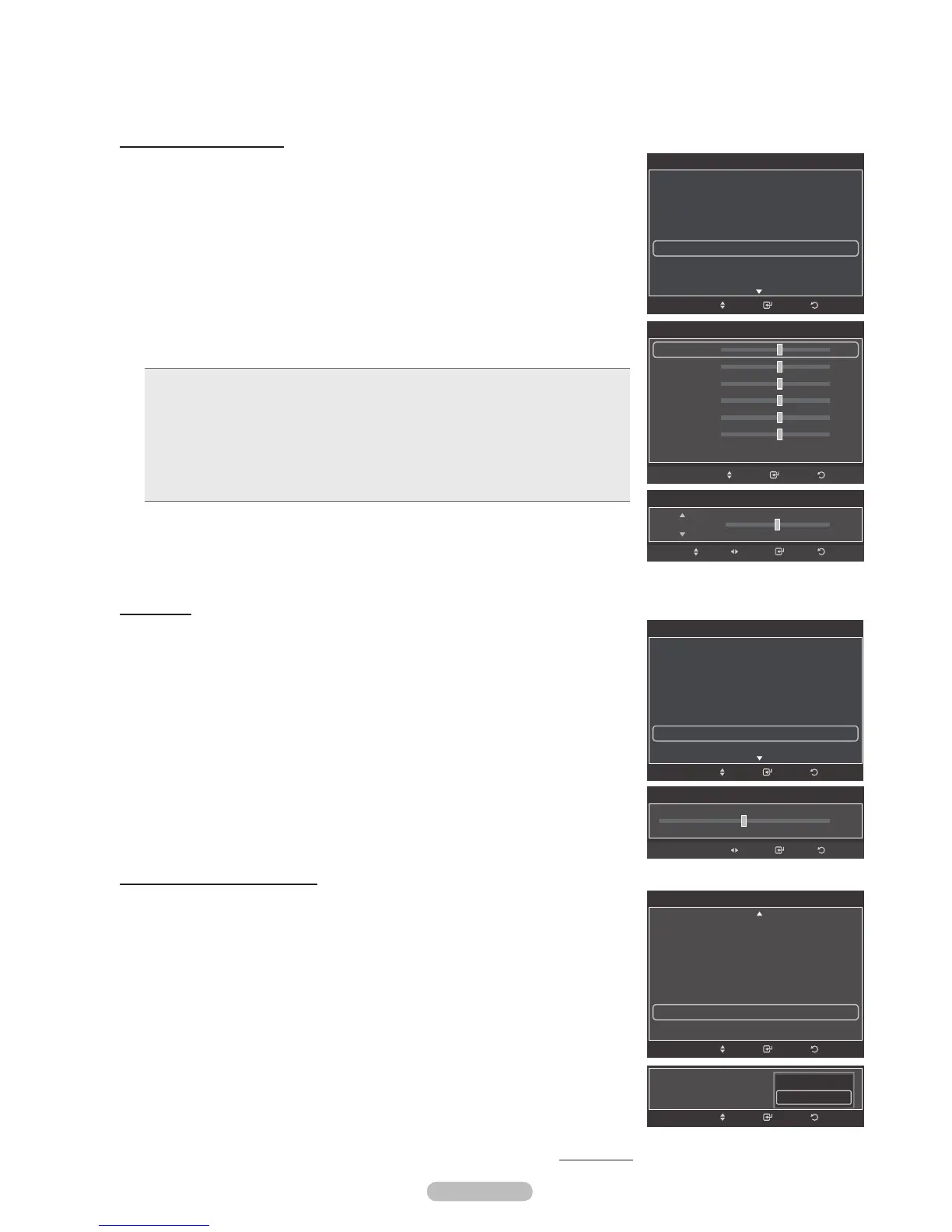
20 Press the or button to select Flesh Tone, then press the ENTER button.
21 Press the or button to decrease or increase the value.
Press the
ENTER button.
®
Changing the adjustment value will refresh the adjusted screen.
Activating Edge Enhancement
You can emphasize object boundaries in the picture.
22 Press the or button to select Edge Enhancement, then press the ENTER
button.
23 Press the or button to select Off or On. Press the ENTER button.
Continued...
Activating White Balance
You can adjust the color temperature for more natural picture colors.
17 Press the or button to select White Balance, then press the ENTER
button.
18 Select the required option by pressing the or button, then press the
ENTER button.
19 Press the or button to decrease or increase the value of a particular item.
Press the ENTER button.
• R-Offset: Adjusts the red color darkness.
• G-Offset: Adjusts the green color darkness.
• B-Offset: Adjusts the blue color darkness.
• R-Gain: Adjusts the red color brightness.
• G-Gain: Adjusts the green color brightness.
• B-Gain: Adjusts the blue color brightness.
• Reset: The previously adjusted white balance will be reset to the factory
defaults.
®
Changing the adjustment value will refresh the adjusted screen.
Flesh Tone
0
Enter ReturnAdjust
ReturnEnter
Detailed Settings
Dynamic Contrast : Medium
Gamma : 0
Color Space : Native
White Balance
Flesh Tone : 0
Edge Enhancement : On
xvYCC : Off
Move
Edge Enhancement : On
ReturnEnterMove
Off
On
White Balance
R-Offset 25
G-Offset 25
B-Offset 25
R-Gain 25
G-Gain 25
B-Gain 25
Reset
ReturnEnterMove
White Balance
25R-Offset
Enter ReturnAdjustMove
Detailed Settings
Black Adjust : Off
Dynamic Contrast : Medium
Gamma : 0
Color Space : Native
White Balance
Flesh Tone : 0
Edge Enhancement : On
ReturnEnterMove
Detailed Settings
Black Adjust : Off
Dynamic Contrast : Medium
Gamma : 0
Color Space : Native
White Balance
Flesh Tone : 0
Edge Enhancement : On
ReturnEnterMove







 To Next Page